5G INDOOR CPE FX2000 USER GUIDE 24
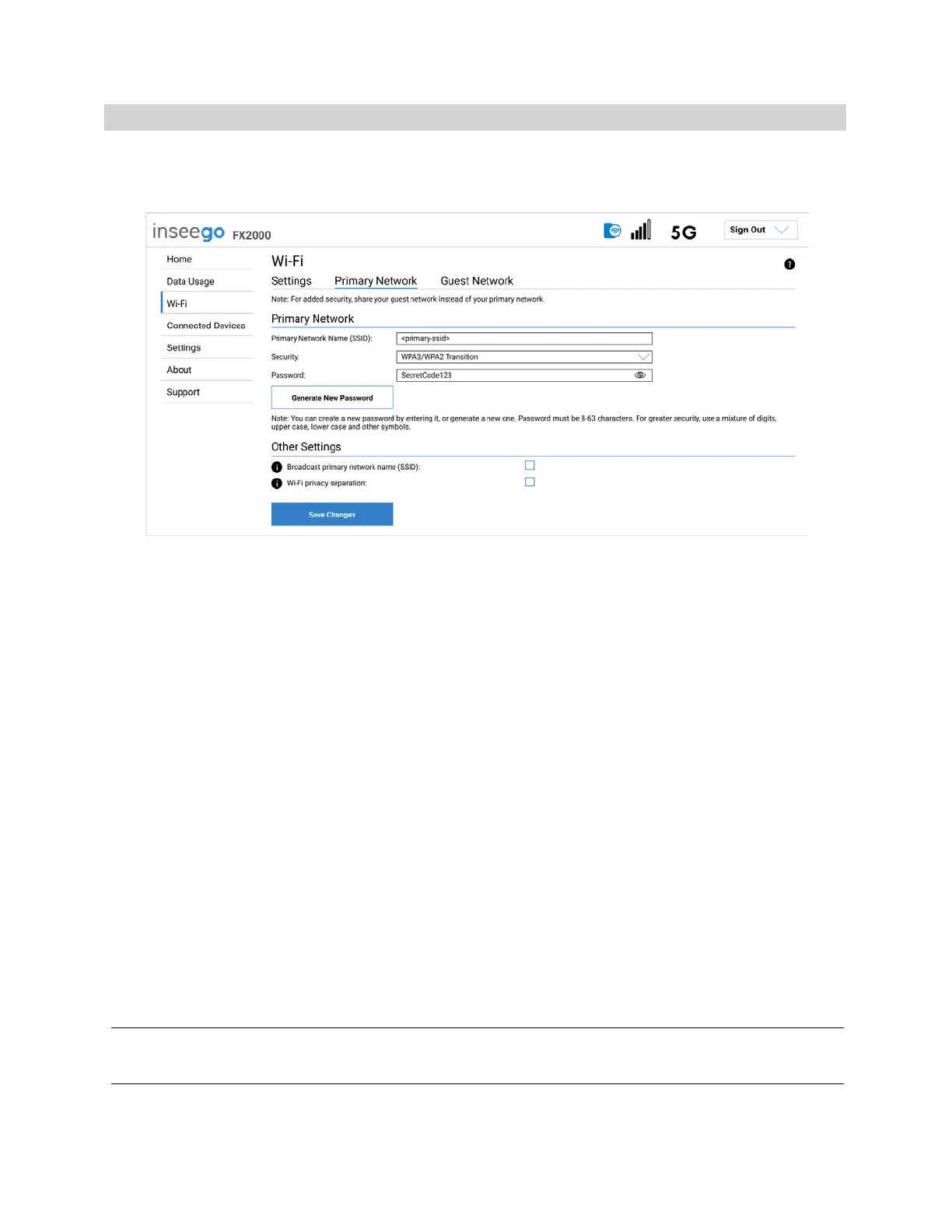
Primary Network Tab
Use these settings to connect initially to the primary Wi-Fi network or change primary network
information. Connected devices must use the Wi-Fi settings shown on this screen.
NOTE: If you change these settings, existing connected devices may lose their connection.
Primary Network
Primary network name (SSID): Enter a primary network name (SSID) to set up or change the primary
network name. The name can be up to 32 characters long.
Security: Select an option for Wi-Fi security:
• WPA3/WPA2 Transition is the most secure method of Wi-Fi Protected Access and should be
used if possible for WPA2 and WPA3 compliant devices.
• WPA3 PSK can be used for WPA3 devices.
• WPA 3 Open Enhanced provides encryption and privacy on open networks that are not
password-protected, and can be used for WPA3 devices.
• WPA/WPA2 Mixed Mode can be used if some of your older devices do not support WPA2.
• WPA2 AES PSK can be used for WPA2 devices.
• Open allows others to monitor your Wi-Fi traffic and use your data plan to access the Internet.
NOTE: Avoid using this option.
Password: Enter a Wi-Fi password, or you can use the Generate New Password button.
Important: It is critical that you change the password from the default and use a different password
from your Admin password to keep the device and your network secure.
Generate New Password: This button inserts a strong random password in the Password field.
You can click the eye icon to view the password.



 To Next Page