- 70 - - 71 -
Connecting the PC Connecting the PC
AppendixPrinting
3
Setting Up
2
Before use
1
Basic Device Operations
4
Index
AppendixPrinting
3
Setting Up
2
Before use
1
Basic Device Operations
4
Index
13
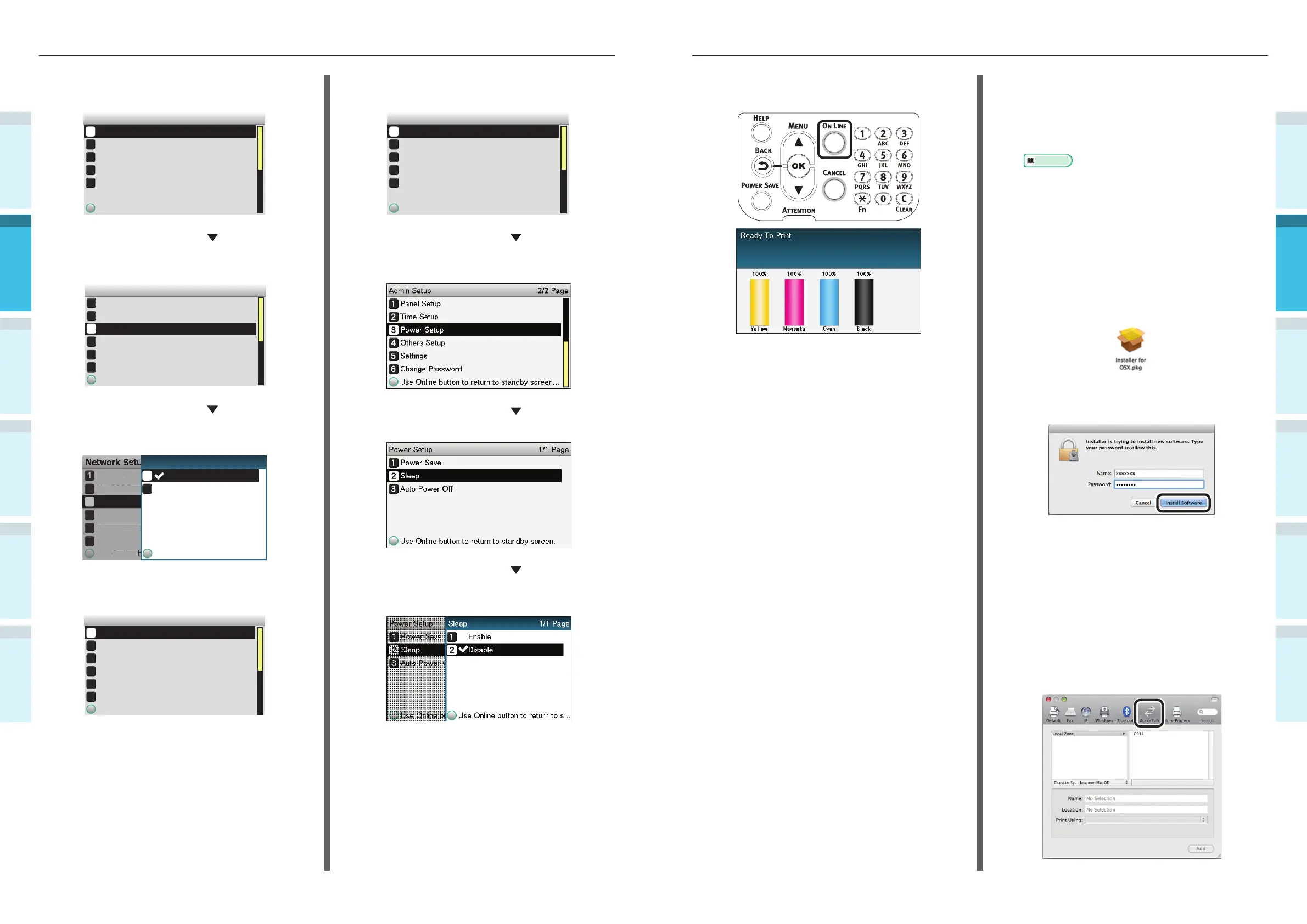
Press the [ON LINE] button to return to
the standby screen.
Installing the printer drivers on the computer
1
Check that the device and PC are
connected, and that the power supply is
turned ON.
Reference
�
“Connecting Using LAN Cables” (P.57)
2
Insert the "Software DVD-ROM" into the
PC.
3
Double-click the Intec icon on the
desktop.
4
Double-click [Driver]> [Installer for Mac
OS X].
5
Enter the Mac OS X administrator
password, and click [Install Software].
Finish the installation by following the
instructions displayed on the screen.
6
Select [System Preferences] from the
Apple menu.
7
Click [Print & Scan].
8
Click [+].
9
Click [AppleTalk].
5
Check that [Network Setup] has been
selected, and press the [OK] button.
Admin Setup 1/2 Page
Network Setup
Print Setup
PS Setup
PCL Setup
Use
Online
button
to
return
to
standby
screen
USB Setup
6
Press the scroll button several times
to select [EtherTalk], and then click the
[OK] button.
1
2
3
4
5
6
Network Setup 1/1 Page
TCP/IP
EtherTalk
IP Address Set
IPv4 Address
Subnet Mask
Use
Online
button
to
return
to
standby
screen
NetBIOS over TCP
7
Press the scroll button to select
[Enable], and then press the [OK]
button.
1
2
3
4
5
6
TCP/IP
NetBIOS over TCP
EtherTalk
IP Address Set
IPv4 Address
Subnet Mask
Use Online button to return to standby screen
Network Setup
Use Online button to return
2
Disable
Enable
1
1/1 PageEtherTalk
8
Press the [BACK] button to display the
"Network Setup" screen.
1
2
3
4
5
6
Network Setup 1/2 Page
TCP/IP
EtherTalk
IP Address Set
IPv4 Address
Subnet Mask
Use Online button to return to standby screen
NetBIOS over TCP
9
Press the [BACK] button to display the
[Admin Setup] screen.
Admin Setup 1/2 Page
Network Setup
Print Setup
PS Setup
PCL Setup
Use
Online
button
to
return
to
standby
screen
USB Setup
10
Press the scroll button several times
to select [Power Setup], and then click
the [OK] button.
11
Press the scroll button to select
[Sleep], and then click the [OK] button.
12
Press the scroll button to select
[Disable], and then click the [OK]
button.



 To Next Page