D-0126440-A – 2020/08
VisualEyes™ 515/525 Instructions for Use - US Page 16
Laptop configurations will use a USB hub to connect devices that use an external power adapter. If a DataLink is
connected to the system, it should connect either to a USB port on the monitor hub (tower computers) or directly
to the laptop computer. Please refer to Figure 3.5-1 to view pictorial represtation of all the configuration available
with the VisualEyes
TM
System without a rotational chair.
3.5.2 Systems configured with a rotational chair
The VisualEyes™ System can be configured with Reclining (Orion, System 2000 and Nydiag 200), and Auto
Traverse/Comprehensive (Orion and System 2000) chairs as discussed below.
It is important to use an isolation transformer for electrical safety and/or step-down power supply for
the VisualEyes™ systems with a rotational chair option. The isolation transformer is used to reduce
equipment current leakage for all devices plugged into it. The supplied isolation transformer will step
down an incoming 220, 230, or 240 VAC power supply to 115 VAC power used by the rotational
chairs. VisualEyes™ systems without the rotational chair are also encouraged to use an isolation
transformer for electrical separation, though it is not required. If an isolation transformer is used, all components
of the VisualEyes™ system must be powered by the isolation transformer. Please refer #3 in the warning section
1.5.
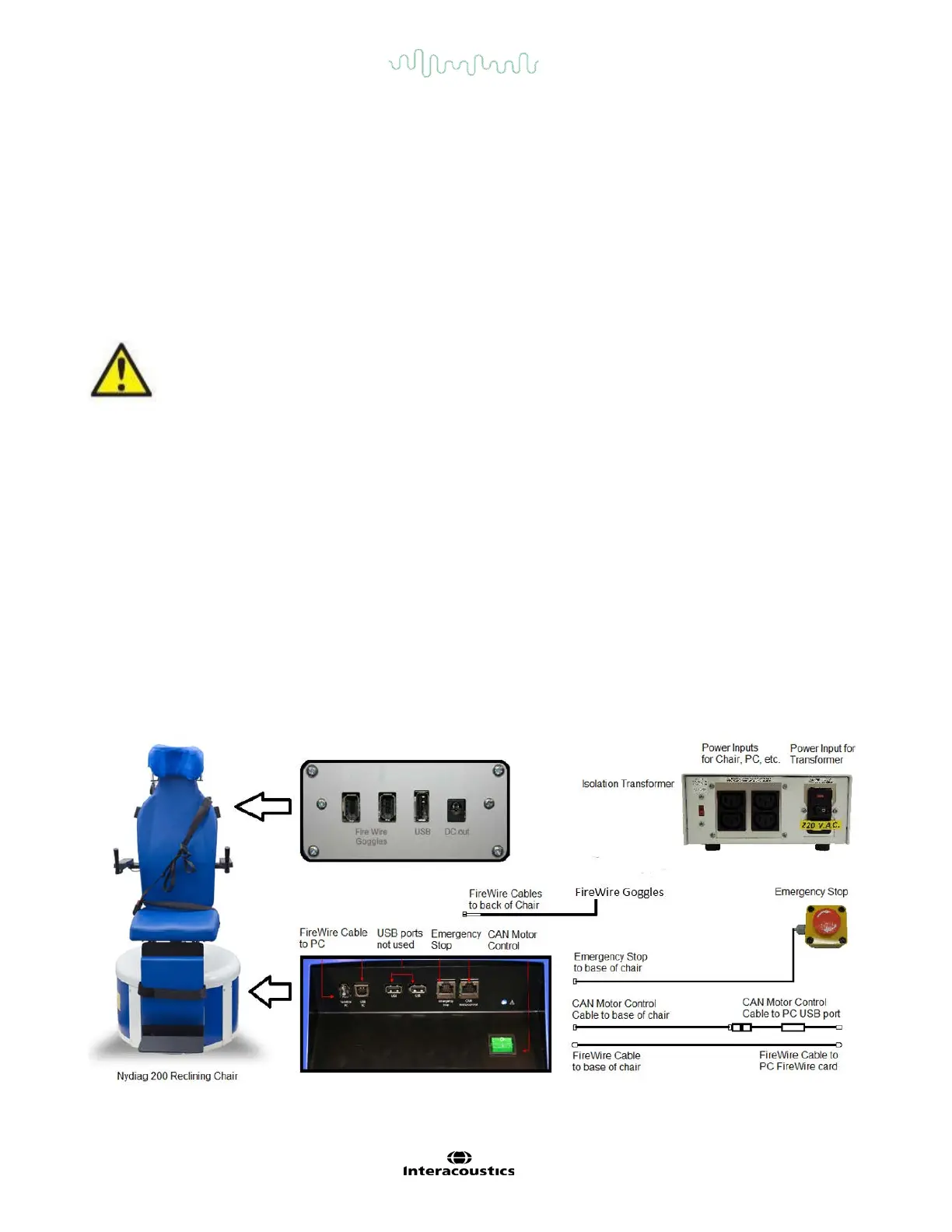
3.5.3 Reclining chair setup
The goggles can be connected directly to the reclining rotational chair. FireWire® cards are used with FireWire®
side mounted and FireWire top mounted camera goggles and with the System 2000 Reclining and Nydiag 200
chairs. Connect the power supply connector from the laptop PC Express card to power mains when used with
laptops. If the card must be removed later, the computer must be turned off before removing the card. The TV
stimulus will connect via a HDMI cable to the back of the computer (which may require an adapter cable). Laptop
configurations will use a USB hub to connect devices which uses an external power adapter and connects to the
back of the laptop, though the USB cable from the chair will connect directly to the computer (not through the
USB hub if present). If a DataLink is connected to the system, it should connect either a USB port on the monitor
hub (tower computers) or directly to the laptop computer. Please refer to Figure 3.5-2, Figure 3.5-3 and Figure
3.5-4 for pictorial representation of different chair types.
Figure 3.5-2 VisualEyes™ with NyDiag 200 rotary chair














 To Next Page