D-0126440-A – 2020/08
VisualEyes™ 515/525 Instructions for Use - US Page 28
4.7.9 Video Head Impulse Testing (vHIT for VORTEQ
TM
and EyeSeeCam)
vHIT for VORTEQ
TM
:
Ensure that the patient is seated in an upright position and the head rest of the rotational chair is taken off.
Ensure the calibration is done before starting the test. Side mounted/top mounted goggle with camera can be
used for this test. Make sure the VORTEQ
TM
rate sensor is connected to the binocular goggles and manually
oriented for the desired subtest (horizontal/vertical). In the use of VORTEQ
TM
rate sensor, the VLink will
connect to the computer and the cable will have to stretch to the patient seated in the chair. If the VORTEQ
TM
IMU is used, it is wireless and make sure the IMU is switched on prior to starting the test.
vHIT for EyeSeeCam:
Ensure that the patient is seated in an upright position with arm rest and low back rest. The test can be done
with the EyeSeeCam goggle with camera and built-in IMU. Ensure that the standard calibration and the head
calibration is done before starting the test. The operator can then proceed with the subtests (Lateral, LARP,
RALP and SHIMP). Please refer to ‘Additional information’ for more detail.
4.7.10 Ocular Counter Roll
This is a vision-denied test. Side mounted/front mounted/top mounted goggle with camera can be used for
the test. Ensure that the patient is seated in the upright position. Prior to starting the test, the clinician will
need to enter ‘Calibration’ and then go to ‘Torsion Calibration’ to establish the iris signature. The test will then
have the patient hold his/her head in the center, then roll the head to the left and hold, and then roll to the
right and hold.
4.7.11 Caloric test
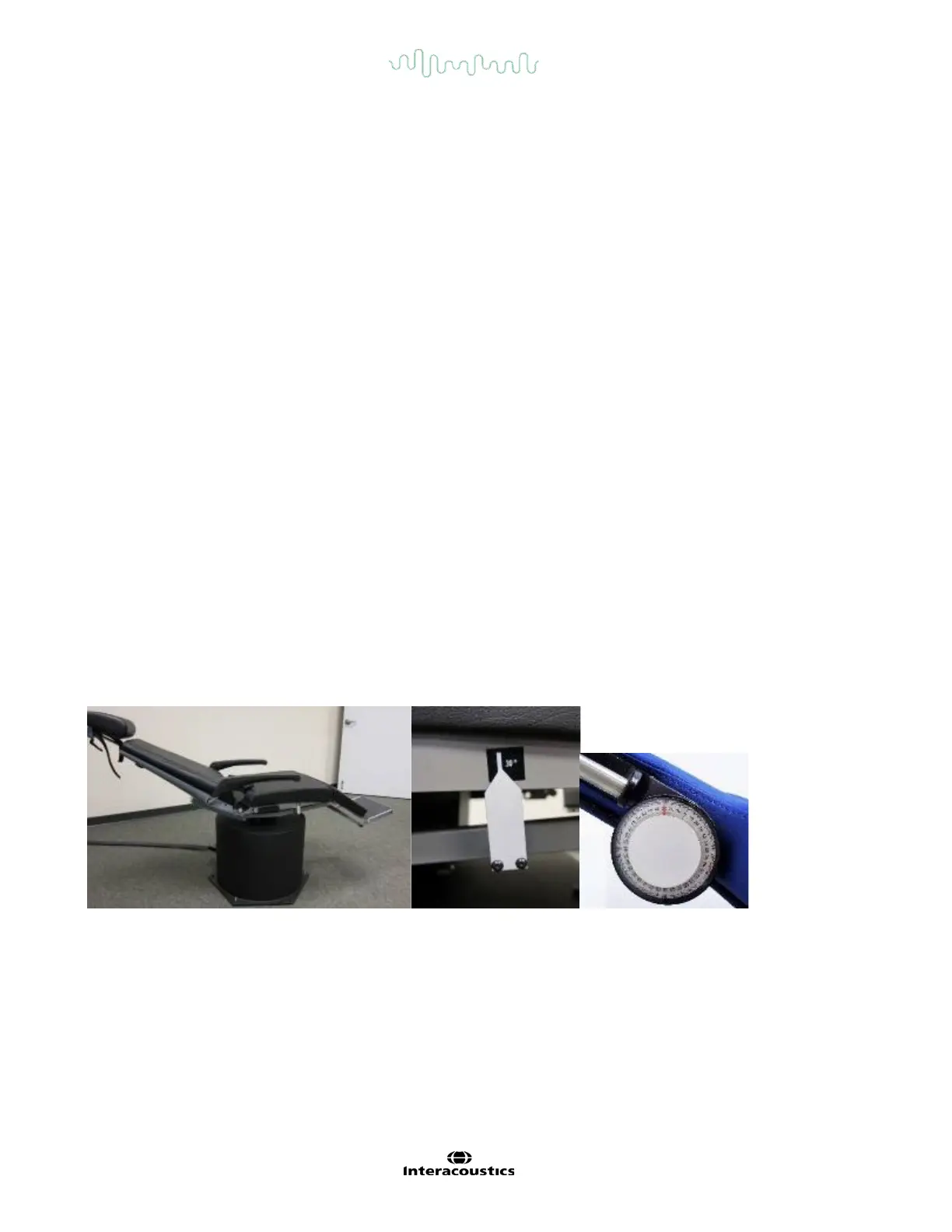
Caloric testing is completed with the goggle cover on for vision-denied testing. If using the System 2000
reclining chair, engage the foot brake to prevent the chair from rotating. Recline the chair to be thirty degrees
above horizontal to perform the caloric tests. On the Orion rotary and System 2000 reclining chairs, there is a
marker below the seat that shows the correct reclined orientation (refer to Figure 4.7-3). For the Nydiag 200
rotary chair, there is an inclination dial that displays the current chair angle near the top of the chair frame.
Figure 4.7-3 Reclined chair for caloric testing with caloric angle marker and inclination dial.
When the caloric test is selected, VisualEyes™ will initialize the irrigator for the selected warm or cool
temperature. The irrigator status will be displayed in the left menu panel. When the appropriate temperature
has been reached, the status will change to ‘Ready’ and a beep will sound to alert the user. To begin
recording, press the button on the AirFx or AquaStim irrigator handle. To abort the test, hold down the button
on the irrigator handle for three seconds. Alerting tasks should be administered during the caloric tests to
prevent the patient from suppressing the nystagmus.














 To Next Page