D-0126440-A – 2020/08
VisualEyes™ 515/525 Instructions for Use - US Page 22
4.5.1 Seat the patient in the reclining chair (Orion/System 2000/Nydiag 200)
If the rotational chair is to be used for a test, the patient must be seated appropriately as follows.
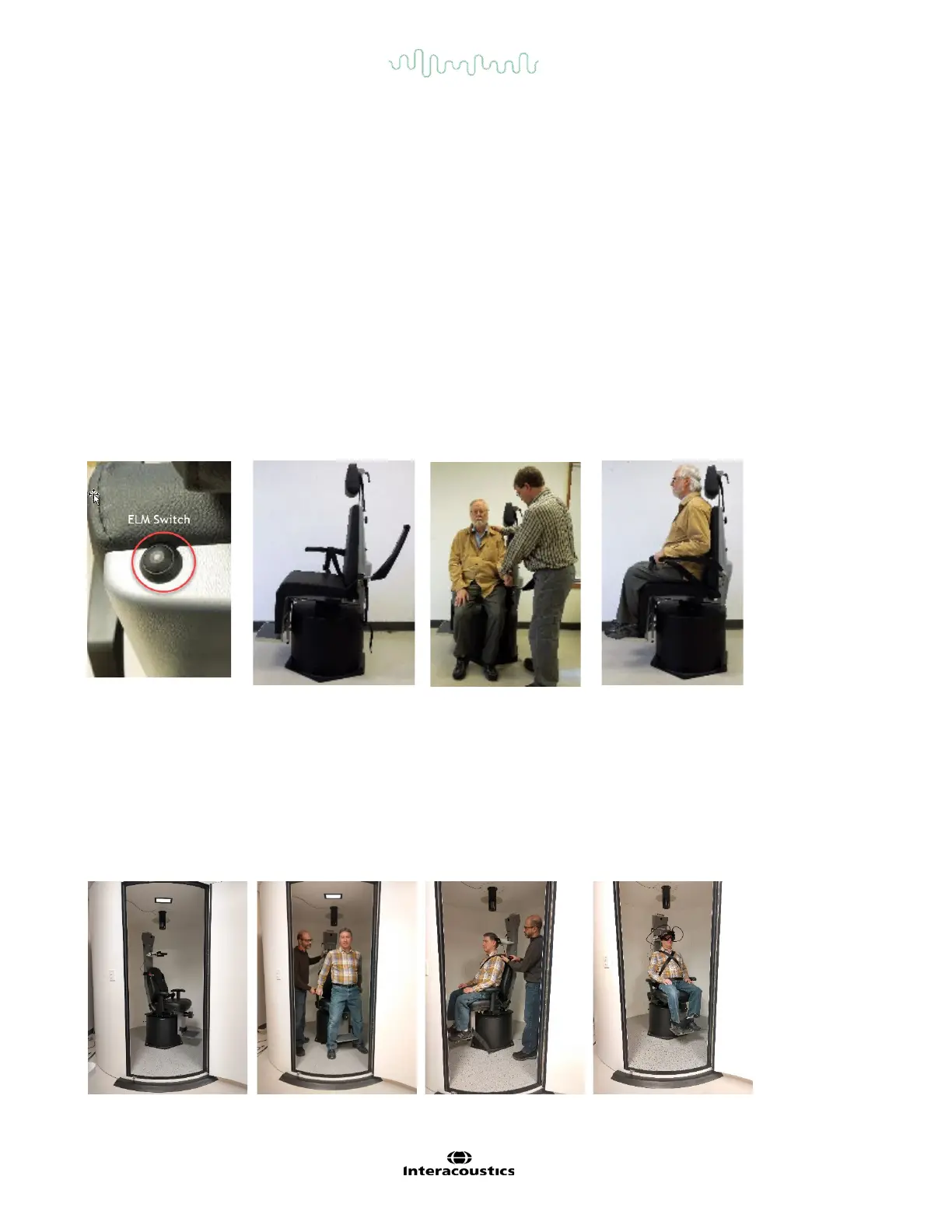
Orion Reclining chair: The chair can be rotated using the electronic locking mechanism (ELM) switch (refer
to Figure 4.5-2) to control the chair movement. Press and hold the ELM switch to disengage the ELM and
rotate the chair to a position to facilitate patient seating. Lift the appropriate chair arm. Guide the patient to sit
down in the chair from the side (refer to Figure 4.5-2). Guide the patient to swing his/her legs around the
chair to face forward in the chair with the feet resting on the footrest. Have the patient fasten the seat belt.
Lower the chair arm back down. Note: If needed, the patient can recline the chair back partially for comfort
using either of the recline handles found on the sides of the chair frame and this is up to the operator to
decide considering the test requirements. The footrest should not be used as a step to enter the chair.
Release the ELM switch and rotate the chair (manually or through software) until it locks in the desired place
to start with the test. The software locks the chair automatically once the operator starts the test as an
additional safety feature to the Orion chair.
System 2000 reclining and Nydiag 200 chairs: Patient seating instructions are as same as the Orion
Reclining chair except System 2000 reclining chairs can rotate freely and can be locked manually by de-
pressing the foot brake to prevent the chair from unintended turns whereas the Nydiag 200 chair can be
locked using the software.
Figure 4.5-2 Sequential images of patient seating procedure with Orion reclining Chair (left to right)
4.5.2 Seat the patient in the AT/C chairs (Orion/System 2000)
Open the door to the booth enclosure. Unscrew the head support and move it up and out of the way. Guide
the patient to sit and push into chair while avoiding the footrest (Refer to Figure 4.5-3). Note that the footrest
should not be used as a step to enter the chair. Guide the patient to adjust the seating position having the
patient backed up into the chair. If needed, the armrests can be widened by using the adjustment levers
underneath the armrests of the Orion chairs or adjustment knobs underneath the armrests of the System
2000 chairs. Fasten the lap belt and shoulder belts. Adjust the head support for patient comfort. Secure the
patient’s feet with the ankle restraint.
Figure 4.5-3 Sequential images of patient seating procedure with Orion/System 2000 Auto Traverse and
Comprehensive Chair (left to right)














 To Next Page