32
SEAT
S
E
A
T
ADJUSTING THE SEAT WIDTH-NON-MINI
TILT (FIGURE 4)
WARNING
The following procedure must be performed by
an authorized Invacare dealer or qualified tech-
nician.
1. Remove the existing back upholstery and
spreader bar from the wheelchair. Refer to RE-
PLACING THE BACK UPHOLSTERY and RE-
PLACING THE SPREADER BAR in PROCE-
DURE 4 of this manual.
2. Remove the existing seat pan from the wheel-
chair. Refer to REPLACING THE SEAT PAN in
this section of the manual.
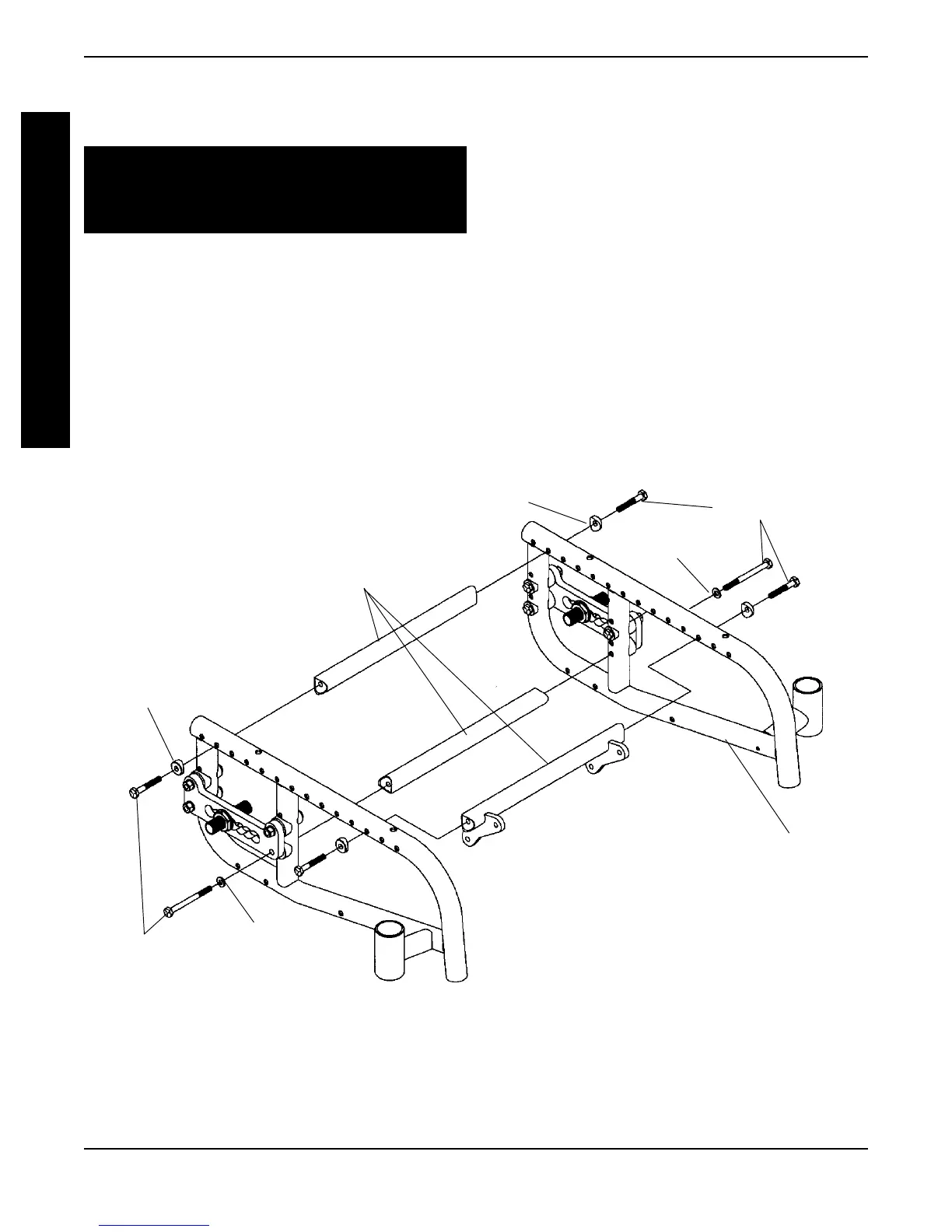
3. Remove the six (6) hex screws, washers and
coved washers that secure the three (3) exist-
ing crossmembers to the wheelchair frame.
4. Install the new crossmembers onto the wheelchair
by reversing STEP 3. Refer to FIGURE 4 for cor-
rect hardware orientation and crossmember po-
sition.
5. Install the new seat pan onto the wheelchair.
Refer to REPLACING THE SEAT PAN in this
section of the manual.
6. Install the new back upholstery and spreader
bar onto the wheelchair. Refer to REPLACING
THE BACK UPHOLSTERY and REPLACING
THE SPREADER BAR in PROCEDURE 4 of
this manual.
FIGURE 4 - ADJUSTING THE SEAT WIDTH-
NON-MINI TILT
Coved Washer
Hex Screws
Washer
Wheelchair
Frame
Crossmembers
Coved Washer
Hex Screws
Washer
PROCEDURE 3
S
E
A
T






 To Next Page