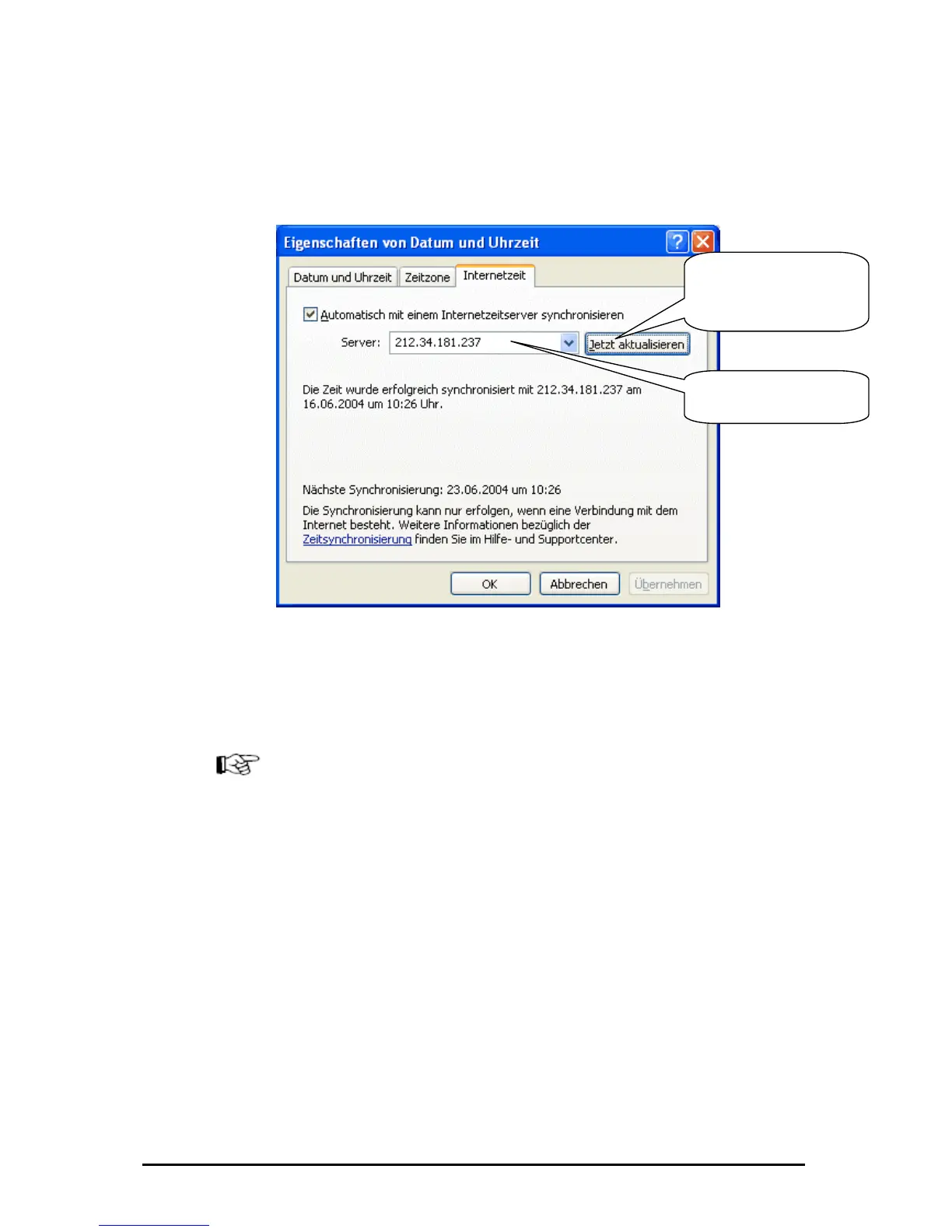
Synchronisation of the time under Windows XP
By double-clicking onto em clock the dialog „Option d time“
opens, in the card index rider „Interne ust make following
settings.
the syst s of date an
t time“ now you m
Please click h
synchronise
ere to
your PC-
th the SNTP-Time wi
Server.
Please enter here the IP-
Address of the SNTP-
Server
The default updating interval is o dapted only in the
registry under
"Hkey_Local_M lSet001\Services\W roviders\
NtpClient" with the new DWORD va
desired
Caution:
We have the info try entry from the ake
over any liability for possible damag
Generally:
A change in the Windows-Regist dure can lead to not
correct shuting down or starting the s are also possible.
Computer newcomers should emselves.
ne week and could be a
achine\System\Contro 3
l“, where you enter the
2Time\TimeP
Entry „SpecialPollInter
seconds as a decimale value.
rmation for this regis internet and do not t
es.
ry at inappropriate proce
system. Data losse
not carry out such changes th
Änderungen vorbehalten Stand 09.09.05
ipcas GmbH ipEther232 V11.01 Seite 104 von 150



 To Next Page