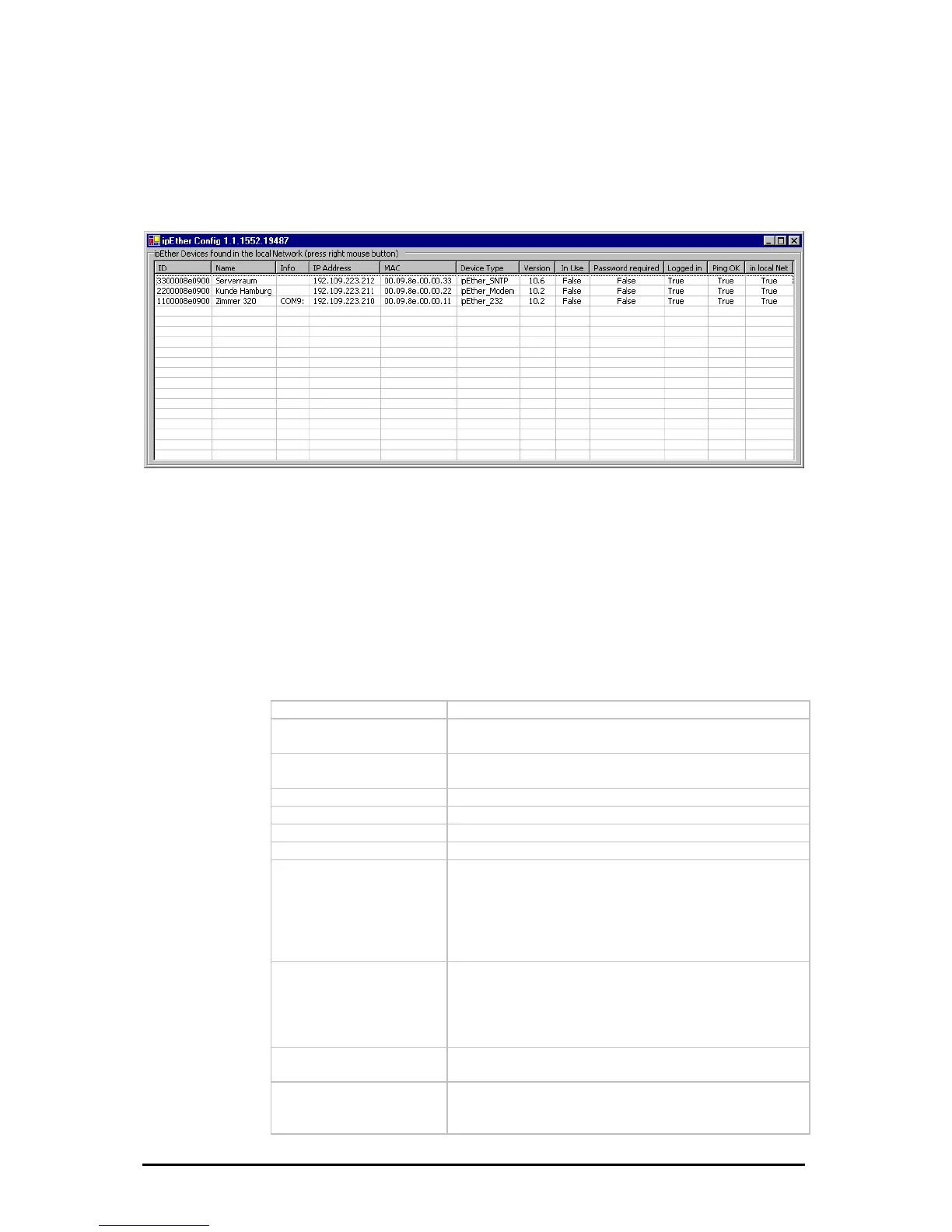
3.2 Configurationtool
The configuration program recognizes all devices in its own network segment,
even if they do not have a valid IP address.
By clicking on a column in t ddress”) all found
es are sorted for a be
order
he overview border (e.g.: “IP A
devic
tter overview.
In the overview b
are the following entries:
ID
Device-id
Name
Info (Comments could be very helpful to find a
particular device very quickly)
Info
Current configured ComPort (only at ipEther232
„virtual ComPort“)
IP Address
Current IP-Address
MAC
MAC-Address
Device Type
Firmwaretype of the device
Version
Current Firmwareversion
In Use
On ipNTP - DCF77
PS
m
On ipNTP - G
If this entry is „True“, the device is already in use and
you shouldn`t configure the parameters.
The device received data one minute along if this
entry is “True”
If this entry is “True”, the device received signals fro
several satellites.
Passwort required
If the password is forgotten, the device must be
returned.
If this entry is „True“, the device is password-
protected and the password have to be entered
before the configuration. (Right-click “Login”)
ogged in
If this entry is „False“, the password (Right-click
tion.
L
„Login“) have to be entered before the configura
Ping OK
If this entry is „False“, the device couldn`t be found. It
is not connected, switched of or is in another network
segment.
Änderungen vorbehalten Stand 09.09.05
ipcas GmbH ipEther232 V11.01 Seite 21 von 150



 To Next Page