Chapter 2: The Device
2.1 Sockets
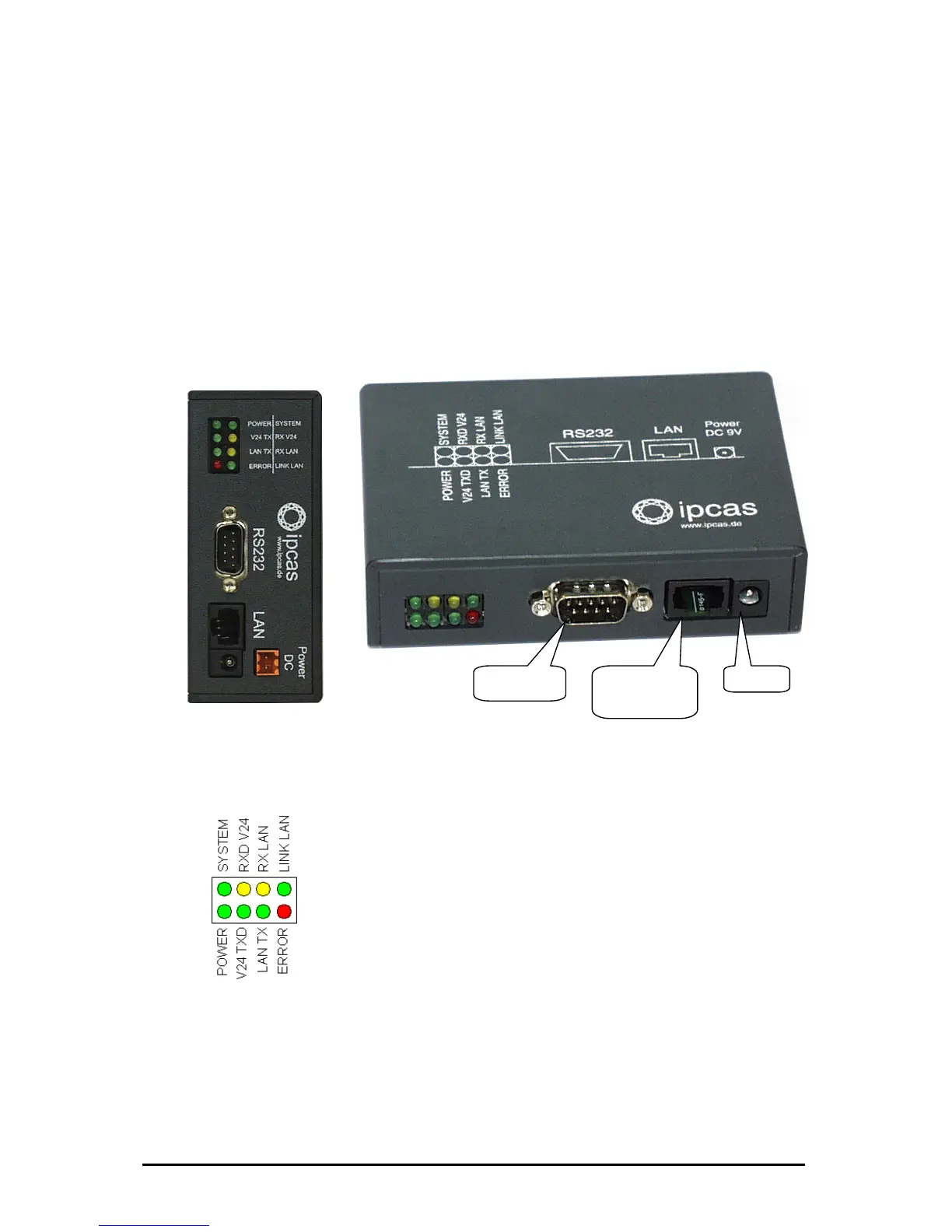
ipEther232 has three sockets:
• Ethernet (10BaseT) for a 10/100 Mbit network
• RS232 SUB-D 9
• 9V DC mains supply or 24 VDV or 48/60V DC
A diagram of all connectors and their designation is displayed on the housing.
behalten Stand 09.09.05
ipcas GmbH ipEther232 V11.01 Seite 8 von 150
The LEDs indicate the device state and have the following meaning:
• POWER The device is switched on.
• System Slow flashing indicates that at the moment there is
no connection to a PC. Fast flashing indicates that
the device is in use.
• LINK LAN There is a physical connection to the network.
• LAN Rx Packets are received by the Ethernet.
• x Packets are sent to the Ethernet.
• 24 Rx Data is received via the RS232 line.
• V24 Tx Data ia the RS232 line.
• Error An error has occured in the RS232 line.
At Ethernetprotocols like IPX, RIP and IGRP (MTU
p
he
Ehternetprotocol.
After the virtuel Com-Port is closed the red LED will
ake it optically visible.
LAN T
V
is sent v
RS232
SUB-D 9 Pin
Ethernet
10/100
RJ45
9V DC
higher then 1500) the red LED lights u
because it can’t be recognized by t
light up for 0.5 seconds to m
Änderungen vor



 To Next Page