local Net
If this entry is „False“, the device is not in the local
network segment.
-
vents that a
device is getting inaccessible by mistake.
in
If the device is installed behind a router, the IP
Address couldn`t be changed. This pre
To start with, each device must be allocated an unambiguous IP address.
On delivery of ipEther232 no valid IP-Address has been set (Default: 10.10.5.1).
he IP-Address can be obtained from the network administrator. It must comply
ith your network and cannot be assigned twice.
-Address from your network administrator for your ipEther232.
In order to set the IP address in your ipEther232, the device must be connected
to its own network segment.
If need be, connect the device via a "cross over“ cable to the PC.
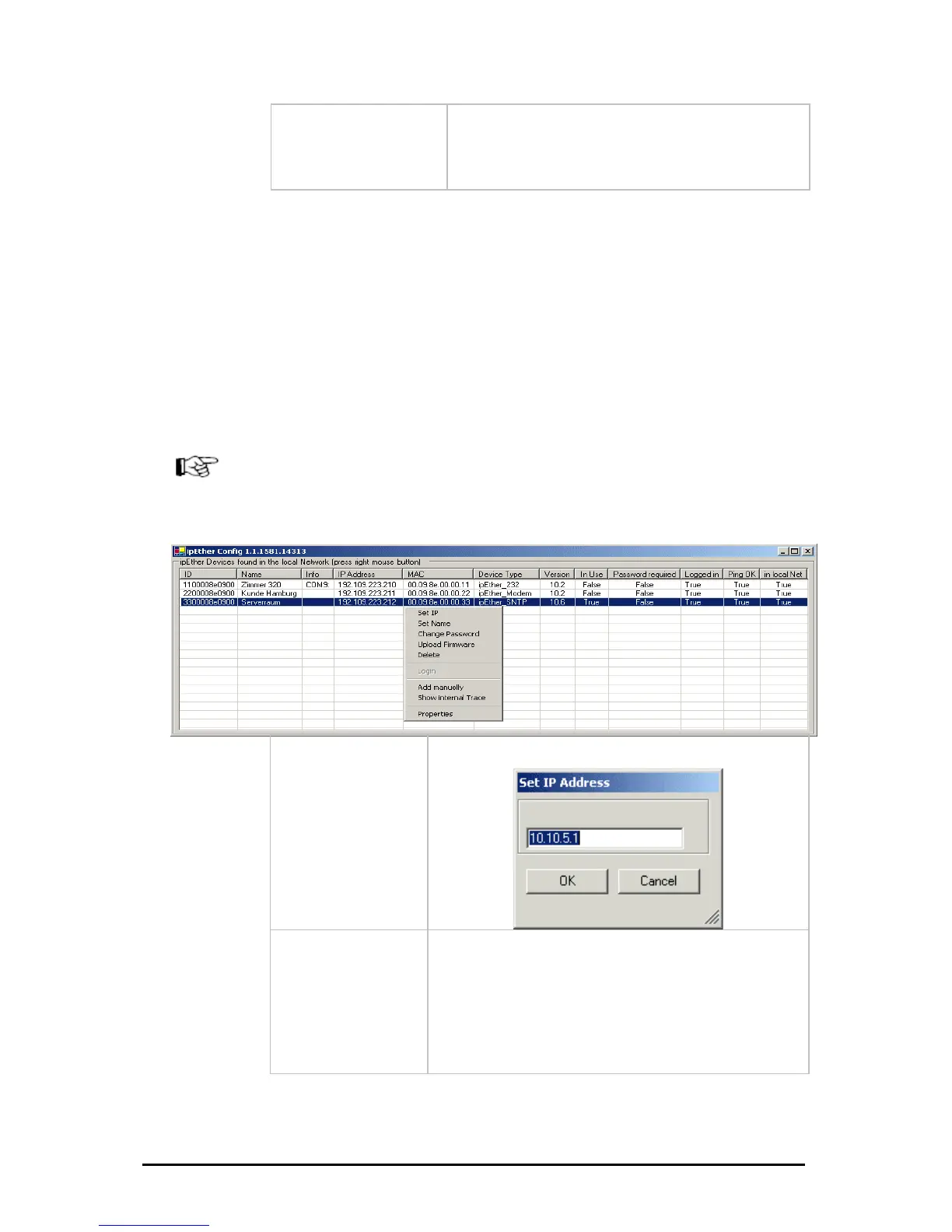
Durch einen Rechten Mausklick auf einen Geräteeintrag wird ein Dialog gezeigt
in dem Sie weitere Aktionen ausführen können.
T
w
If you are embedded in a DHCP network, you`ll have to recieve a static
IP
Set IP
Set IP-Address
Set Name
Set Name
Änderungen vorbehalten Stand 09.09.05
ipcas GmbH ipEther232 V11.01 Seite 22 von 150



 To Next Page