C. User Guide30
IP Validators
An IP Validator is a rule that determines how the Firewall should handle packets received from or sent to a
specific IP address or a range of addresses. If you know the address details of a specific external host
whom you believe may attempt to infiltrate or damage your internal network, you can block traffic from that
host. Similarly, if an internal host is accessing an external web site that contains unacceptable material,
you can block their access to it. You must also determine which direction packets should be allowed to
travel in:
inbound; permitted traffic is transported from the outside interface to the inside interface
outbound; permitted traffic is transported from the inside interface to the outside interface
both; inbound and outbound rules apply
4.7.1.1 IP Filter page
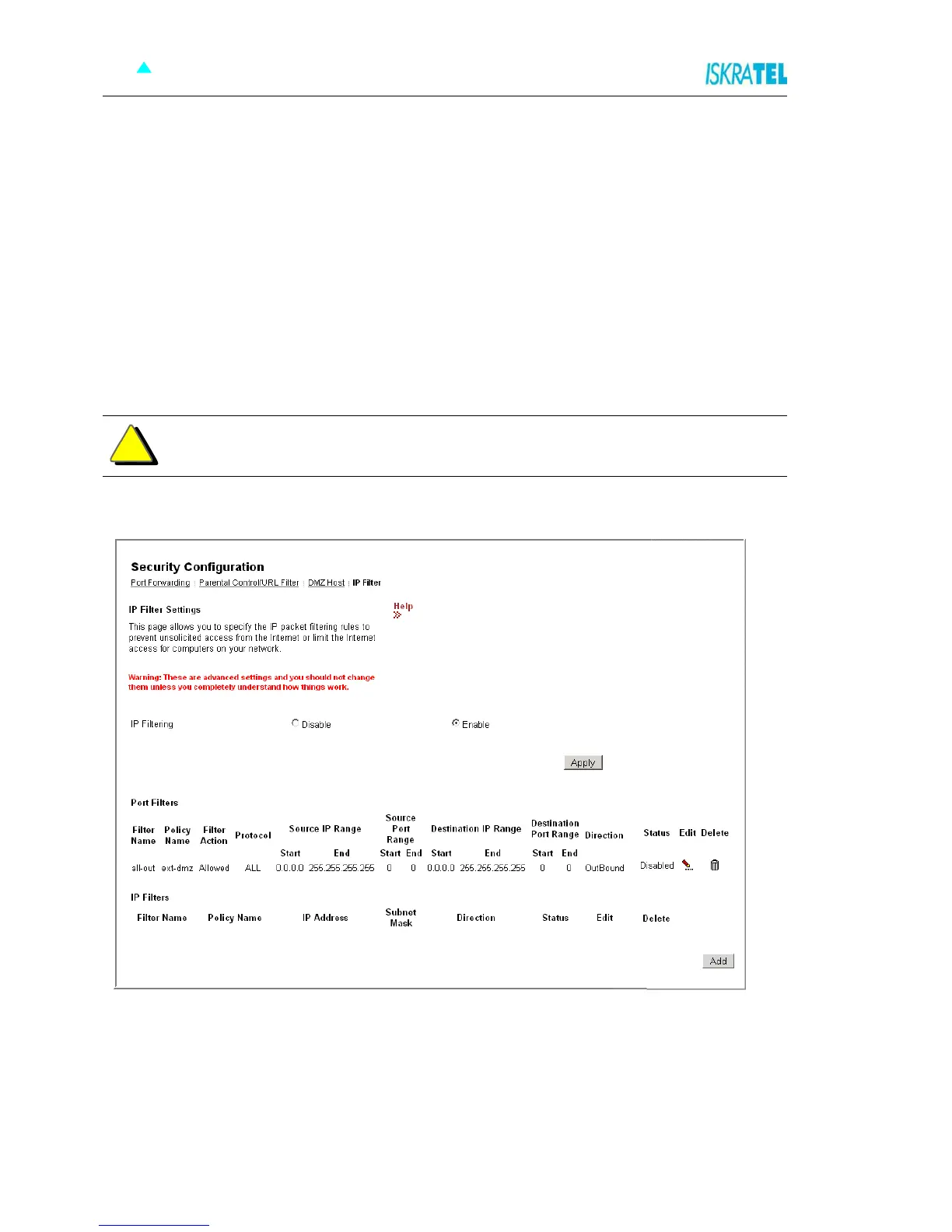
1. Select the IP Filter tab. The following page opens.
Figure 4-30: IP Filter Settings
2. You can select Disable or Enable to disable or enable IP Filtering (Firewall).
3. If there are any rules already configured, you can edit or delete them in this page. Select Edit or
Delete option accordingly. all-out ext-int and all-out ext-dmz port filter rules are configured
by default and should not be deleted. If all-out ext-int port filter rule is deleted, internet
connection will not work and you will have to create a new default ext-int policy port filter rule.
4. To add a new Port Filter Rule or IP Validator Rule, click Add.
Warning: These are advanced settings and you should not change them unless you
completely understand how things work.
!



 To Next Page