C. User Guide38
4.9 Port Configuration
The Port Configuration page allows you to change the way local ports of Sinope568+ are used. The default
port configuration is as follows:
Ethernet1-2: ports for connecting PCs or other network devices (data)
Ethernet3-4: ports for connecting Set Top Boxes (video)
USB1-2: ports for wireless data or voice transmission
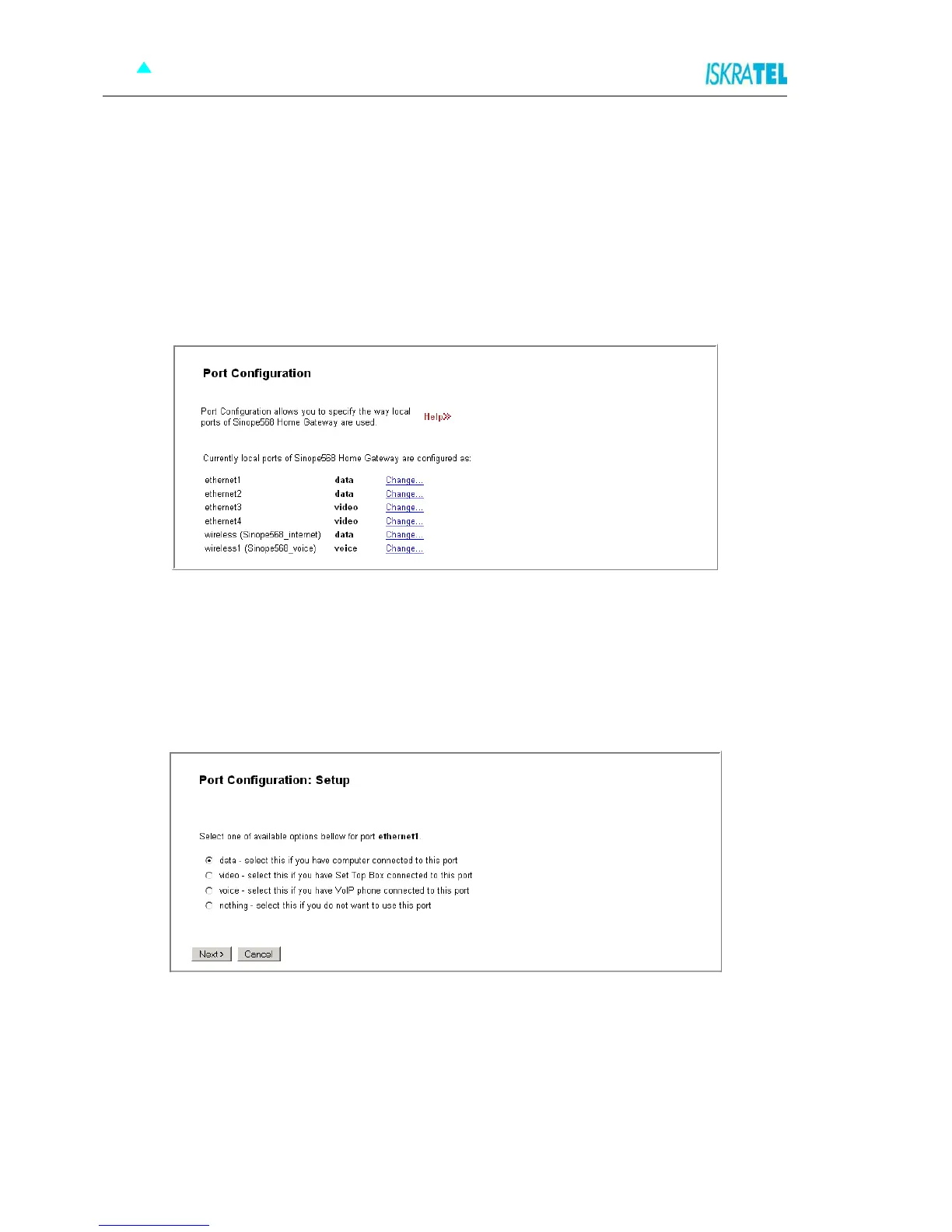
To view the current port configuration settings, click the Port Configuration option. The following page
opens.
Figure 4-40: Port Configuration
4.9.1 To change the port function
Depending on device type connected to the port, you can change the port function.
1. To change the port function, click Change... . The following page opens.
Figure 4-41: Port Configuration - Setup
2. Select one of the available options:
data - computer connected to this port
video - Set Top Box connected to this port
voice - VoIP phone connected to this port
nothing - select this if you do not want to use this port
3. Click Next to continue. The following page opens.



 To Next Page