C. User Guide36
3. In the WAN Interface field, select the WAN interface on which you want to apply the port forwarding
rule:
• Forward to Internal Host Name: Select the internal host name of device to which you want to
forward packets.
• Forward to Internal Host IP Address: Type the internal host IP address of device to which you
want forward packets.
4. By using the rules: If you choose predefined applications, the data in these fields are set from
applications base. If you choose user defined application, you must enter data manually.
• Protocol: Select protocol which is used by your application. Each application has defined
protocols and ports that it uses. Data can be found on the Internet for example. Also, more than
one protocol could be set for one application.
• External Port (Port Start, Port End): Type External Port (Start, End) of your application (range 1-
65535). Start and End values could be equal. Also, external and internal ports could be equal.
• Internal Port (Port Start, Port End): Type Internal Port (Start, End) of your application (range 1-
65535). Start and End values could be equal. Also, external and internal ports could be equal.
5. Click Apply to confirm the settings.
4.8 DNS settings
4.8.1 LAN Host
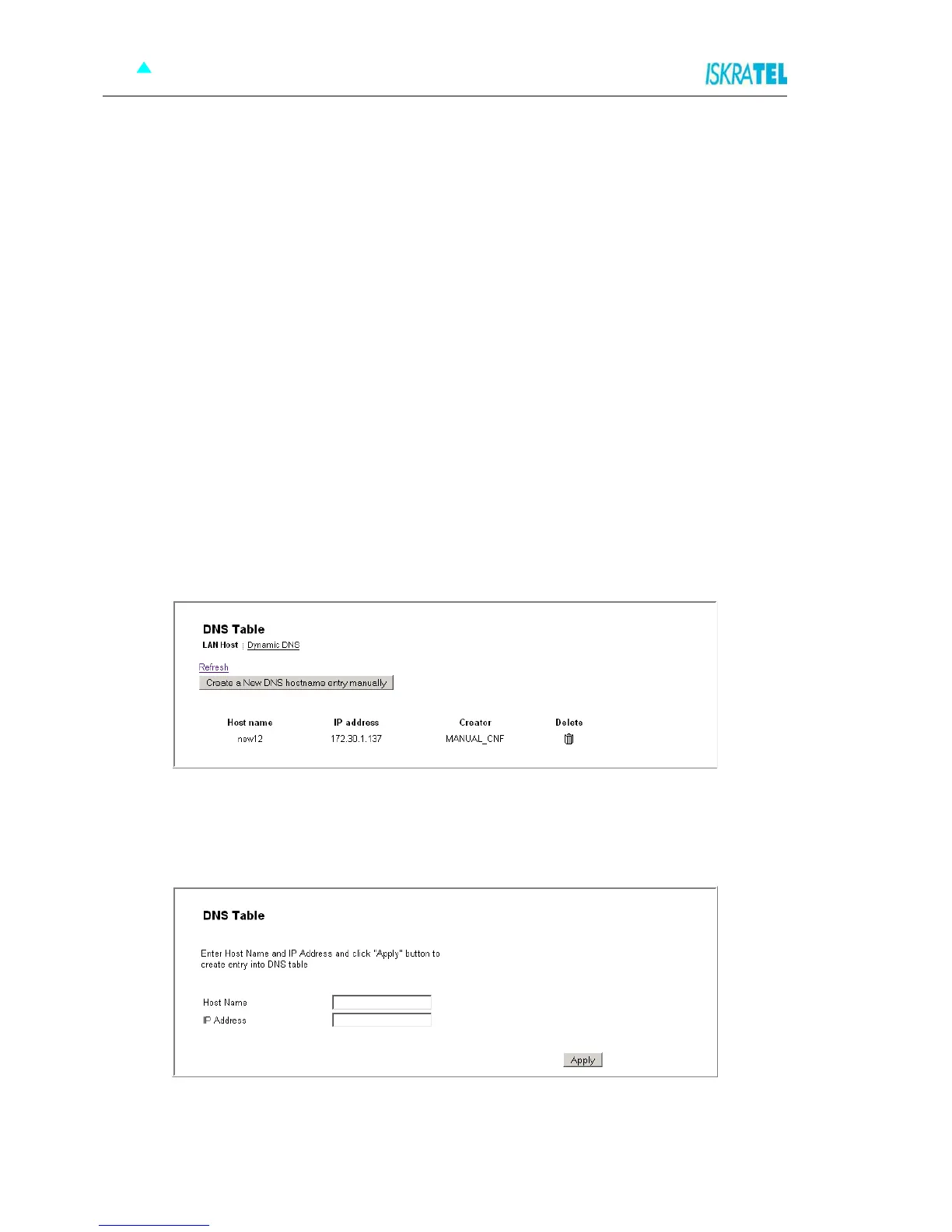
1. Select Configuration > DNS. The following page opens.
Figure 4-37: DNS Table - add new LAN host
2. To add a new LAN host to the DNS table, click the Create a new DNS hostname entry manually. The
following page opens.
Figure 4-38: Add hostname entry
3. Enter the name of the host in the Host Name field and the IP address in the IP Address field.
4. Click Apply.



 To Next Page