50
IT10151 - IT12151
8
8
14
10
OPERATING AND MAINTENANCE HANDBOOK
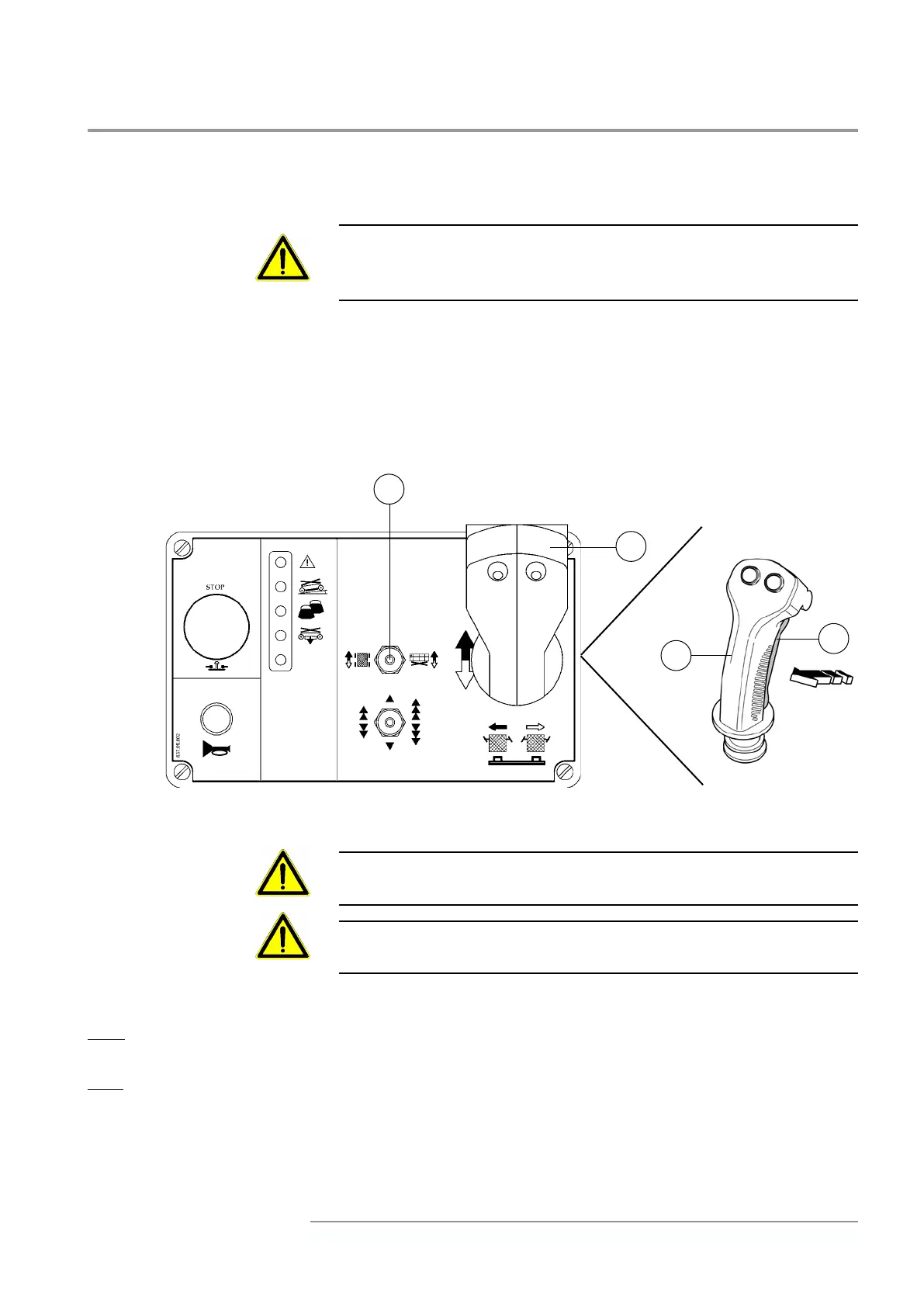
Platform liing/lowering
During movement, do not move selector 14 from traction to liing
position and vice versa. In this case the machine stops. Release the
joystick 8 and give the command again to restore the movement.
• With machine in stop position, move selector 14 right.
•Hold joystick 8.
•Press push buon 10 “man present” and keep it pressed.
•Bring the joystick forward to li the platform or backward to lower
it.
The liing speed has adjusted accordingly with the inclination given
by the joystick 8.
Before liing or lowering platform make sure that no obstacles are
present on or under it.
Always check the state of emergency pilot lights; in case they go on,
please, read section “Emergencies”
Liing stopping
Slow: bring gradually joystick 8 back into the starting position, keeping pressed the push buon 10 “Man
present”. The electronic control device guarantees a so stopping.
Fast: release switch 10 “Man present”. The braking electronic control device assures a quick stopping.
Lowering stopping device
Bring joystick 8 back into the starting position or release the “Man present” push buon 10: the stopping
happens immediately.



 To Next Page