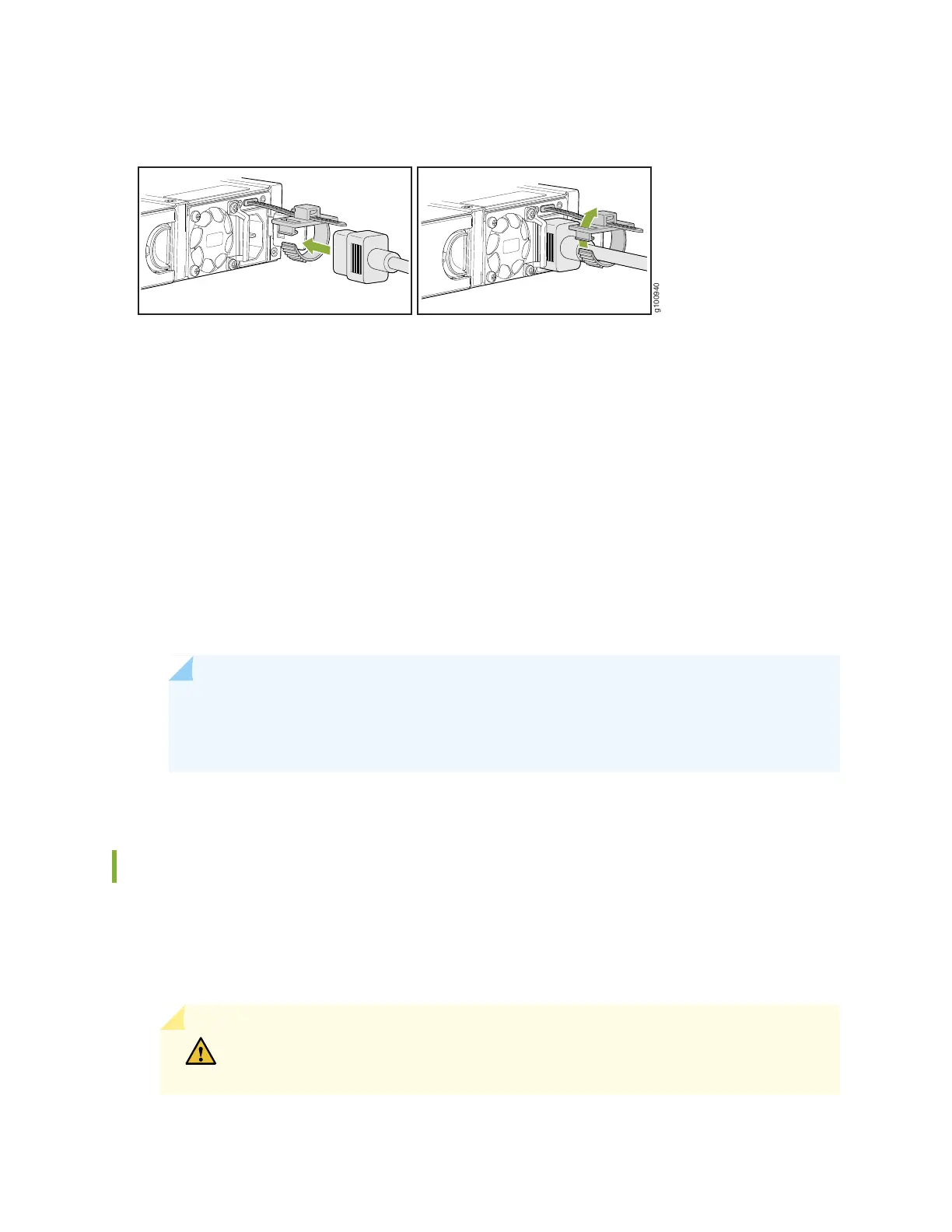
Figure 14: Connecting an AC Power Cord
6. Press the tab on the loop and draw out the loop into a tight circle.
7. If the AC power source outlet has a power switch, set it to the OFF (0) position.
8. Insert the power cord plug into an AC power source outlet.
9. If the AC power source outlet has a power switch, set it to the ON (|) position.
If the power supply is installed correctly and functioning normally, the LED on the faceplate of the
power supply glows solid green.
The device starts automatically as the power supply completes its startup sequence. The PWR LED
lights up during startup and remains on when the device is operating normally.
NOTE: After the power supply is turned on, it can take up to 60 seconds for status
indicators—such as the STAT and PWR LEDs—to show that the power supply is functioning
normally. Ignore error indicators that appear during the first 60 seconds.
Powering Off the SRX380 Services Gateway
You can power off the services gateway in one of the following ways:
•
Graceful shutdown—Press and immediately release the Power button. The device begins gracefully
shutting down the operating system and then powers itself off.
CAUTION: Use the graceful shutdown method to power off or reboot the services
gateway.
45



 To Next Page