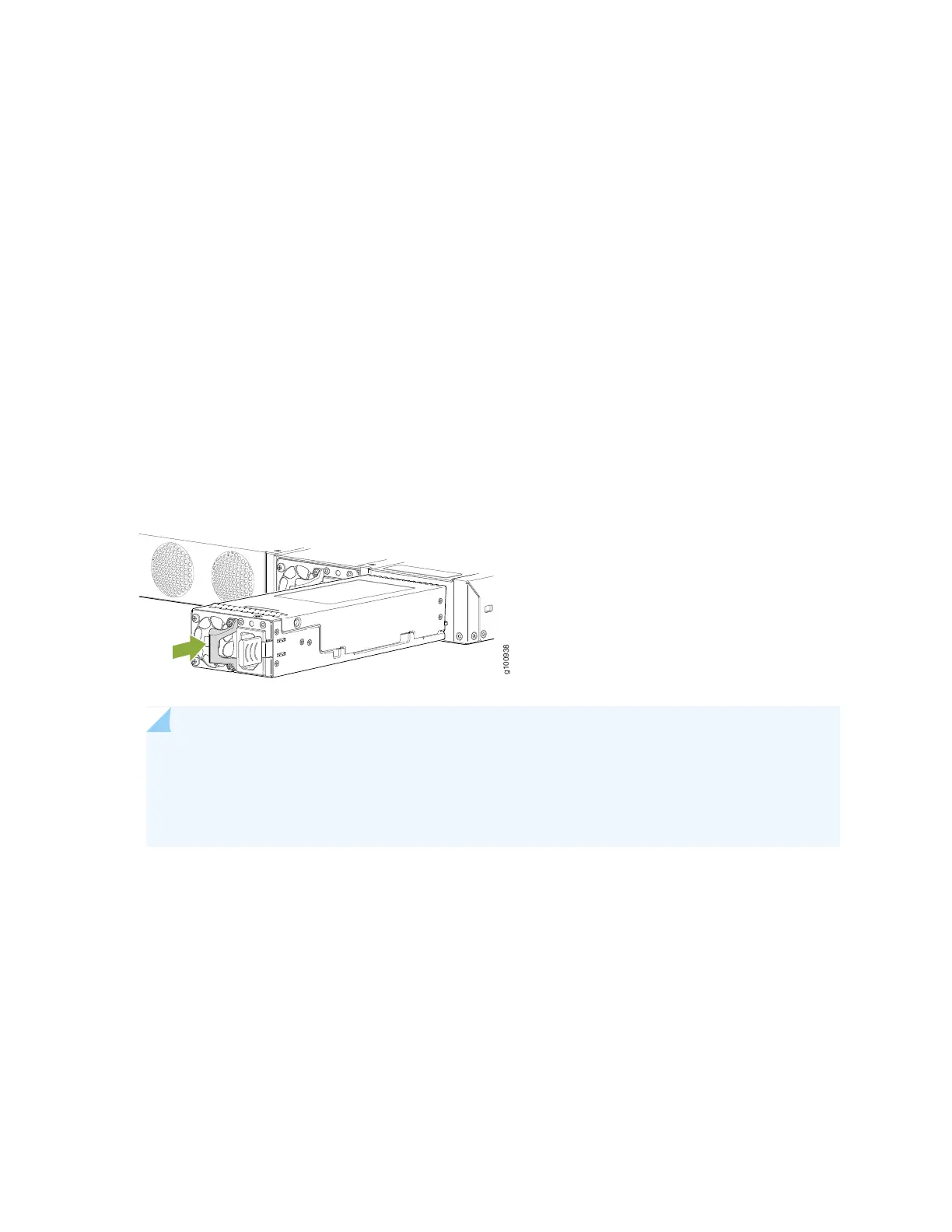
To install an AC power supply in the device (see Figure 20 on page 64):
1. Wrap and fasten one end of the ESD grounding strap around your wrist and connect the other end to
a site ESD point.
2. If the power supply slot has a cover panel on it, loosen the captive screws on the cover panel by using
your fingers or the screwdriver. Hold the captive screws and gently pull the screws outward to remove
the cover panel. Save the cover panel for later use.
3. Taking care not to touch power supply pins, leads, or solder connections, remove the power supply
from the bag.
4. Using both hands, place the power supply in the power supply slot on the rear panel of the device and
slide it in until it is fully seated and the ejector lever fits into place.
Figure 20: Installing an AC Power Supply in an SRX380 Device
NOTE: If you have a Juniper J-Care service contract, register any addition, change, or upgrade
of hardware components at https://www.juniper.net/customers/support/tools/updateinstallbase/.
Failure to do so can result in significant delays if you need replacement parts. This note does
not apply if you replace existing components with the same type of component.
64


 To Next Page
 Loading...












