] OEN
IndoorUse
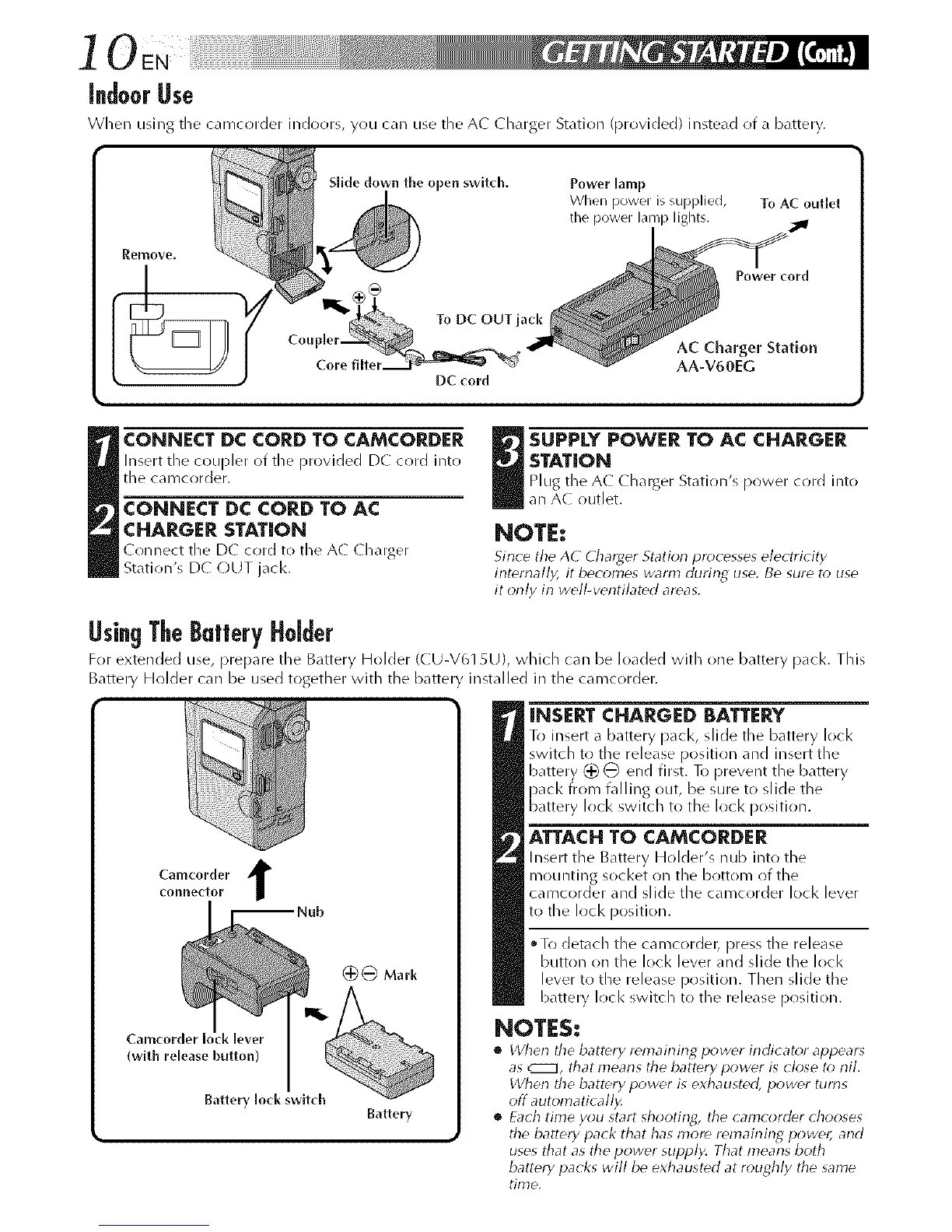
When using tile c,lmcorder indoors, you can use the A( Charger Station (provided) instead of a battery.
Slide clown the open switch. Power lamp
When power is supplied, To AC outlet
the power lamp lights.
Power cord
To DC OUT jack
AC Charger Station
AA-V60EG
DC (ord
CONNECT DC CORD TO CAMCORDER
Insert the coupler (>ftile Dr(>vided DC cord into
the camcorder.
CONNECT DC CORD TO AC
CHARGER STATION
Conned the D( cord to the A( ( h_rger
Station's DC OUT jack.
_ UPPLY POWER TO AC CHARGER
STATION
Plug the A( ( h_rger Station's power cord into
an AC outlet.
NOTE:
Since the AC Charger Station princesses eler trkity
internally, it becomes warm during use. Be sure to use
it only in well-verltilated areas.
UsingTheBatteryHolder
For extended use, i_repare the Battery Holder (C U-V615L//, which can be loaded with one battery pacl<. This
Battery Hr)lder car/be used together with the batten installed in the camcorder.
Camcorder t
connector
Camcorder Io
(with release button)
Battery lock switch
Battery
INSERT CHARGED BATTERY
To insert a battery p_el<, slide the battery lock
switch to tile release [)osJtJon and insert the
battery (:_ _ end first. To prevent the battery
pack from falling out, be sure t() slide the
battery loci< switch to the lock [)osition.
ATTACHTO CAMCORDER
Insert tile Battery Holder's nub into the
mounting s(*cl<et on the br)ttom of the
camcorder and slide the camcorder lock lever
to the lock position.
To detach the camcordet_ press tile release
button on the lock lever and slide the lock
lever to the release position. Then slide the
battery lock switch to the release position.
NOTES:
• When tile battery remairlirlg p(_wer irlr]icator appears
as _*-il, that mearls the battery power is close to nil.
When the battery power is exhausted, power turns
off avtomaticall_
• Each tmle you start shootirlg, the camcorder chooses
the battery pack that has more relTlaining power, and
uses that as the power supply. That means both
battery packs will be exhausted at roughly the same
time.



 To Next Page