Date/TimeSettings
Date and time will automatically be recrlrded on tape at _dl times. It is your choice to display it or not during
playback (_-7 pg. 5 I).
Lock button
1
Display
Power Dial
Select Dial
MEN U button
Recordlng Menu _.
Date/Time Menu
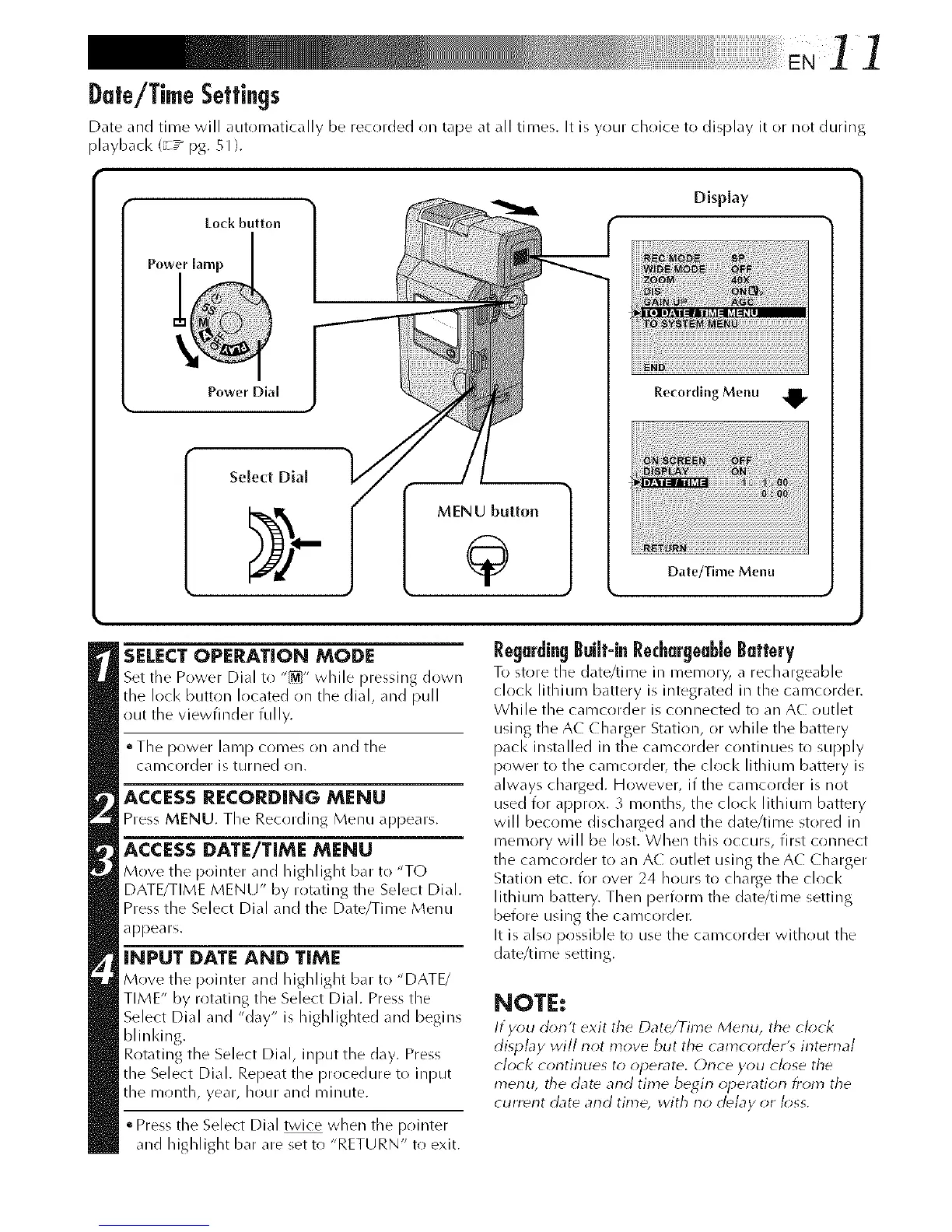
SELECTOPERATION MODE
Set tile Power Dial to "_" while pressing down
the lock button located on the dial, and pull
out the viewfinder fully.
• The power lamp c()mes ()n and the
calllC()rder is turned on.
ACCESS RECORDING MENU
Press MENU. The Recording Menu appears.
ACCESS DATE/TIME MENU
Move the pointer and highlight b_. to "TO
DATE/TIME MENU" by rotating the Select Dial.
Press the Select Dial and the Date/Time Menu
appears.
I@PUTDATE AND TIME
Move the pointer _md highlight b_, to "DATE/
TIME" by rotating the Select Dial. Press the
Select Dial and "clay" is highlighted and begins
blinldng.
Rotating the Select Dial, input the day. Press
the Select Dial. Repeat the procedure to input
the month, year, hour and minute.
• Press the Select Dial twice when tile pr)inter
and highlight bar are set to "RETURN" to exit.
Regurdin9 Built-inRechurgeub[eButtery
To store the d_lte/time ill memory, _ rechargeable
clock lithium battery is integrated in the camcorder.
While the camcorder is connected to an AC outlet
using the A( (ha rger Staff on, (11"while the battery
pack installed in the camcorder c(/ntinues to supply
power t() the camcorder, the clock lithium battery is
always charged. H()wever, if the camcrlrder is not
used for approx. 3 months, the clock lithium battery
will become dischalged and the date/time stored in
memory will be lost. When this occurs, first connect
the camcorder to an A( (/utlet using rheA( Charger
Stati()n etc. for over 24 h()urs t() charge the clock
lithium battery. Then perform the date/time setting
before using the camcorder.
It is also possible to use the camc()rder without the
date/time setting.
NOTE:
If you d_)n't exit tile Date/Time Menu, tile ok)ok
display will riot move but the camcorder'_ intema/
clock contirlues to operate, Orlce you close the
menu, tile date arid time begin operation from the
current date and time, with no de/ay or/_;ss.



 To Next Page