PlaybackMenu
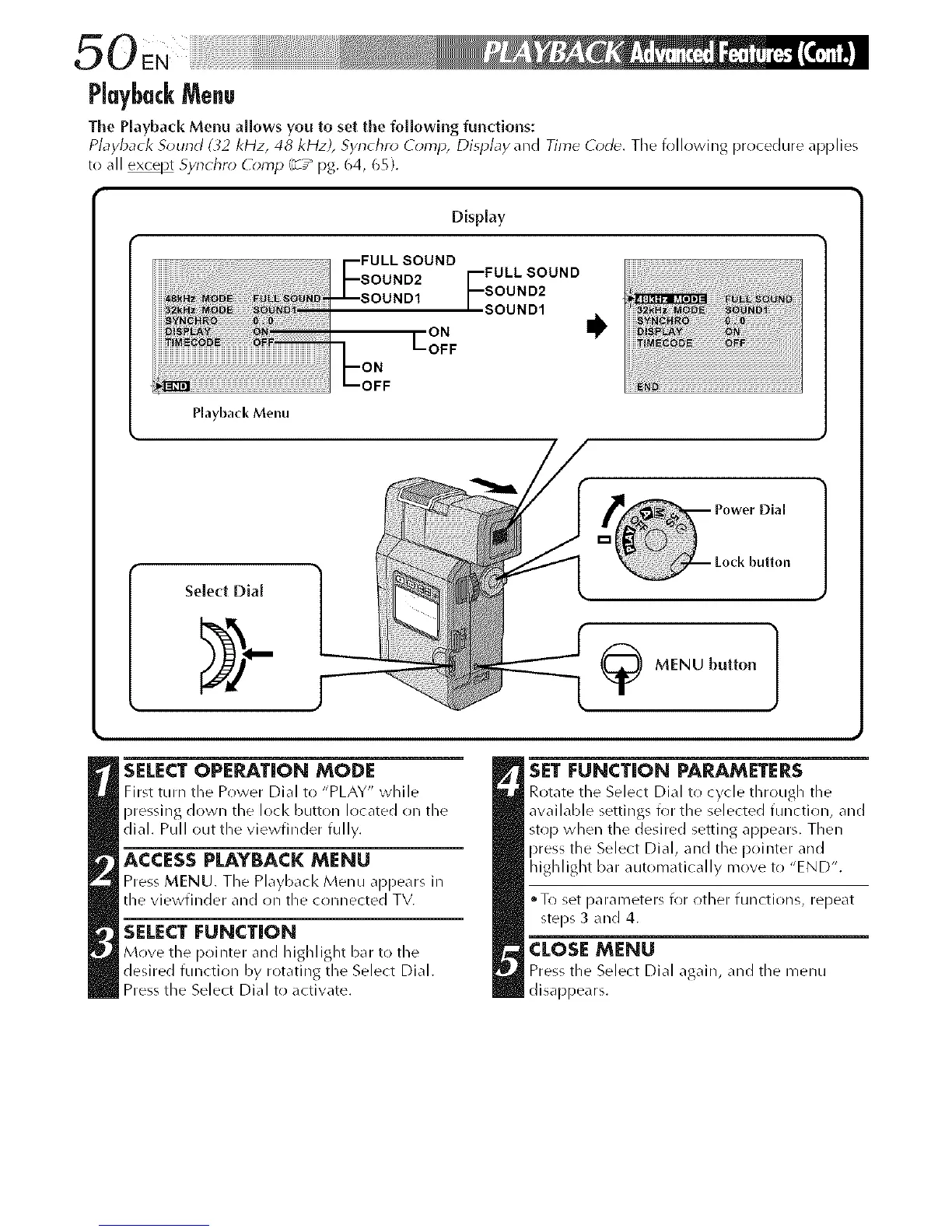
The Playback Menu allows you to set the following functions:
Playback Sound (32 kHz, 48 kHz), Synchro Comp, Display _lnd Time Code. The fr)llr)wing prr)cedure _lpplies
to all _ Synchro Comp (z7_ pg. 64, 65).
Display
FULL SOUND
SOUND2
SOUND1
ON
LOFF
Playback Menu
SELECT OPEPJ_TION MODE
First turn the P(_wer Dial to "PLAY" while
pressing down the loci< button Irlcated on the
dial. Pull out the viewfinder fully.
ACCESSPLAYBACKMENU
Press MENU. The Playbacl< Menu appears in
the viewfinder and on the crlnnected TV.
SELECT FUNCTION
Move the p_finter and highlight bar to the
desired function by rotating the Select Dial.
Press the Select Dial to activate.
SET FUNCTION PARAMETERS
Rot_te the Select Dial t_ cycle through tile
available settings for the selected function, and
stop when the desired setting appears. Then
press the Select Dial, and the pointer and
highlight bar automatically move to "END".
• To set parameters for other functions, repeat
steps 3 and 4.
CLOSE MENU
Press the Select Dial again, and tile menu
disappears.



 To Next Page