] 2ENiSJJJJJJJ i i iJ i i;iiii '
Loading/UnloadingACassette
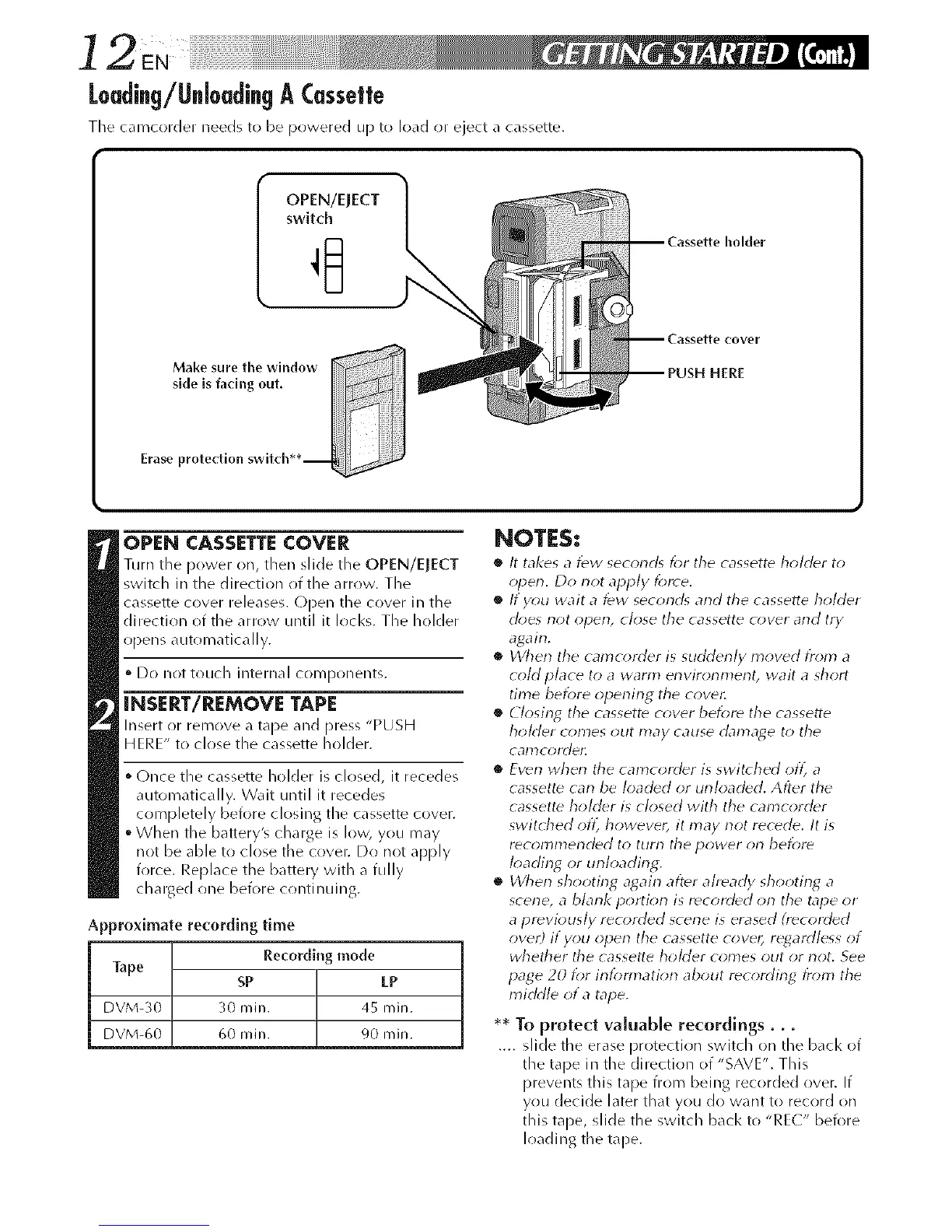
The camcorder needs to be pllwered up to load or eject a cassette.
OPEN/EJECT
switch
-- Cassette holder
Make sure the window
side is facing out.
3
Erase protection switcll**--
-- Cassette cover
PUSH HERE
OPEN CASSETTE COVER
Turn tile power on, then slide tile OPEN/EJECT
switch in the direction of the arrow. The
cassette cover releases. Open the cover in the
direction of the arrow until it locks. The holder
opens automatically.
• Do not touch internal components.
INSERT/REMOVE TAPE
Insert or remove a tape and press "PUSH
H ERE" to close the cassette holder.
(-)nce the cassette holder is closed, it recedes
automatically. Wait until it recedes
completely before closing the cassette cover.
When the battery'_ charge is low, you may
not be able to close the cover. Do not apply
force. Replace the battery with a fully
charged (me before crmtinuing.
Approximate recording time
Recording mode
Tape
SP LP
DVM-30 30 rain. 45 rain.
DVM-60 60 rain. 90 rain.
NOTES:
• It takes a few seconrg k)r the cassette holder to
open. Do not apply force.
• If y_)u wait a few second_ and the cassette holder
d_)es not open, close the cassette cover and try
again.
• When the camcorder is surklenly moved fr_)m a
cold place to a warm environment, wait a short
time before opening the cover,
• Closing the cassette cover before the cassette
holder _on'les out may cause &_n'_age to the
calnc_ydell
• Even when the camcorder is switched oft_ a
cassett_ can be loaded or unloaded. After the
cassette holder is closed with the camcorder
switU_ed oft_ however, it may not recede. It is
recolTtmerlded to turn the power on bef_;re
k)ading or unloading,
• When shooting agairl after already shooting a
scene, a blank portiorl is recorded orl the tape or
a previously recorded scene is erased (recorded
over) if you open the cassette cove_, regardless of
whether the cassette homer comes out or not. See
page 20 for intbm_ation about recording from the
middle of a tape.
• * To protect valuable recordings...
.... slide the erase protection switch on the back of
the tape in the direction of "SAVE". This
prevents this tape from being recorded over. If
you decide later that you do want to record on
this tape, slide the switch back to "RE(" before
loading the tape.



 To Next Page