PlaybackEffects
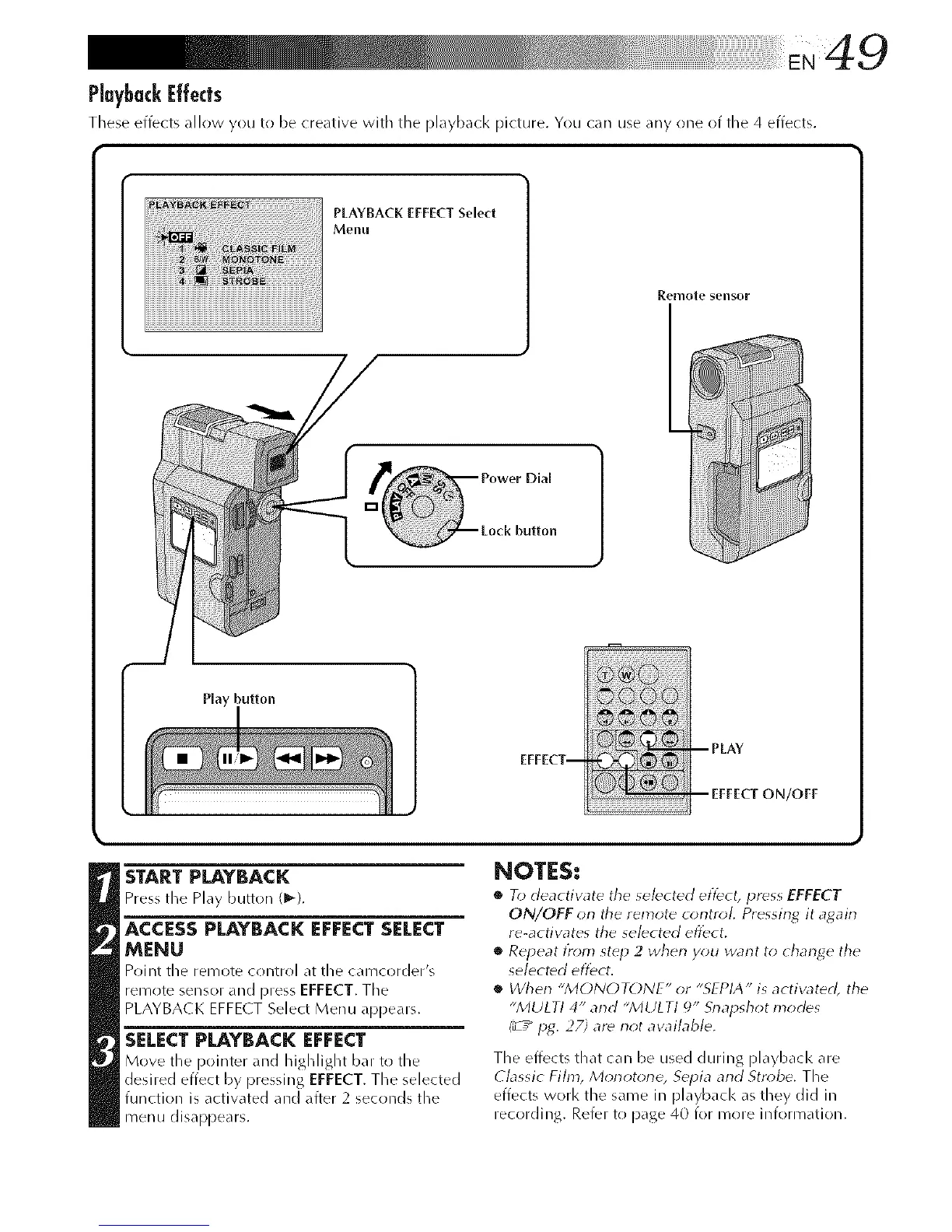
These effects _dlow you to be creative with the pl%_back picture. You c_m use any one of tile 4 effects.
PLAYBACK EFFECT Select
Menu
Remote sensor
Play button
/OFF
STARTPLAYBACK
Press the Play button (1_).
ACCESS PLAYBACK EFFECT SELECT
MENU
Point tile remote crlntrol at tile camcorder's
remote sensor and press EFFECT. The
PLAYBACK EFFE( T Select Menu appears.
SELECTPLAYBACK EFFECT
Move the pointer and JlighJight bar to the
desired effect by pressing EFFECT. The selected
function is activated and after 2 secrlnds the
menu disappears.
NOTES:
• To deactiw_te tile selected effect, press EFFECT
ON/OFF orl the remote corltroL Pressing it agairl
re-actiw_tes the selected effect,
• Repeat t?om step 2 when y_m want to change the
selected effect.
• When "MONOTONE" or "SEPIA" is activated, the
"MULTI 4" and "MULTI 9" Srlapshot modes
1_'/pg. 27) are riot aw_ilable,
The effects that can be used during playbacl< are
Classic Fihn, Monotone, Sepia and Stn*be. The
effects worl< the same in playbacl< as they did in
recording. Refer to page 40 for more information.



 To Next Page