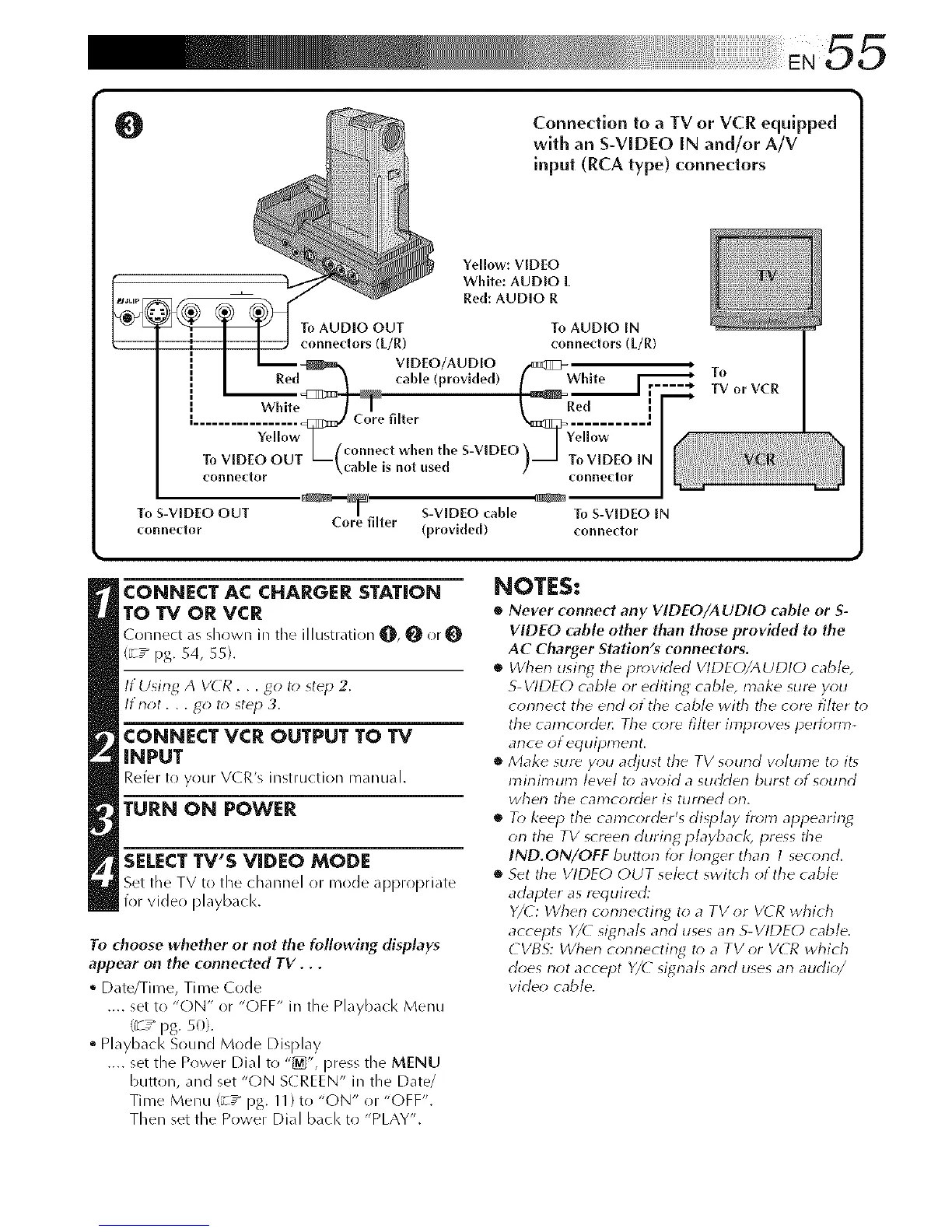
O
connector
To S-VIDEO OUT S-VIDEO cable
connector Core filter (provk|ed)
To S-VIDEO IN
connedor
CONNECT AC CHARGER STATION
TO TV OR VCR
( onnect as shown in tile illustration q[_, q[_ or O
(_/pg. 54, 55).
If Using A VETR... go t() step 2.
ltnot. . . go t_; step 3.
CONNECT VCR OUTPUT TO TV
INPUT
RefeR to your V(R's instruction manual.
TURN ON POWER
SELECT TV'S VIDEO MODE
Set the TV to tile channel or mode appropriate
for video playback.
To choose whether or not the foflowing displays
appear on the connected TV. . .
° Date/Time, Ti me Code
.... set to "ON" or "OFF" in the Playback Menu
(_/pg. 50).
° Playback Sound Mode Display
.... set the Power Dial to "_", press the MENU
button, and set "(-)N S( REEN" in the Date/
Time Menu (_/pg. 11)to "ON" or "(-)FF".
Then set the Power Dial back to "PLAY".
NOTES;
• Never connect any VIDEO/A UDIO cable or S-
VIDEO cable other than those provkled to the
AC Charger Station's connectors.
• When using tile pr_>vided VIDEO/AUDIO cable,
S-VIDEO cable or editing cable, make sure you
connect the end of the cable with the core fi/t_r to
the camcorde_ Tile _()re filter impr()ves per/bm>
ante ot equipment.
• Make sure you adjust the TV sourld volume to it_
mirfin'tun3 level t() avoid a sudden burst of sound
when the camcorder is turned orl.
• To keep the camcorder's display t}'_;m appearin_
on the TV screen during playback, press tile
IND.ON/OEF button for longer than 1 second.
• Set the VIDEO OUT select switch of the cable
adapter as required:
Y/(: When connecting to a TV or V( R which
accepts Y/( signals and uses an S-VIDEO cable.
CVBS: When connecting t_; a TV or VCR which
does not accept Y/( signals and uses an audio/
video cable.



 To Next Page