CleaningThe (recorder
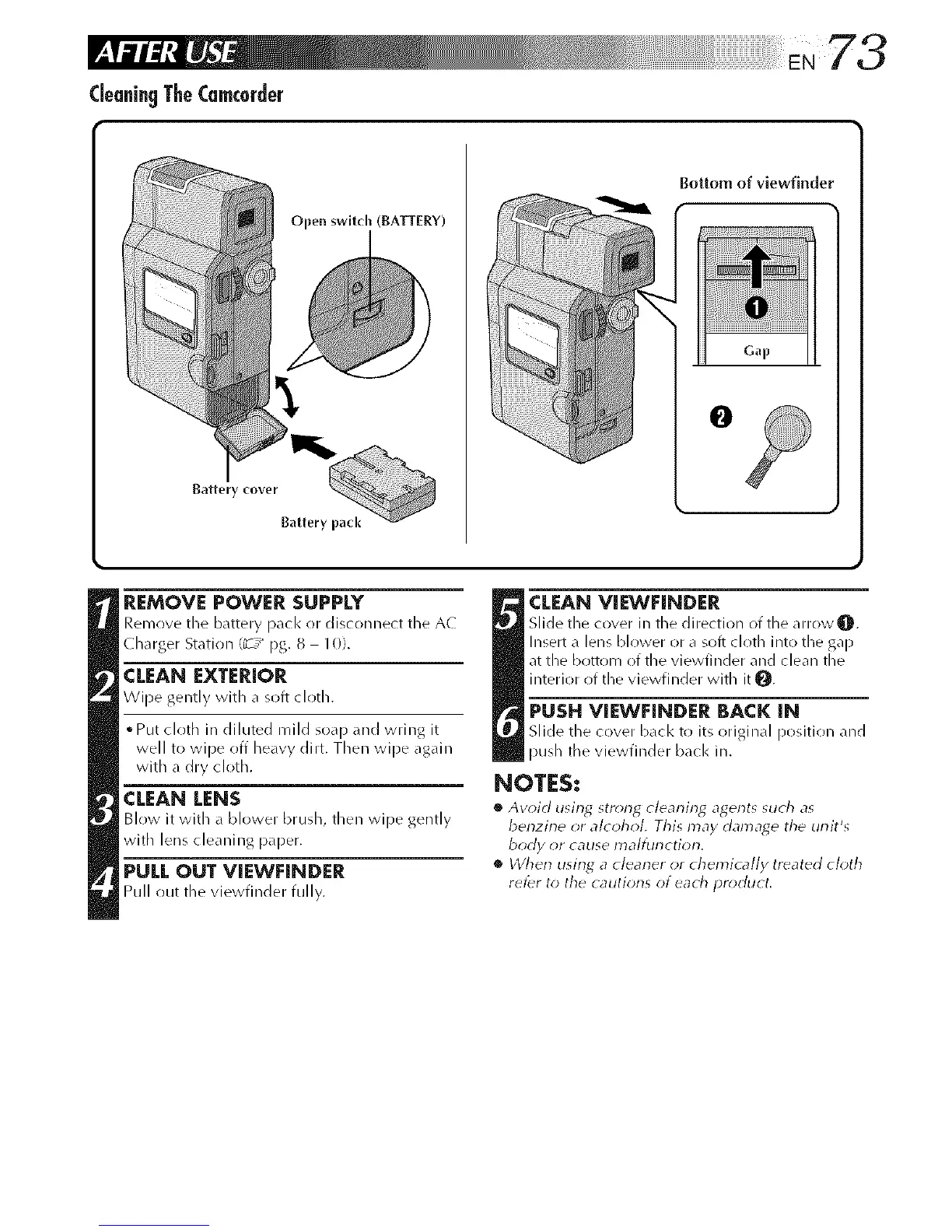
Open switch (BATTERY)
Battery cover
Battery pack
Bottom of viewfinder
Gap
O
REMOVE POWER SUPPLY
Remove the battery pack or disconnect the AC
Charger Station (_-7_ pg. 8 10).
CLEAN EXTERIOR
Wipe gently with a soft cloth.
oput cloth in diluted mild soap and wring it
well to wipe off heavy dirt. Then wipe again
with a dry cloth.
CLEAN LENS
Blow it with a blower brush, then wipe gently
with lens cleaning paper.
PULLOUT VIEWFINDER
Pull out the vJewtJnder fully.
_ LEAN VIEWHNDER
Slide the cover in the direction of the arrow q[_.
Insert a lens blower or a soft cloth into the gap
at the bottom of the viewfinder and clean the
interior of the viewfinder with it 0.
PUSH VIEWFINDER BACK IN
Slide the cover b_lcl< to its orJgJmd posJtJoll and
push tile vJewfJnder back ill.
NOTES:
• Aw)id using strong cleaning agent_ _uch as
benzine or alcohol, This may damage the unit's
body or cause malfurlctiorl.
• When using a clearler or chemically treated cloth
ret_r to the cautions of each product.



 To Next Page