Youshouldalreadyhaveperformedthenecessarypreparations(_-?%.8 17).SettilePowerDialto"[1"
andtryrecordingthatwaybeforeattemptingtousemoreadvancedfeatures.
NOTE:
Bef;)r_ St,lrtin_ r_c_rrhn_, make sure y;_u set tile date arid time (_ / p_. 11), Even it they don't alJpear during
recordint4, you carl display them during playback (_ / pg, 51),
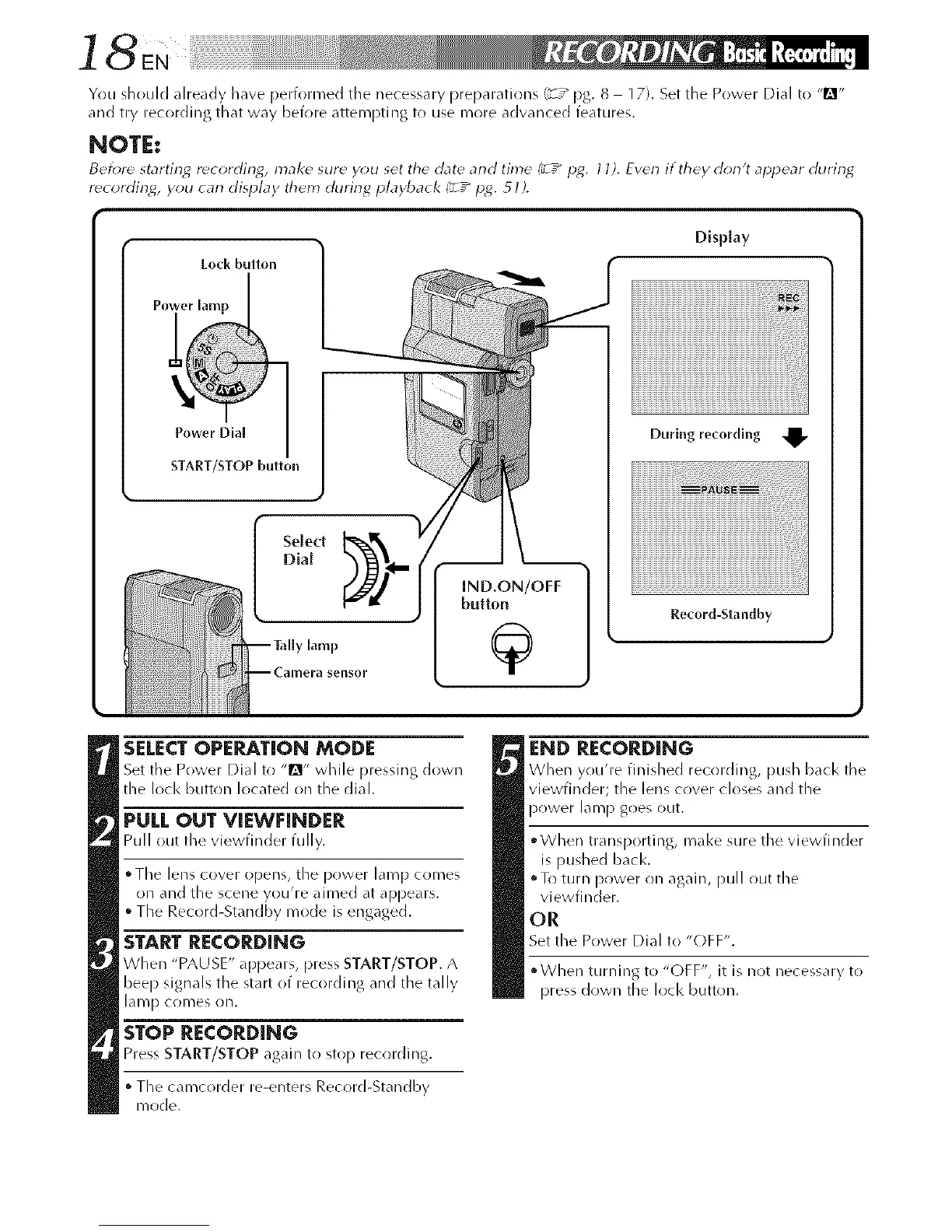
Lo_k button
Power Dh[ [
START/STOP button
[ND.ON/OFF
button
Display
During recordlng
Record-Standby
SELECT OPEP,JE,TION MODE
Set tile Power Dial to "lDr' while pressing down
the loci< button located on the dial.
PULL OUT VIEWFINDER
Pu II out the viewti n der tu IIy.
° Tile lens cover opens, the power lamp comes
on and the scene you're aimed at appears.
° The Record-Standby mode is engaged.
START RECORDING
When "PAUSE" appears, press START/STOP. A
beep signals the start of recording and the tally
lan/D c(inles on.
STOP RECORDING
Press START/STOP ag_lin to stop recording.
The camcorder re-enters Record-Standby
R/ode.
END RECOP,DIN6
When you're finished recordi%, push k_cl< tile
viewfinder; the lens cover closes and the
power lamp goes out.
• When transporting, mal<e sure the viewfinder
is pushed bacl<.
oTo turn power on again, pull out the
viewfinder.
OR
Set the Power Dial to "OFF".
" When turiling to "OFF", it is not necessary to
press down the loci< button.



 To Next Page