AudioDubbing
The audio tr_ek can be customized only when recorded on the _2 kHz mode/_T _ pg. 32).
NOTES:
• Audio Dubbing is not possible on a tape recorded at 48 I<Hz, on a tape recorded in the LP mode or on a
blank portion ot a tape,
• To perform Audio Dubbing while watching in the televisiorl, make corlrlections (_ / pg. 52 S_k
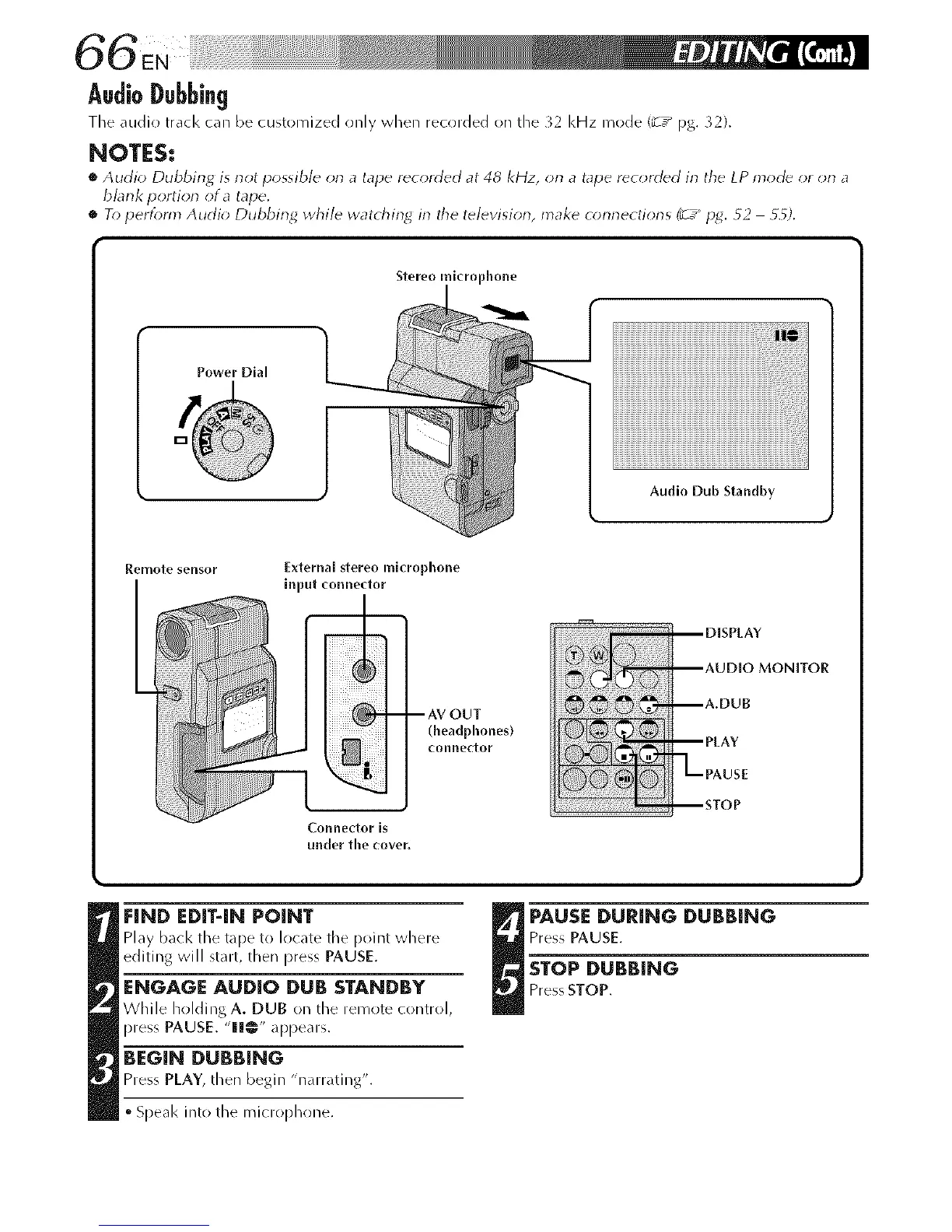
Stereo microphone
Power Dial
Audio Dub Standby
Remote sensor External stereo mlcrophone
input connector
(headphones)
connector
Connector is
under the cover,
FIND EDIT4N POINT
Play bacl< the tape to locate the point where
editing will start, then press PAUSE.
ENGAGE AUDIO DUB STANDBY
While holdingA. DUB on the remote control,
press PAUSE. "llll@" appears.
=
BEGIN DUBBING
Press PLAY, then begin "narrating".
Speal< into the microphr)ne.
_ PAUSE DURING DUBBING
Press PAUSE.
STOP DUBBING
Press STOP.



 To Next Page