AdjustmentofVCR'suguinst(recorder Timing
Display
Playback Menu ,_
Se[ed Dial
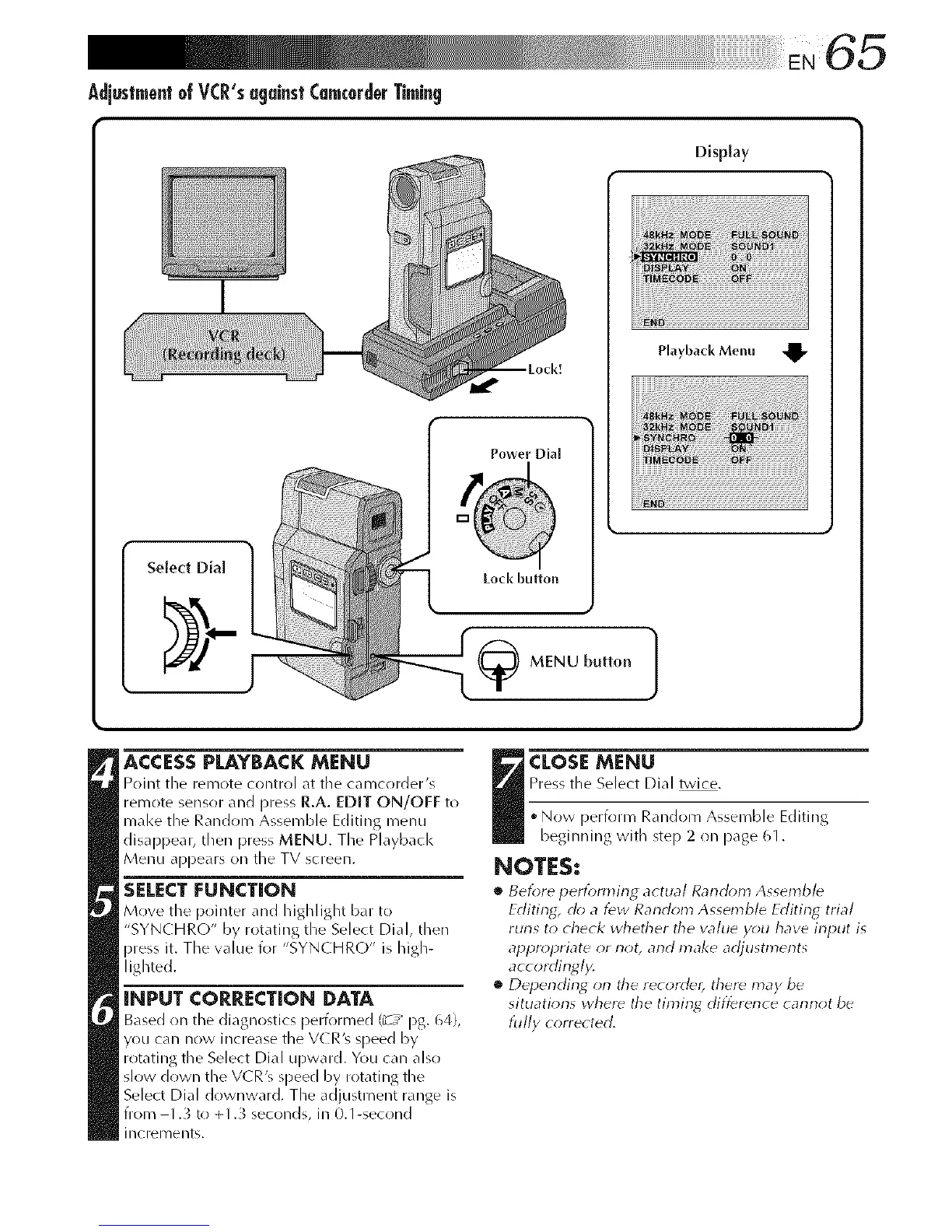
ACCESSPLAYBACKMENU
Point tile remote control at the camcrlrder's
remote sensor and press R.A. EDIT ON/OFF to
mal<e the Random Assemble Editing menu
disappear, then press MENU. The Playback
Menu appears on the TV screen.
SELECT FUNCTION
Move tile pointer and highlight bar to
"SYNCHRO" by rotating the Select Dial, then
press it. The value for "SYNCHRO" is high-
lighted.
INPUT CORRECTION DATA
Based on tile diagnostics performed (_z_ pg. 64),
you can now increase the V(R's speed by
rotat lgt/eSeectDa Lpwac Y t calaso
slow down the VCR's speed by rotating the
Select Dial drlwnward. The adjustment range is
from 1.3 to +1._ seconds, in 0.1-second
increll/ents.
j CLOSEMENU
Press tile Select Dial twice.
• Now perfr)rm Random Assemble Editing
beginning with step 2 on page 61.
NOTES:
• Before pertbmting actual Rancl()m Assemble
Editing, do a few Random Assemble Editiny, trial
runs to check whether the value y_;u have input is
al_prol_riate or not, and make adjustments
accordingly.
• Depending orl the recorder, there may be
situations where the timing difference cannot be
fully corrected.



 To Next Page