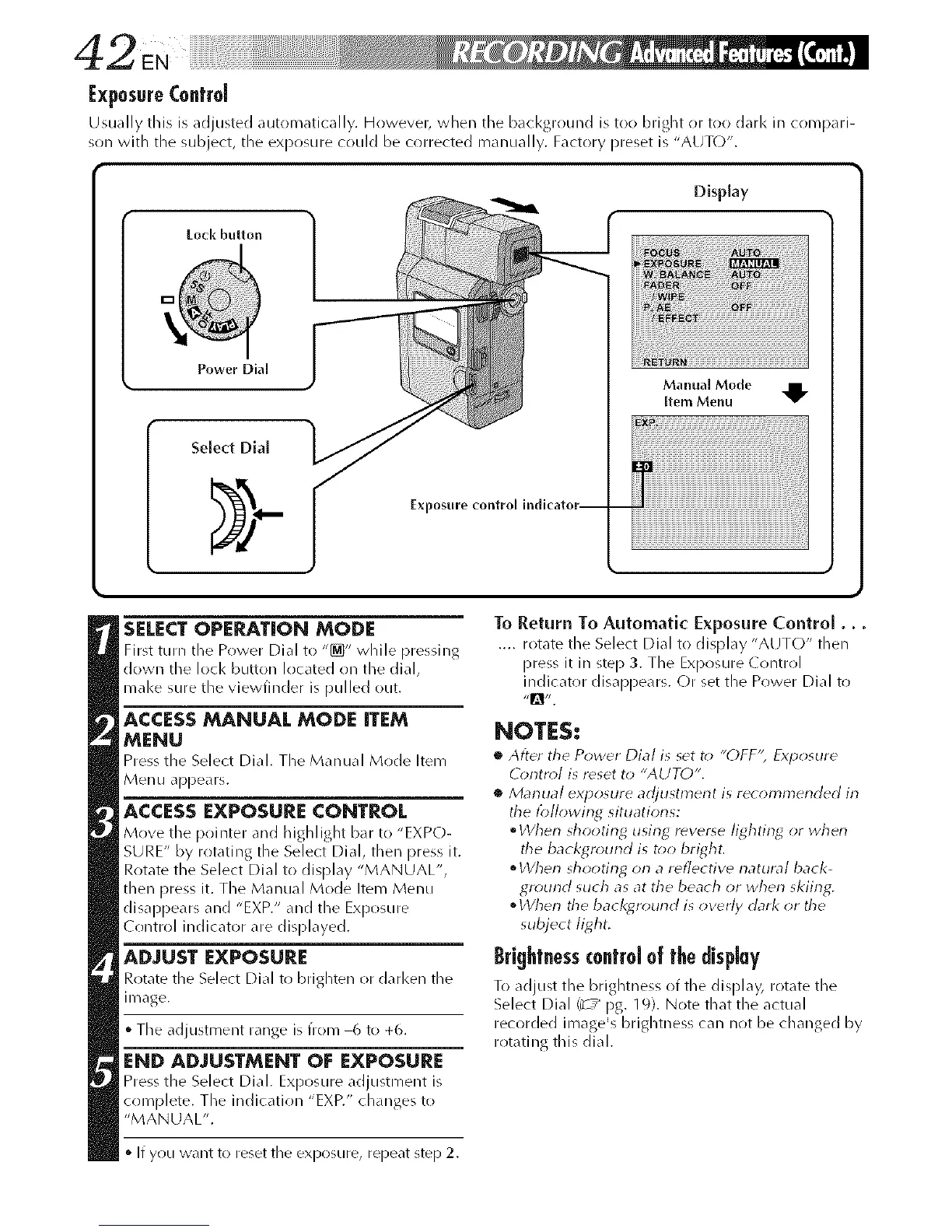
ExposureControl
Usually this is adjusted automatically. However, when tile background is too bright or too dark in comDiri-
son with the subject, the exposure could be corrected manually. Factory preset is "AUT()".
Lock button
Display
Power Dial
Exposure
Manual Mode
Item Menu
SELECTOPERATION MODE
First turn the Power Dial to "_" while pressJilg
down the loci< button located on the dial,
mal<e sure the vJewi]nder is pulled out.
ACCESSMANUAL MODE ITEM
MENU
Press the Select Dial. The M_mual Mode Item
Menu appears.
ACCESS EXPOSURE CONTROL
Move the pointer and highlight bar to "EXPO-
SURE" by rotatillg the Select Dial, then press it.
Rotate the Select Dial to display "MANUAL",
then press it. The Manual Mode Item Menu
disappears and "EXP." and the Exposure
(ontrol indicator are displayed.
ADJUST EXPOSURE
Rotate the Select Dial to brighten or darken the
image.
• The adjustment range is from 6 to +6.
END ADJUSTMENT OF EXPOSURE
Press the Select Dial. Exposure adjustment is
complete. The indication "EXP." changes to
"MANUAL".
If you want to reset the exposure, repeat step 2.
To Return To Automatic Exposure Control...
.... rotate the Select Dial to display "AUTO" then
press it in step 3. The Exposure (ontrol
indicator disappears. Or set the Power Dial to
NOTES:
• After the Power Dial is set t_ "()FF'; Exp_sure
O)rltr_# is rdset to "AUTO",
• Marlual ex'posure adjustment is recommended in
the tbllowing situatiorls:
• When shooting using rever_e lighting or when
the backgrourld is t_>obright.
• When shooting on a reflective rlatura/back-
ground such as at the beach or when skiing.
• Wherl the bacl<ground is overly dark or the
subject light.
Brightnesscontrol of the display
To adjust the brightness of the display, rotate the
Select Dial /_ / pg. 19). Note that the actual
recorded image's brightness can not be changed by
rotating this dial.



 To Next Page