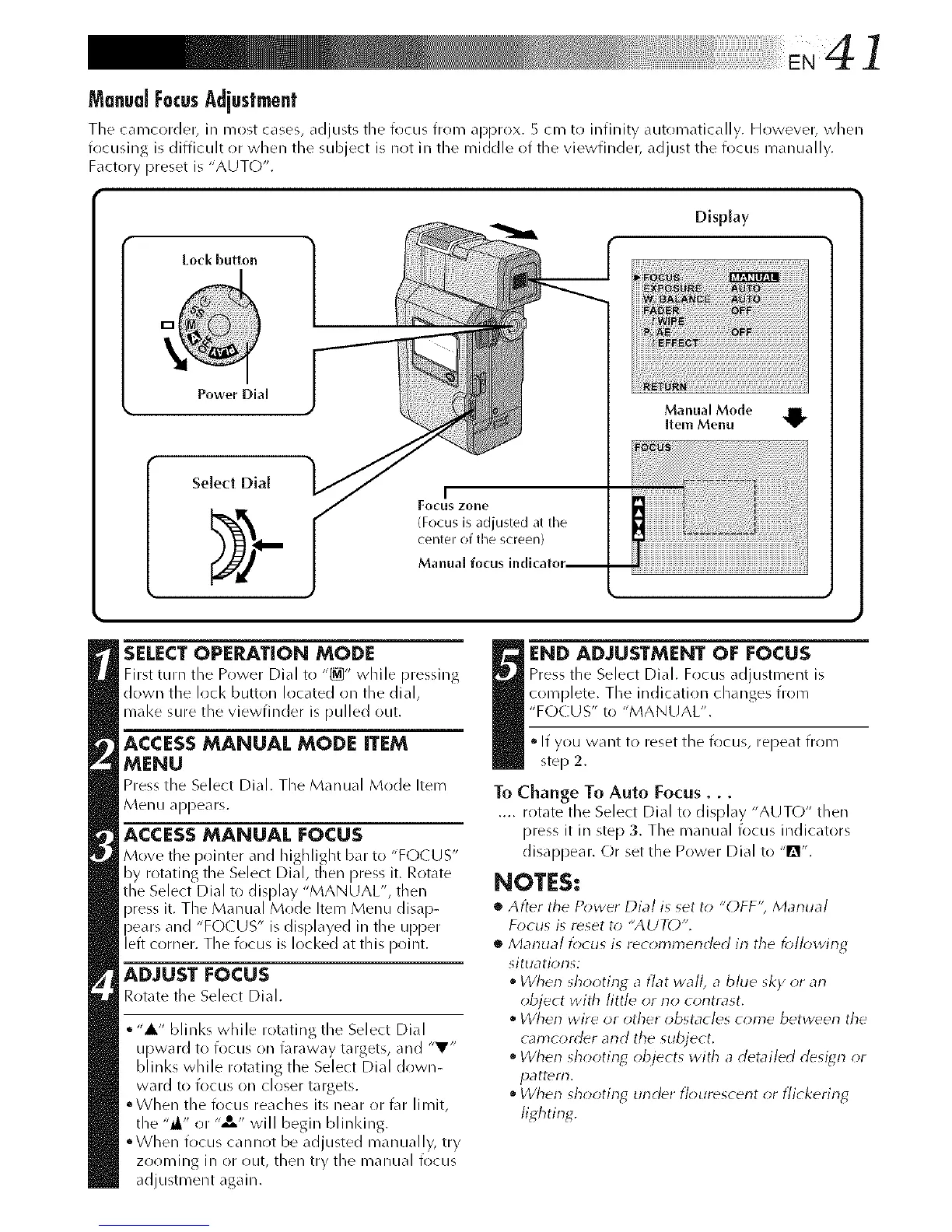
ManualFocusAdiustment
The camcorder, in most cases, adjusts the focus from approx. 5 cm to infinity automatically. However, when
frlcusing is difficult or when the subject is not in the middle of the viewfinder, adjust the focus manually.
Factory [)reset is "AUTO".
Lock button
Display
Power Dial
Select Dial
Manual Mode
Item Menu
SELECTOPERATION MODE
First turn the Power Dial to "_" while pressing
down the lock button located on the dial,
mal<e sure the viewfinder is pulled out.
ACCESS MANUAL MODE ITEM
MENU
Press the Select Dial. The Manual Mode Item
Menu appears.
ACCESSMANUAL FOCUS
Move the pointer and highlight bar to "FOr US"
by rotating the Select Dial, then press it. Rotate
the Select Dial to display "MANUAL", then
)ress it. The Manual Mr)de Item Menu disap-
and "FOCUS" is displayed in the upper
eft corner. The focus is locked at this point.
ADJUST FOCUS
Rotate the Select Dial.
• "A" blinks while rotating the Select Dial
upward to focus on faraway targets, and "V"
blinks while rotating the Select Dial down-
ward to focus on closer targets.
°When the focus reaches its near or t\_r limit,
the "_" or "_,," will begin blinldng.
°When frlcus cannot be adjusted manually, try
zooming in or out, then try the manual focus
adjustment again.
END ADJUSTMENT OF EOCUS
Press the Select Dial. Focus adjustment is
complete, The indication changes from
"FOCUS" to "MANUAL".
• If you want to reset the focus, repeat from
step 2.
To Change To Auto Focus...
.... rotate the Select Dial to display "AUTO" then
press it in step 3. The manual focus indicators
disappear. Or set the Power Dial to "m".
NOTES:
• After the Power Dial is set to "OFF'; Manual
Focus is reset to "AUTO".
• Marlual focus is recommerlded in the _;Ik)wing
situations:
• When shooting a flat wall, a bhle sky or an
object with little or no contrast.
When wire or other obstacles come between the
camcorder and the subject.
When shootin_ objects with a detailed design or
pattern.
• When shootin_ under flourescent or flickering
lighting.



 To Next Page