DisplayingThe DateAndTime During Recording
When the Power Dial is set to "[]', "5S" or "_", you can choose whether to display the date and time
during recording or not. You must first set the date and time (see "Date/Time Settings" _-T_ pg. 11). Set
"DISPLAY" to "ON" in the Date/Time Menu. The Date/Time is always displayed when the Power Dial is set
to "_'.
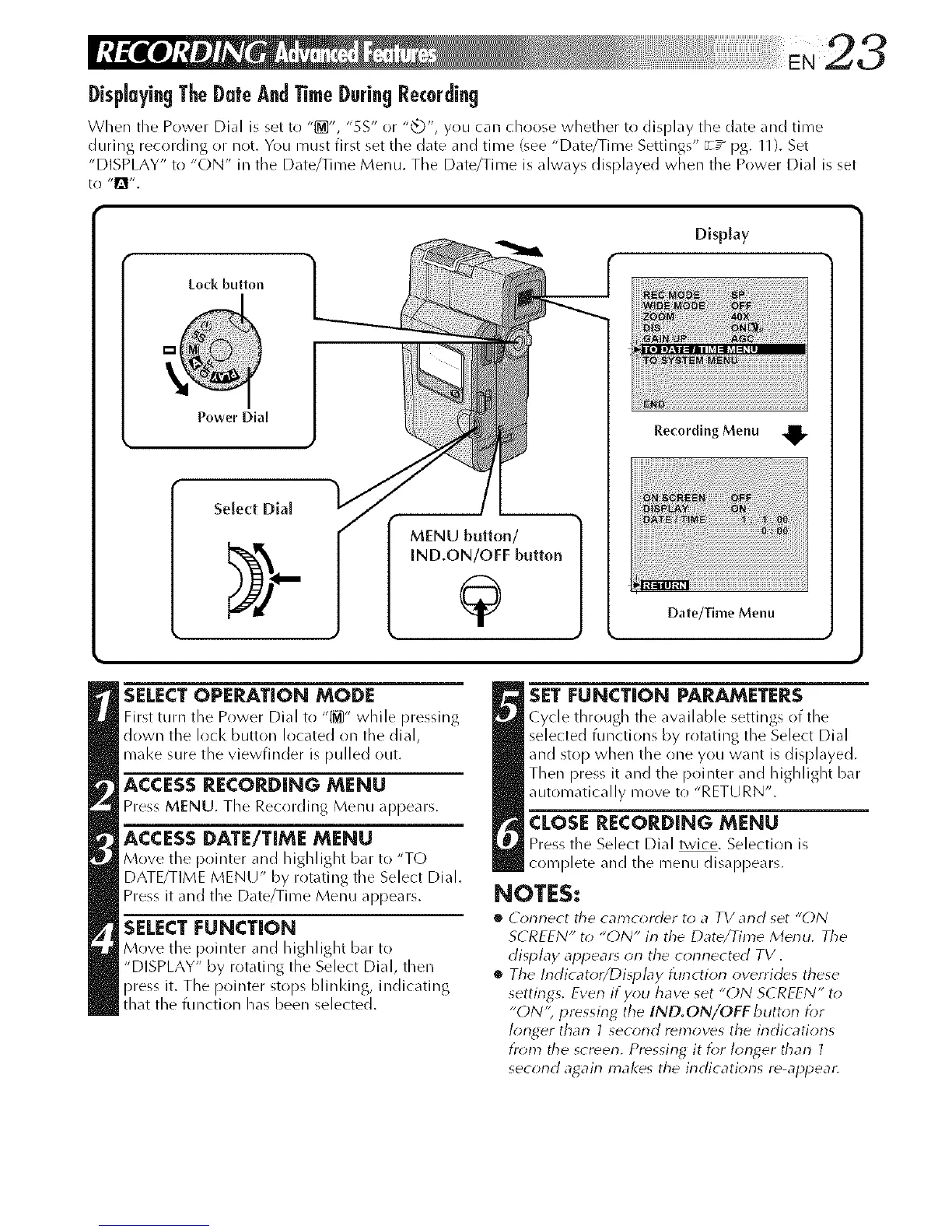
Lock button
Power Dial
Select Dial
Display
Recording Menu
Date/Time Menu
SELECTOPERATION MODE
First ttlH1 the Power Dial to "[1_]" while pressing
down the lock button located on tile dial,
mal<e sure the viewfinder is pulled out.
ACCESS RECORDING MENU
Press MENU. Tile Recording Menu appears.
ACCESS DATE/TIME MENU
Move the pointer _md highlight bar to "TO
DATE/TIME MENU" by rotating tile Select Dial.
Press it and the Date/Time Menu appears.
SELECT FUNCTION
Move the pointer and highlight bdr to
"DISPLAY" by rotating the Select Dial, then
press it. The pointer stops blinldng, indicating
that the function has been selected.
SETFUNCTION PARAMETERS
Cycle through the _w_filable settings of the
selected functions by rotating the Select Dial
and stop when the one you want is displayed.
Then press it and the pointer and highlight bar
automatically move to "RETURN".
CLOSE RECORDING MENU
Press tile Select Dial twice. Selection is
complete and the rnenu disappears.
NOTES:
*_ (onnect the camc_rder to a TV and set "()N
SCREEN" to "ON" in the Date/Time Menu. The
disp/ay appear_ on the connected TV.
*_ The Indicator/Di_l)L_y function overrides these
settings. Even if you have set "ON SCREEN" to
"ON'; pressing the IND.ON/OFF buttorl for
longer than 1 second removes the indications
i)_m_ tile scmerl. Pressing it for Ionp,er tharl ]
secorld agairl makes the indications re-appear.



 To Next Page