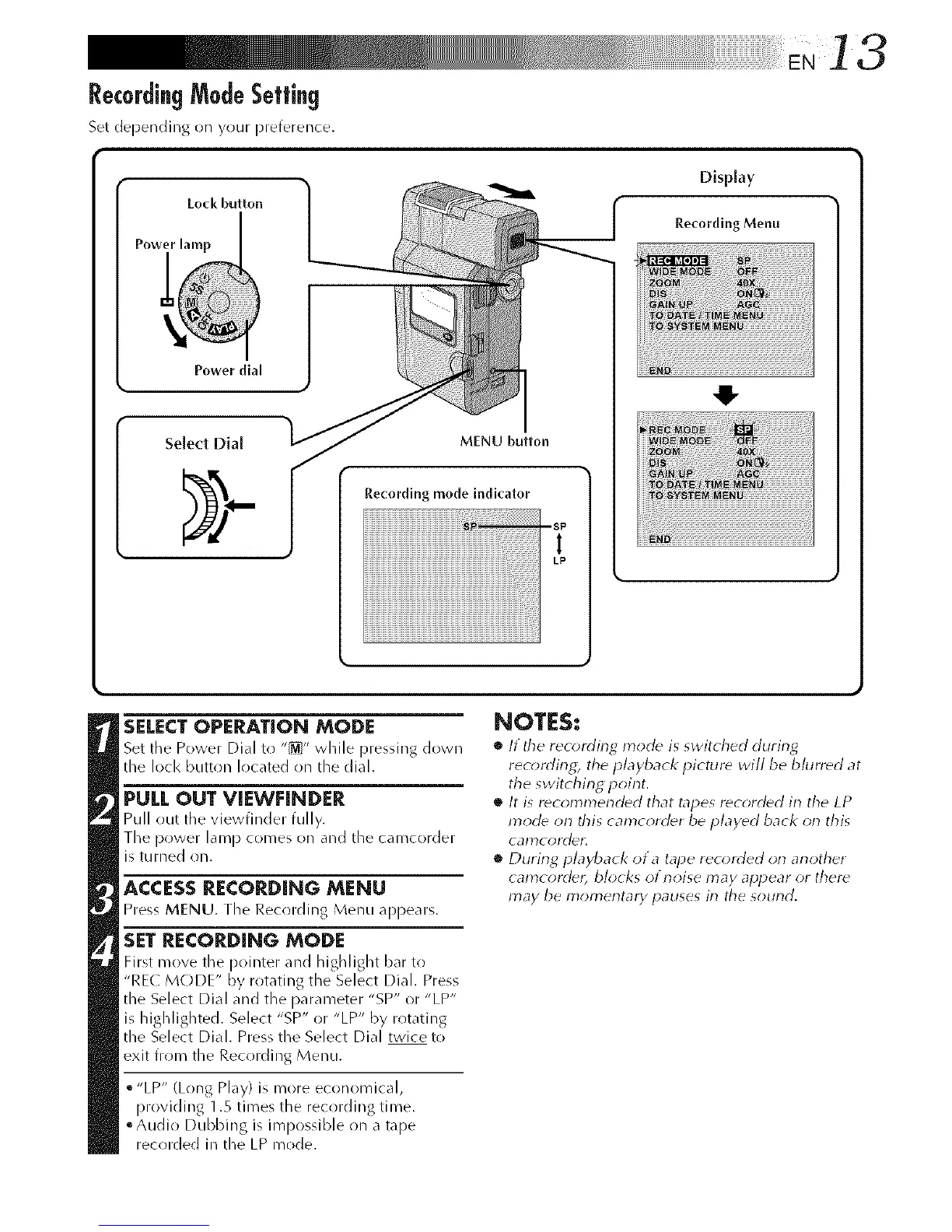
RecordingModeSetting
Set depending on your preference.
Loci( button
Power dial
Select Dial
MENU button
Recording mode indicator
Display
R.e_-ording Menu
SELECTOPERATION MODE
Set the Power Dial to "_" while pressing down
the loci< button located on the dial.
PULL OUT VIEWFINDER
Pull out the viewfinder fully.
The power lamp comes on and the camcorder
is turned on.
ACCESS RECORDING MENU
Press MFNU. the Recording Menu appears.
SET RECORDING MODE
First move the pointer and h igh light bar to
"RE( M(-)DE" by rotating the Select Dial. Press
the Select Dial and the parameter"SP" or"LP"
is highlighted. Select "SP" or "LP" by rotating
the Select Dial. Press the Select Dial twice to
exit from the Recording Menu.
• "LP" (Long Play) is more economical,
providing 1.5 times the recording time.
°Audio Dubbing is impossible on a tape
recorded in the LP mode.
41-
NOTES:
• It the reo_rding mode is switched during
recording, the playback picture will be blurred at
the switching point.
• It is recolnlnended that tapes recorded in the LP
mode on this camcorder be played back on this
calY}COI'(]e_I ",
• During playback ot a tape recorded orl another
camcordec blocks of noise may appear or there
may be mon_entary pauses in the sound.



 To Next Page