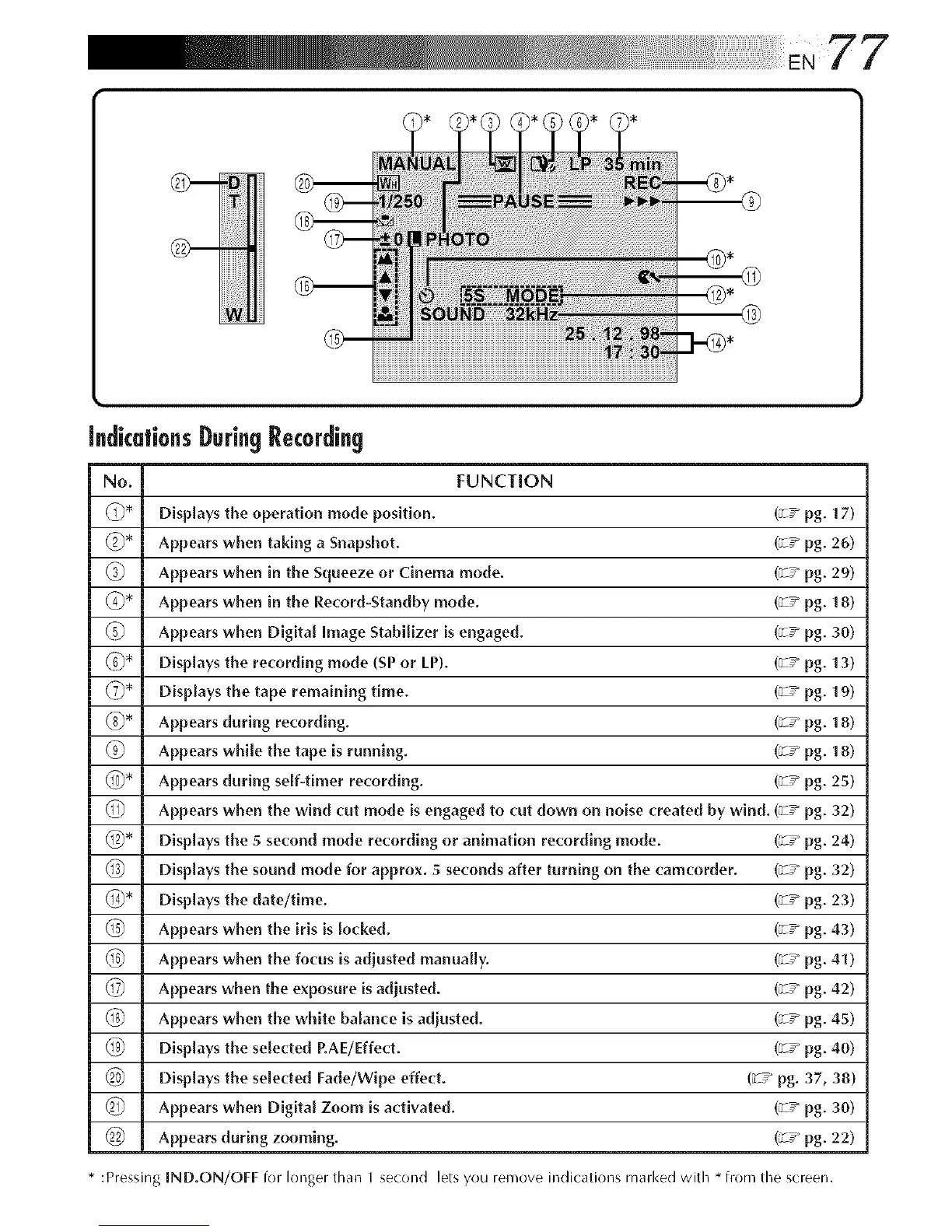
IndicationsDuringRecording
No. FUNCTION
_* Displays the operation mode position. (_w pg. 17)
Appears when taking a Snapshot. (;T _ pg. 26)
Appears when in the Squeeze or Cinema mode. (;T _ pg. 29)
(_* Appears when in the Record-Standby mode. (;T _ pg. 18)
Appears when Digital Image StabiLizer is engaged. (;z _pg. 30)
Displays the recording mode (SP or LP). (_-/pg. 13)
DispLays the tape remaining time. (_-/pg. 19)
Appears during recording. (;z _pg. 18)
Appears while the tape is running. (;z _pg. 18)
Appears during self-timer recording. (;z _pg. 25)
Appears when the wind cut mode is engaged to cut down on noise created by wind. (_-/pg. 32)
_* Displays the 5 second mode recording or animation recording mode. (_-/pg. 24)
(_) Displays the sound mode for approx. 5 seconds after turning on the camcorder. (_T_ pg. 32)
_4_* Displays the date/time. (;z _pg. 23)
Appears when the iris is Locked. (_-/pg. 43)
Appears when the focus is adjusted manually. (_-/pg. 41)
Appears when the exposure isadjusted. (;z _pg. 42)
Appears when the white balance is adiusted. (;z _pg. 45)
Displays the selected P.AE/Effect. (_-/pg. 40)
Displays the selected Fade/Wipe effect. (_-/pg. 37, 38)
_ Appears when Digital Zoom is activated. (;z _pg. 30)
Appears during zooming. (_T_ pg. 22)
* :Pressing IND.ON/OFF for longer than I second lets you remove indications marked with * from the screen.



 To Next Page