iiii_iii_ii++:ii#i_iii_iii_iii_iii_iii_ii_i_:_!_:_:_:_:_:_:_:_:_:_:_:_:_:_:_:_:_:_:_:_:_:_:_:_:_:_:_:_!_:_+:_+_+_i!+!!l_:EN¸61
RandomAssembleEditing
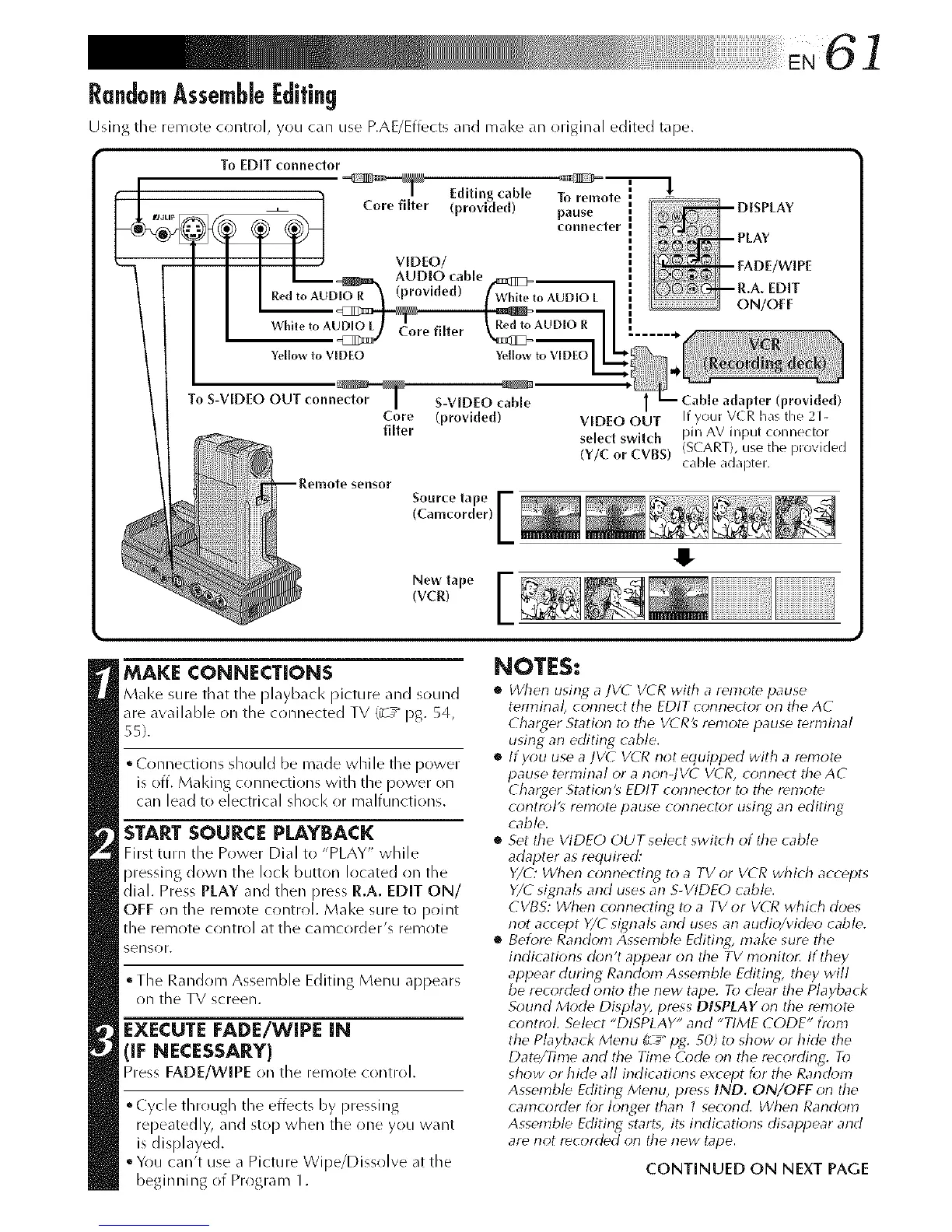
Using the remote control, you can use P.AUEffects and make an original edited tape.
To EDIT connector
Editing cable To remote
Core filter (provided)
pause [
connecter[
• VIDEO/
tol_A AUDIO cable
Red R (provided)
while to
Yellowr_
Core filter
Red ro AUDIO R
I
I
I
I
I
Yellow to VIDEO
ON/OFF
To S-VIDEO OUT connedor ] S-VIDEO cable
Core (provided)
filter
1 - Cable adapter (provided)
VIDEO OUT If your VCR has the 21-
select swltch pin AV input connector
(Y/C or CVBS) (SCART), use the provided
caMe adapter.
Source tape [
(Camcorder)
New tape
(vcr)
MAKE CONNECTIONS
Make sure that the Playback Picture and sound
are available on the crlnnected TV (_z_ pg. 54,
55).
• ( onnections shr>uld be made while the power
is off. Malting connections with the power on
can lead to electrical shr>ck or malfunctions.
START SOURCE PLAYBACK
First turn the Power Dial to "PLAY" while
pressing down the lock button located on the
dial. Press PLAY and then press R.A. EDIT ON/
OFF on the remote control. Make sure to pcfint
the remote control at the camcorder's remr)te
sensor.
• The Random Assemble Editing Menu appears
on the TV screen.
EXECUTE FADE/WIPE IN
llrqECESSAR:I"++ > >
Pre FADE!WIPE (n the rein te c( ntr( I.
• Cycle through the effects by pressing
repeatedly, and stop when the one you want
is displayed.
• You can't use a Picture Wipe/Dissolve at the
beginning of Program 1.
$
NOTES:
• When usirlg a IV(- VCR with a remote pause
terminal, connect the EDIT connector on ttre AC
Charger Station to the VCR's remote pause terminal
using an editing cable.
• If you use a ]VC VCR riot equipped with a remote
pause terminal or a non-JVC VCR, connect the AC
Charger Station's EDIT corlnector to the remote
control's remote pause conrlector using an editing
cable.
• Set tile VIDEO OUT select swit(h of the cable
adapter as required:
Y/C: When cormecting to a TV or VCR which accepts
Y/E signals and uses an S-VIDEO cable.
CVB5: When cormecting to a TV or VCR which does
not accept Y/Esignals and uses an audio/video cable.
• Bek_re Rarldom Assemble Editing, make sure the
indications don't appear on tile TV morlito_ If they
appear during Random Assemble Fdithlg, they will
be recorded onto the new tape. To clear the Playback
Sound Mode Display, press DISPLAY on the remote
control. Select "DISPLAY" and "TIME CODE" from
the Playback Menu (L_+pg. _0) to show or hide the
Date/Time and the Time O)de on the recording. To
show or hide all indicatior_s except for the Random
Assemble Editing Menu, press IND. ON/OFF on tile
carncorder for longer than 1 second. Wherl Random
Assemble Editing starts, its irldications disappear and
are not recorded on the new hrpe.
CONTINUED ON NEXT PAGE



 To Next Page