60
e-L
SHIFT--
MBR SET
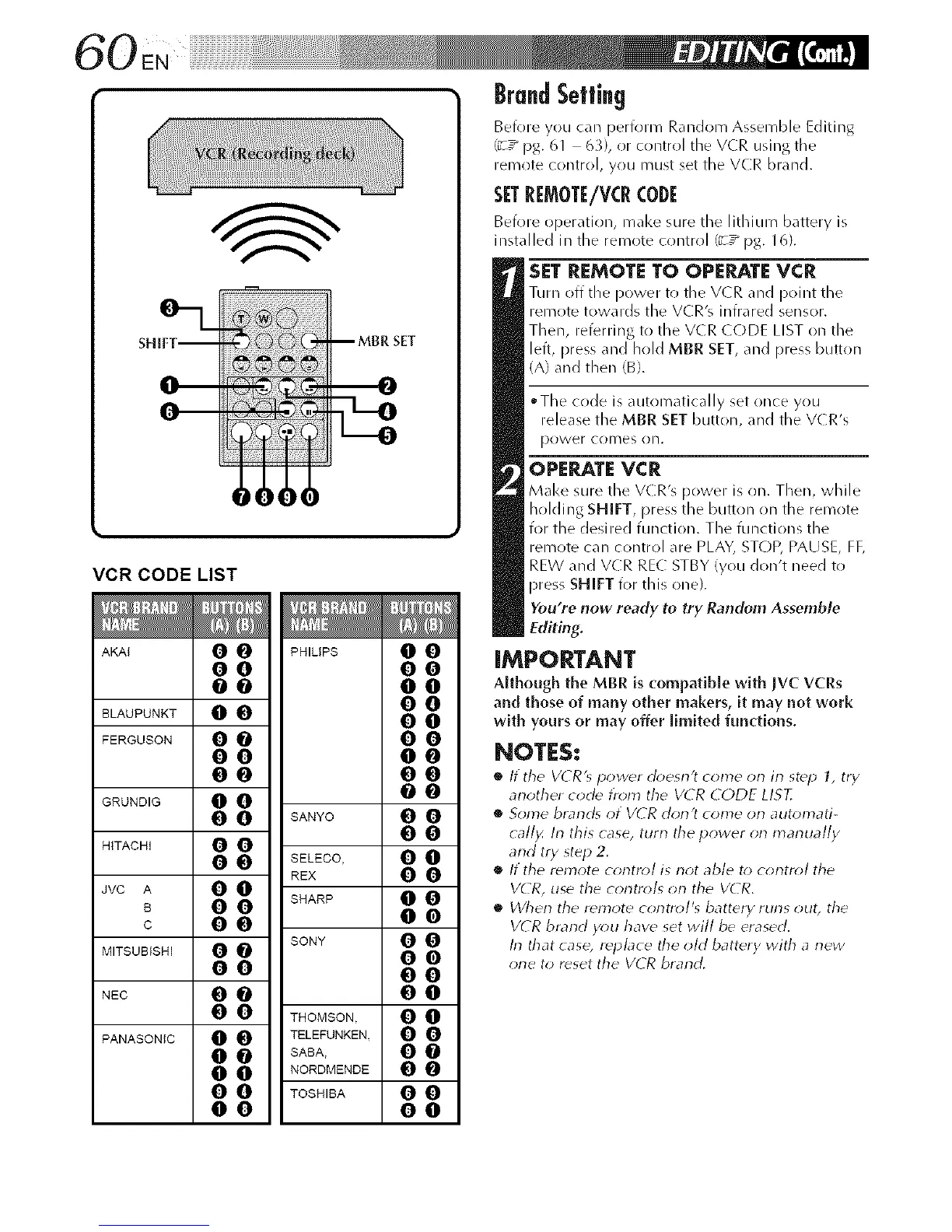
VCR CODE LIST
AKAI 0 O PHILIPS 0 0
O0 O0
O0 O0
BLAUPUNKT 0 0 $$
FERGUSON 0 0 0 0
O0 O0
O0 O0
GRUNO,G 0 0 0 0
0 0 8ANYO 0 0
O0
HITACHI 0 0
0 0 SELECO, 0 0
REX 0 0
JVC A 0 0
B 0 0 SHARP 0 0
c O0 O0
MITSUBISHI 0 0 SONY 0 0
O0
O0 O0
NEC 0 0 0 0
0 0 THOMSON. 0 0
PANASONIC O O TELEFUNKEN. O O
0 0 SABA, 0 0
0 0 NORDMENDE 0 0
0 0 TOSHIBA 0 0
O0 O0
BrandSetting
Beiore you can periorm Random Assemble Editing
(_T_ pg. 61 6_}, or control the VCR using the
remote control, you Fnust set the VCR brand.
SET RI:MOff/V(R CODE
Befllre operatiol% make sure the lithium battery is
installed in the remote control (_T_ pg. 16).
SETREMOTE TO OPERATEVCR
Turn off the power to tile V(R and point the
remote towards the VCR's infrared sensor.
Then, referring to the VCR CODE LIST on the
left, press and hold MBR SET, and press button
(A) and then (B).
*The code is autoFnatically set once you
release the MBR SET button, and the VCR's
I)o_Ver COllleS on.
OPERATEVCR
Make sure the VCR's power is on. Then, while
holding SHIFT, press the button on the remote
R)r the desired function. The functions the
reFnote can control are PLAY, STOP, PAUSE, FF,
REW and VCR REC STBY (you don't need to
press SHIFT for this one}.
You're now ready to try Random Assemble
Editing.
IMPORTANT
Although the MBR is compatible with IVC VCRs
and those of many other makers, it may not work
with yours or may offer limited functions.
NOTES:
• It tile VLR'_ power doesn't come on in step 1, try
another code troln the V(:R CODE LIS?,
• Some brarld_ ot VCR dorl't come orl automati-
call)< In this case, tutti the power on manually
arid try step 2.
• If the r_mote control is not able to control the
VCR, use the controls on the V( R.
• £Vherl the remote control's battery furls out, the
V(R brand you have set will be erased.
In that case, rdp/ace the old battery with a new
one to rdset the VCR brand.



 To Next Page