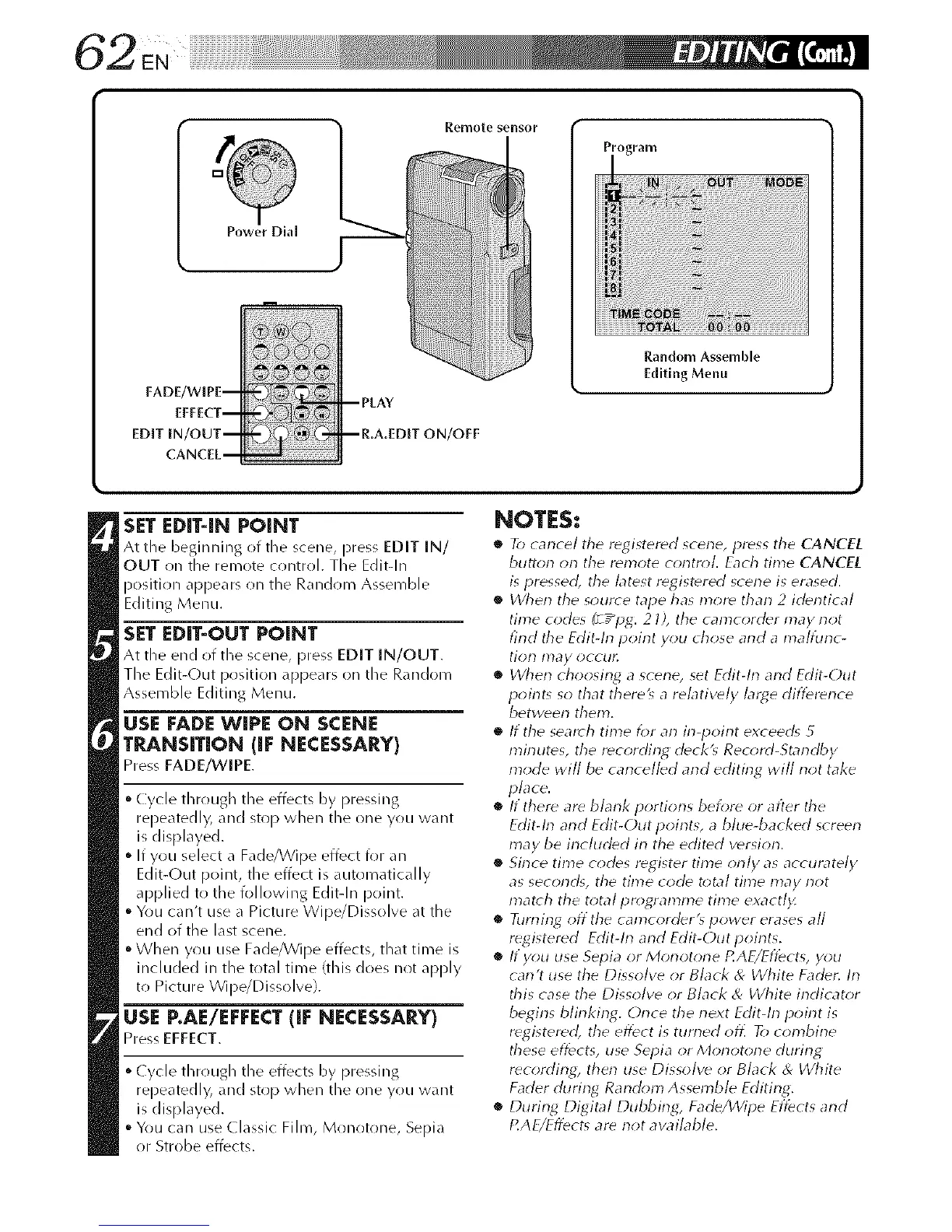
FADE/WIPE-
EFFECT-
EDIT IN/OUT-
CANCEL-
Remote sensor
--PLAY
-- R.A.EDIT ON/OFF
Random Asseinble
Editing Menu
SET EDff-IN POINT
At tile beginning of the scene, press EDIT IN/
OUT on the remote control. The Edit-In
position appears on the Random Assemble
Editing Menu.
SET EDIT-OUT POINT
At the end of the scene, press EDIT IN/OUT.
The Edit-Out position appears on the Random
Assemble Editing Menu.
USE FADE WIPE ON SCENE
TI_&NSITION (iF NECESSARY)
Press FADE/WIPE.
Cycle through the effects by pressing
repeatedly, and stop when the one you want
is displayed.
If you select a Fade/Wipe effect for an
Edit-Out point, the effect is automatically
applied to the following Edit-In point.
You can't uusea Picture Wipe/Dissolve at the
end of the last scene.
When you use Fade/Wipe effects, that time is
included in the total time (this does not apply
to Picture Wipe/Dissolve).
USE P.AE/EEEECT lie NECESSARY)
PressEFFECT.
Cycle through tile effects by pressing
repeatedly, and stop when the one you want
is displayed.
You can use Classic Film, Monotone, Sepia
or Strobe effects.
NOTES:
• To cancel tile registered scene, press the CANCEL
button on the remote control. Each time CANCEL
is pressed, the latest registered scene is erased.
• When the source tape has more than 2 identical
time codes (_ /pg. 21), the camcorder may not
find tile Edit-h-1 point y_;u chose and a malfunc-
tion may occur.
• When choosing a scene, set Edit-In and Edit-Out
point_ so that there_ a relatively large diftbrence
between them.
• If the search time for an in-point exceed_ 5
minutes, the recording deck_ Record-Standby
mode will be cancelled and editing will not take
place.
• If there are blank portiorls before or after the
Edit-In arid Edit-Out points, a blue-backed screen
inay be included in the edited version.
• Since time codes register time only as accurately
as second% the time code total time may not
match the total pr_;gramme time exact/)<
• Turning offthe camcorder's power erases all
registered Edit-In and Edit-Outpoints.
• If you use Sepia or Mor}otone RAE/Eft_cts, you
carl't use the Dissolve or Black & White Fader. In
this case the Dissolve or Black & White indicator
begins blinking. Once the next Edit-In point is
registered, the effect is tun-led off] To combine
these eft_cts, use Sepia or Morlotorle during
recording, then use Dissolve or Black & White
Fader during Random Assemble Editing.
• During Digital Dubbing; Fade/Wipe Eft_cts and
P.AE/Efl_ct_ are not available.



 To Next Page