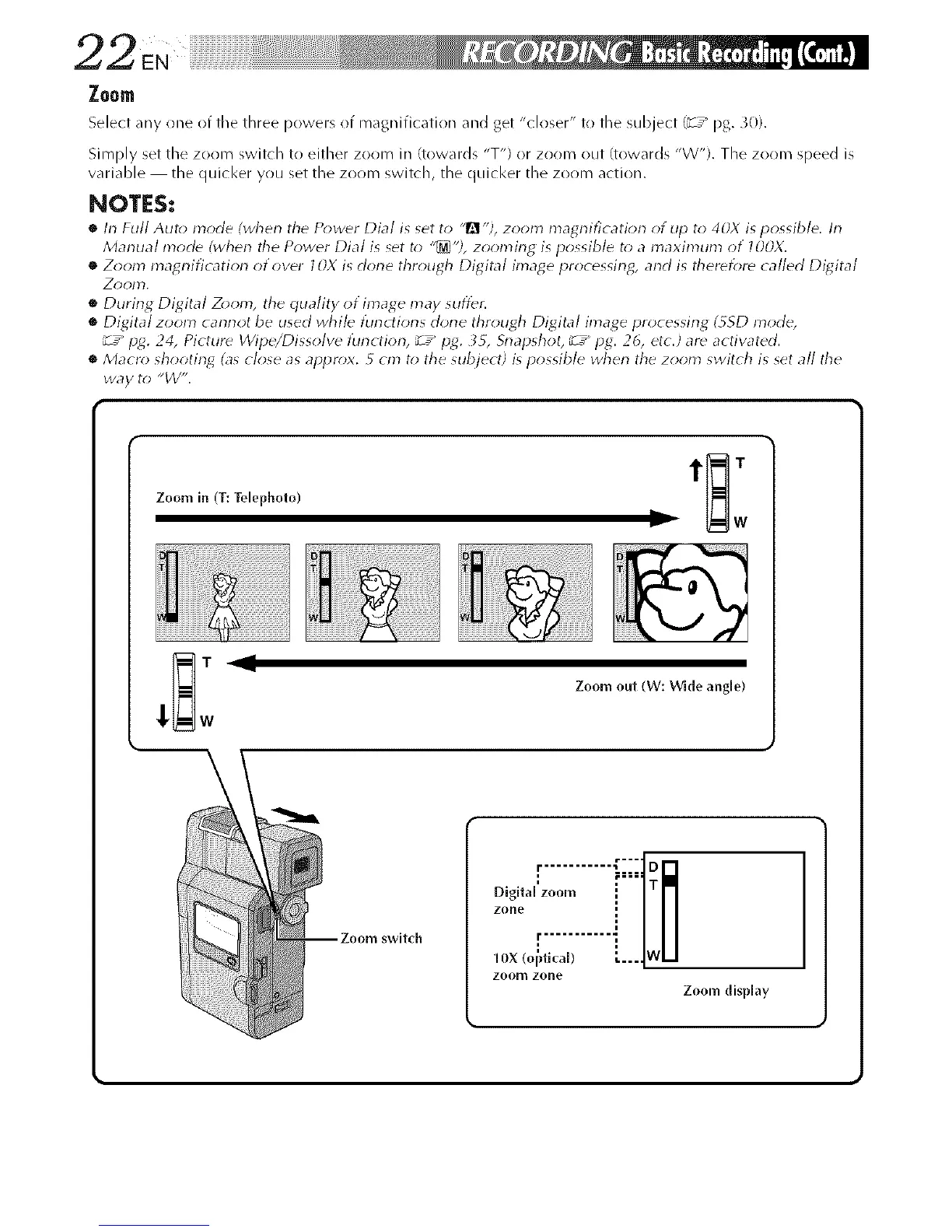
Select any one of the three powers of magnification and get "closer" to tile subject (_T_pg. _0).
Simply set tile zoom switch tr! either zoom in (towards "T") or zor_m out (towards "W"). The zoom speed is
variable the quicl<er you set the zoom switch, the quicl<er the zoom action.
NOTES:
• h-1Full Auto mode (when the P_>wer Dial is set to "_1 "?, zor*m magrlificatiorl of tip to 40X is possible, h-1
Manual mode (wherl the Power Dial is set to "_'?, zoomirlg is possible t_>a maximum of l OOX.
• Zoom magrlification of over 10X is dorle through Digital image processing, and is theref_;re called Di_4ital
Z_)ol)'L
• During Digital Z_*om, the quality ot image may stiffer.
• Digital zoom carlrlot be used while tunctiorls dorle through Di_4ital image processing (_SD mode,
_ z_ pg. 24, Picture Wipe/Dissolve function, _ Z_ P_4. __, Snapshot, _ z_ pg. 26, etc./ar_ activated.
• Macro; shooting4 (as close as apl)r_x. 5 cm t_) the subject) is possible when the zoom switch is set all the
way to "_/V".
Zoom in (T: Telephoto)
Zoom out (W: Wlde angle)
swltch
Digltal zoom [
zone !
r ........... "
10X (oi_fical) _....
zoom zone
Zoom display



 To Next Page