IrisLock
Use this function when shooting a moving subject, when zooming, when the subject changes its distance
(thus its size in the viewfinder), or when you want to loci< the brightness level.
When the subject is close, I<eep the Ms Iocl<ed. Even when the subject moves away from you, the image will
not darl<en.
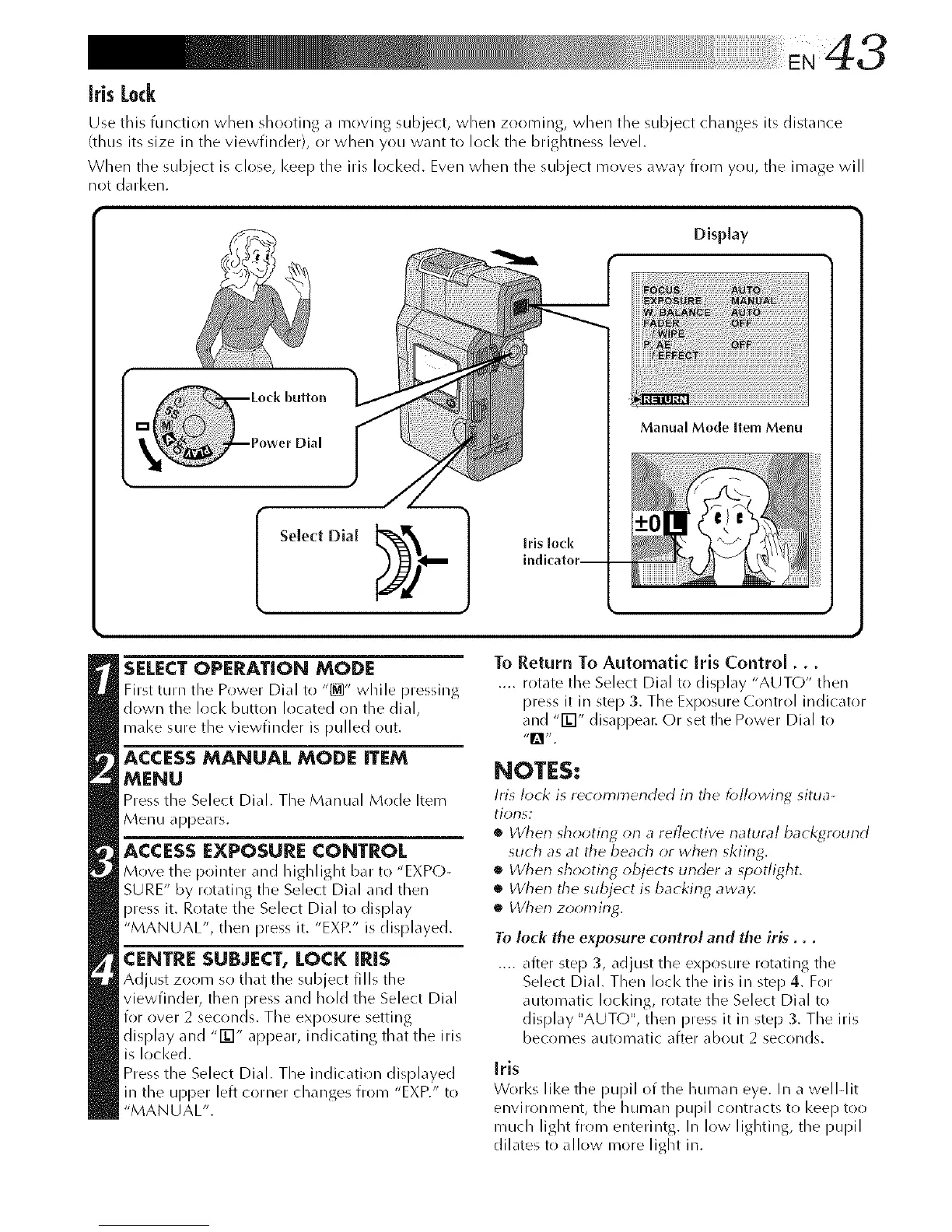
Display
Manual Mode Item Menu
SELECTOPERATION MODE
First turn the Power Dial to "_" while pressing
down the lock button located on the dial,
mal<e sure the viewfinder is pulled (>/it.
ACCESS MANUAL MODE ITEM
MENU
Press the Select Dial. The Manual Mode Item
Menu appears.
ACCESSEXPOSURE CONTROL
Move the pointer and JlJgJlJJghtbar to "EXP()-
SURE" by rotating the Select Dial and then
press it. Rotate the Select Dial to display
"MANUAL", then press it. "EXP." is displayed.
CENTRE SUBJECT, LOCK IRIS
Adjust zoom so that the subject fills the
viewfindeb then press and hold the Select Dial
for over 2 seconds. The exposure setting
display and -ED" appear, indicating that the iris
is Iocl<ed.
Press the Select Dial. The indication displayed
in the upper left corner changes fron/"EXP." to
"MANUAL".
To Return To Automatic Iris Control...
.... rotate the Select Dial to display "AUTO" then
press it in step 3. The Exposure Control indicator
and "FE]" disappear. Or set the Power Dial to
NOTES:
Iris lock is rec_m_lnended in tile foll_*wing situa-
tions:
• When shooting orl a reflective natural background
such as at the beach or when skiing.
• When shooting objects under a spotlight.
• When the subject is backing awa)<
• When zooming.
To lock the exposure control and the iris...
.... after step 3, adjust the exposure rotating tile
Select Dial. Then loci< the Ms in step 4. For
automatic Iocldng, rotate the Select Dial to
display "AUTO", then press it in step 3. The iris
becomes automatic after about 2 seconds.
Irls
Works like the pupil of the human eye. In a well-lit
eiwironilleilt, the human pupil contracts to I<eep too
rnuch light frorn enterilltg. In I(>w lighting, tile pupil
dilates to all ow m(>re light in.



 To Next Page