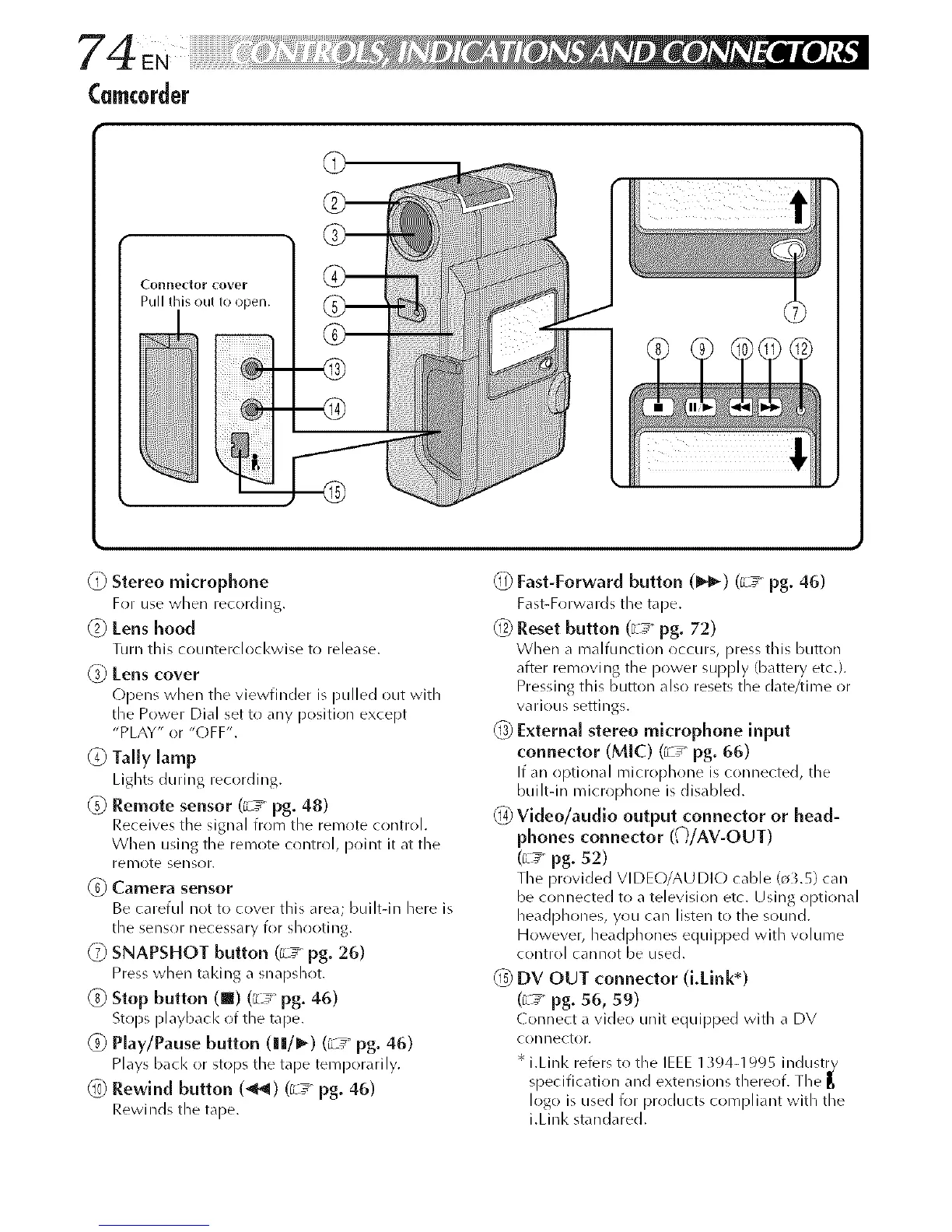
(recorder
Connedor cover
Pull this out to open.
@ Stereo microphone
For use when recording.
(2) Lens hood
Turn this counterclocl<wise to release.
_) tens cover
(-)pens when the viewfinder is pulled out with
the Power Dial set to any position except
"PLAY" or "(-)FF'.
(_) Tally lamp
Lights during recording.
_g) Remote sensor (c__ pg. 48)
Receives the signal from the remote control.
When using the remote control, point it at the
remote sensor.
Camera sensor
Be careful not to cover this area; built-in here is
the sensor necessary for shr)oting.
_ SNAPSHOT button ([L_ pg. 26)
Press when taking a snapshot.
(_ Stop button (m) (_L_ pg. 46)
Stops playbacl< of the tape.
_) Play/Pause button (|[/_) (_ pg° 46)
Plays bacl< or stops the tape temporarily.
_0) Rewind button (_1) (c__ pg. 46)
Rewinds the tape.
Fast-Forward button (_) (c__ pg. 46)
Fast-Forwards the tape.
_) Reset button (_L_ pg. 72)
When a malfunction occurs, press this button
after removing the power supply (battery etc.).
Pressing this button also resets the date/time or
various settings.
_3)External stereo microphone input
connector (MlC) (r_ pg. 66)
If an optional microphone is connected, the
built-in microphone isdisabled.
_ Video/audlo output connector or head-
phones connector (()iAV-OUT)
(_L_ pg. 52)
The provided VI DEO/AU DIO cable (o3.5) car/
be connected to a television etc. Using optional
headphones, you can listen to the sound.
However, headphones equipped with w)lume
control cannot be used.
(_) DV OUT connector (LMnk*)
(_L_ pg. 56, 59)
( onnect a video unit equipped with a DV
con hector.
* i.Linl< refers to the IEEE 1_94-1995 industr_
specification and extensions thereof. The [_
logo is used for products compliant with tile
i.Linl< standared.



 To Next Page