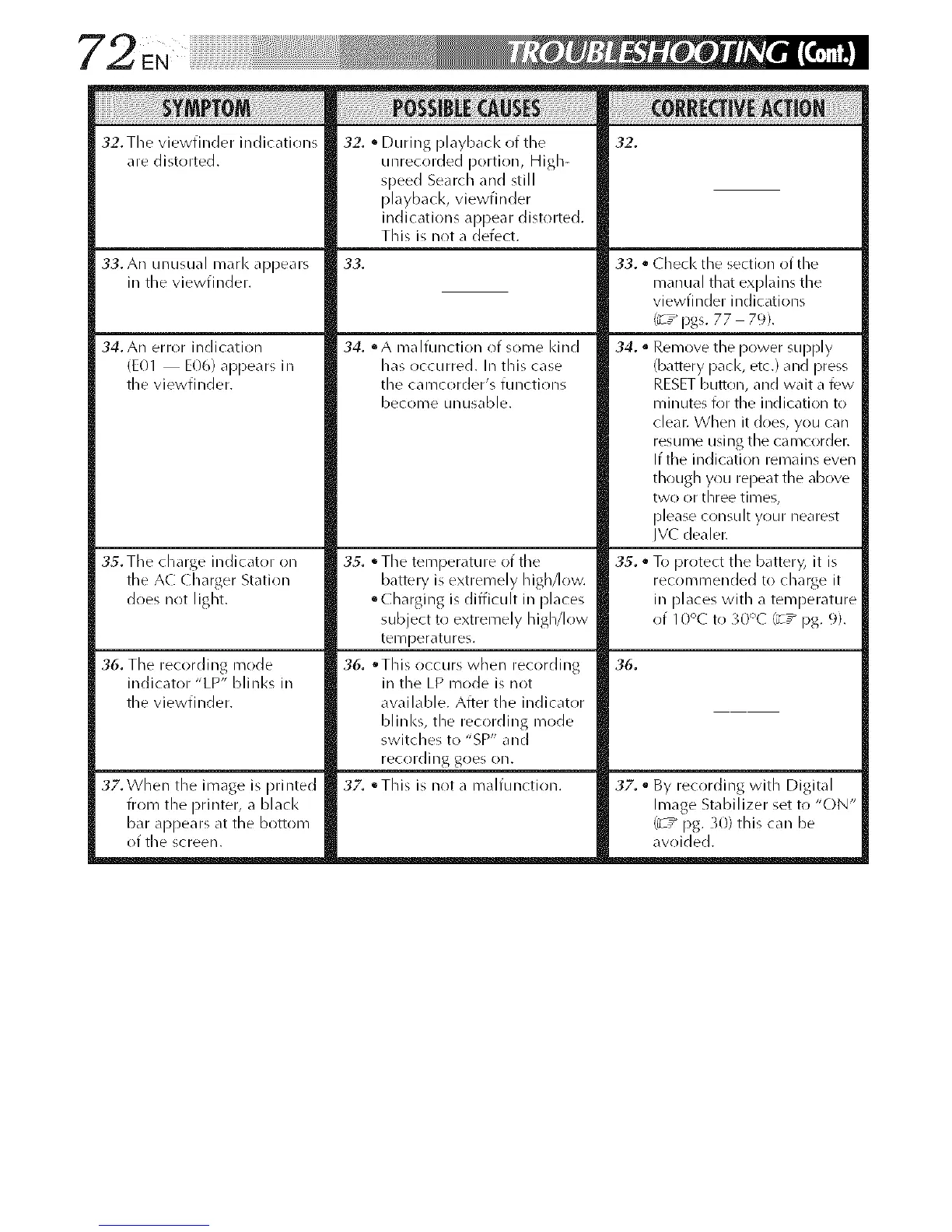
:/2. The viewfinder indications
are distorted.
:/2. • During playback of the
unrecorded portion, High-
speed Search and still
playback, viewfinder
indications appear distorted.
This is not a defect.
32.
33. An unusual marl< appears
in tile viewfinder.
34. An error indication
rE01 E06) appears in
the viewfinder.
35. Tile charge indicator on
the AC Charger Station
does not light.
36. The recording mode
indicator "LP" blinks in
the viewfinder.
32. When the image is printed
from the printer, a black
bar appears at the bottom
of the screen.
33.
3,4. ° A malfunction of some Idnd
has occurred. In this case
the camcorder's functions
become unusable.
35. ° Tile temperature of tile
battery is extremely high/low.
• Charging is difficuh in [)laces
subject to extremely higMr)w
tel_/perat/ires.
36. oThis occurs when recording
in the LP mode is not
available. After the indicatrlr
blinl<s, the recording mode
switches to "SP" and
recrlrding goes on.
32. °This is not a malfunction.
33. • Check the section of the
manual that explains the
viewfinder indications
('_ ,_pgs. 77 79).
34. • Remove the power supply
(battery pacl<, etc.) and press
RESET button, and wait a few
min utes k)r the ind [cation to
cleat. When it does, you can
resume using the camcorder.
If the indication remains even
though you repeat the above
two or three times,
[)lease consult your nearest
JV( dealer.
35. • To protect the batteD; it is
recommended to charge it
in [)laces with a temperature
of 10';C to 30':'C (_7_ pg. 9).
36.
32. • By recording with Digital
Image Stabilizer set to "ON"
(_ ,_ pg. 30) this car/be
avoided.



 To Next Page