(0nne¢fl0n ToA Video IJnil EquippedWilh A BV (0nned0r
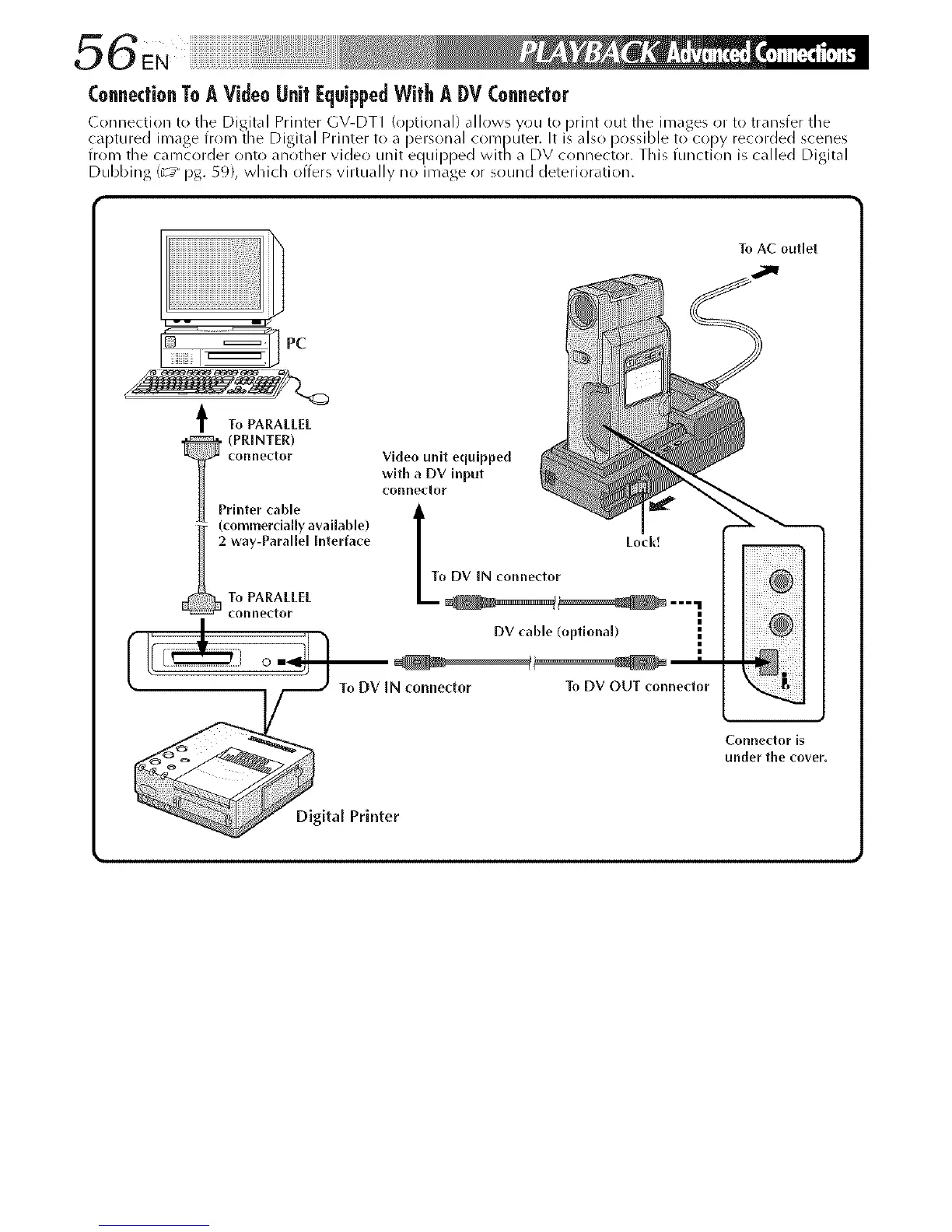
( onnection t() the Digital Printer GV-DT1 (optional) allows you t(>print out the images or to transfer the
ca )tured image from the Digital Printer to a personal corn )uter. It is also possible to copy recorded scenes
trOIT/ tTe Cdl_/Cold@r onto dnot/el V C eo un t eqLI I)[)@d ¥_ t7 a DV COlTnector, T I S tunct on S Col @d D g ta
Dubbing (_y pg. 59), which offers virtually no image or sound deterioration.
To AC outlet
PC
t To PARALL[L
(PR_NTER)
rinterconnectorcable withconnectorVideOaunitDV inputequipped
i_ (commerdally available)
I 2 way-Parallel Interface
To PARALL[L
connel_tor
/
f I' Jr 7 _,
DV cable
(opfionab
•
To DV IN connector To DV OUT connedor " -
Connector is
under the cover.
al Printer



 To Next Page