PlaybackZoom
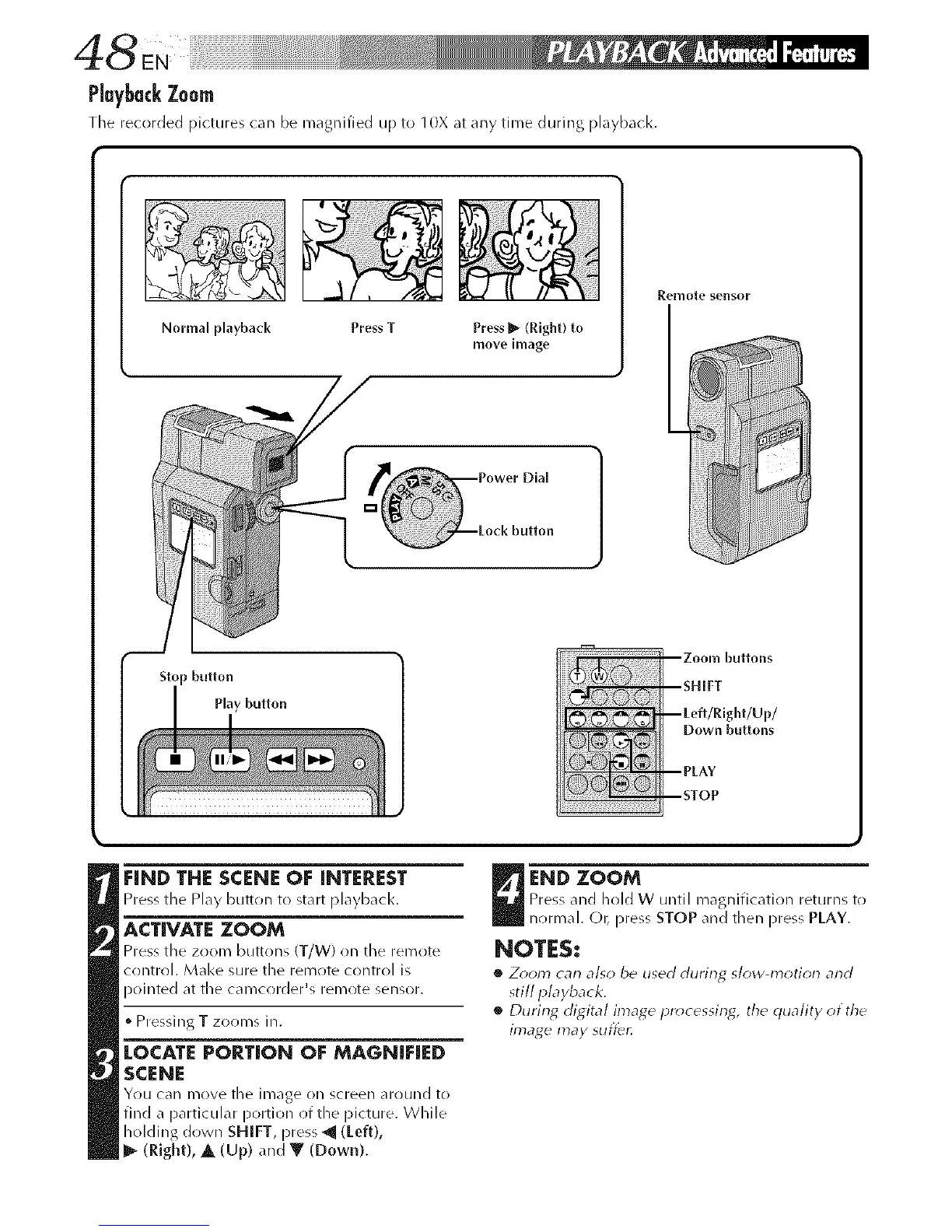
The recorded pictures can be magnified up to 10X at any time during playback.
Normal playback Press T Pressm[_(Right) to
move hnage
Remote sensor
Stop button
Play button
Down buttons
FIND THE SCENE OF INTEREST
Pressthe PLaybutton to stuartplayb_d¢.
ACTIVATE ZOOM
Press the zoom buttons iT/W) on the remote
control. Make sure the remote control is
pointed at the cai_/cr)rder's remote sensor.
i
• PressingT zooms in.
lOCATE PORTION OF MAGNIFIED
SCENE
You c_ul move the image on screen around to
find a [)articular portion rlf the picture. While
holding down SHIFT, press ._ (Left),
l_ (Right), A (Up) and V (Down).
END ZOOM
Press and hold W until magnification returns tr)
nr)rmal. C)t_press STOP and then press PLAY.
NOTES:
• Z_)om can also be used during sk)w-ln_4ion and
still I_layback.
•_ During digital image pr_)cessin_, the quality of the
image may suffer,



 To Next Page