EN¸3 -I
SystemMenu
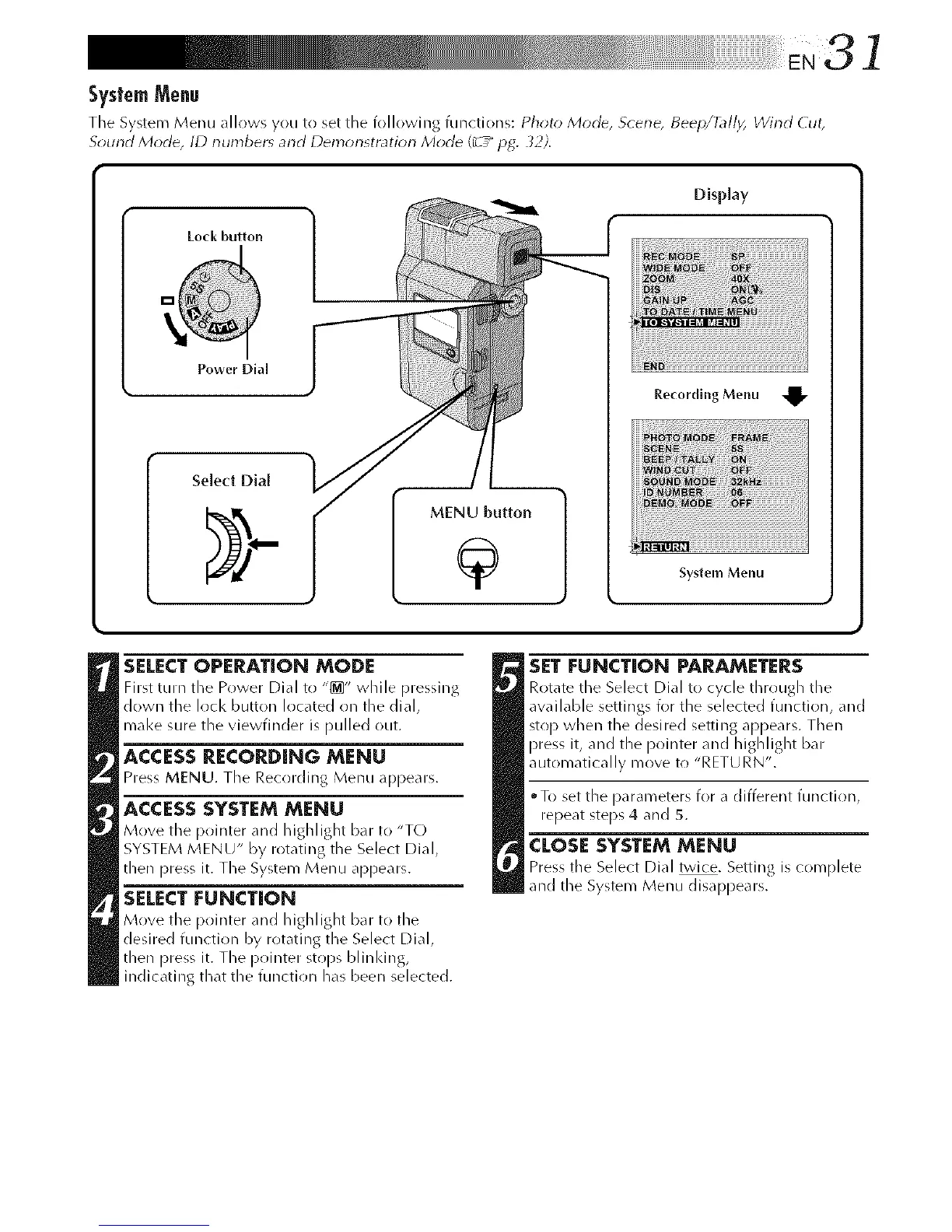
The System Menu allows you to set the following functions: Photo Mode, Scene, Beep/_//_ Wind Cut,
Solmct Mode, ID numbers and Demor_stratior_ Mode (_-5_ pg. 32).
Lock button
Display
Power Dial
Seled Dial
MENU button
9 System Menu
SELECTOPERATION MODE
First turn the Power Dial to "_" while pressing
down the lock button located on the dial,
mal<e sure the viewfinder is pulled out.
ACCESS RECORDING MENU
Press MENU. Tile Recrlrding Menu appears.
ACCESSSYSTEMMENU
Move the pointer and highlight bar to "TO
SYSTEM MENU" by rotating the Select Dial,
then press it. The System Menu appears.
SELECT FUNCTION
Move the pointer and highlight b_r to the
desired function by rotating the Select Dial,
then press it. The pointer stops blinldng,
indicating that the function has been selected.
SET FUNCTION PARAMETERS
Rotate the Select Dial to cycle through the
awfilable settings for the selected function, and
stop when the desi red setting appears. Then
press it, and the i_ointer and highlight bar
automatically move t() "RETURN".
• To set the parameters for a different function,
repeat steps 4 and 5.
CLOSESYSTEM MENU
Press tile Select Dial twice. Setting is complete
and the System Menu disappears.



 To Next Page