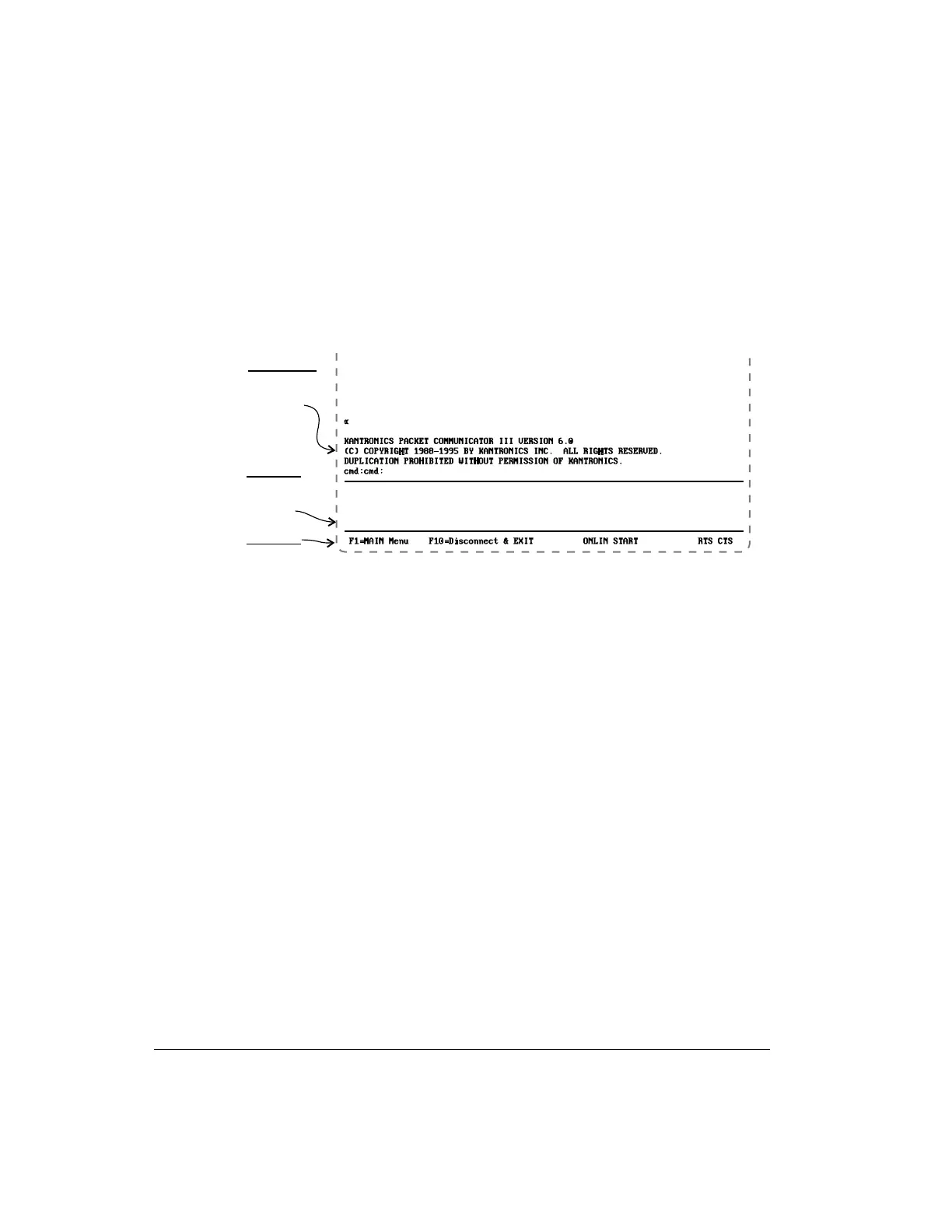
The Terminal Screen
As shown below (in an example showing Pacterm connected to a KPC-3), the
Terminal Screen is in three parts, a viewing area, an input area, and a status line:
The Status Line
The Status Line gives the following information, from left to right on the line:
• Reminders of how to get to the MAIN Menu and how to EXIT to DOS.
• The current status of Flow Control Functions:
•
Shows whether the user has set Pacterm to send data immediately to
the TNC (ONLIN) or to hold data to send it later (OFLIN).
•
Shows whether the user has set Pacterm to request the TNC to send
data (START) or not to send data (STOP) .
•
The current status of Output Control Functions:
•
If the PRINT request is ON, PRINT is shown on the Status Line.
•
If the Holding Buffer is OPEN, BUFF is shown on the Status Line.
•
The current status of Hardware Control signals:
•
While Pacterm permits the TNC to send it data, RTS is shown.
•
While the TNC permits Pacterm to send it data, CTS is shown.
Pacterm v 2.0 Pacterm Screens
User’s Guide 80 KAM’98 v 8.3
Vi e w i n g a r e a
(se e d a ta se n t
to Pacterm from
the TNC)
In p u t a re a
(se e m a te ria l
e nte re d , to se nd
to the TNC)
Sta tus Line



 To Next Page