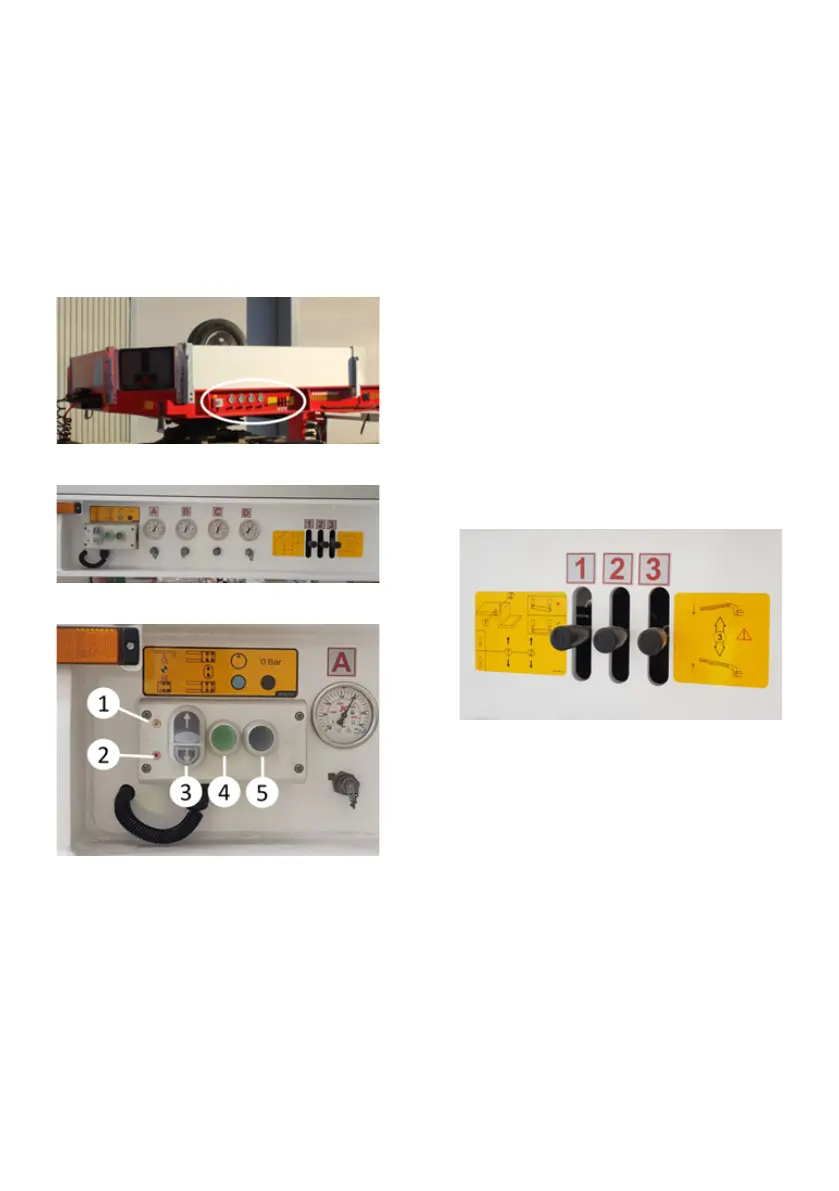
3.6.6. Control Panel
The steering system control panel is lo-
cated on the left front of the vehicle ac-
cording to the driving direction. There
are Yellow and Red steering warning
lights on the control panel, buttons that
direct the axles to the right/left, a Pump
Operation Button to pressurize the hy-
draulic system and a Pressure Relief
Button to reduce the hydraulic system
pressure when necessary.
The location of the control panel
Control panel
Control buttons
Yellow Lamp (1):
It flashes at the same time with the yel-
low lamp on the left front of the goose-
neck. The operating principle of the
vehicle according to the steering type is
explained in the section on the alignment
systems.
Red Lamp (2):
It flashes at the same time with the red
lamp on the left front of the gooseneck.
The operating principle of the vehicle ac-
cording to the steering type is explained
in the section on the alignment systems.
Right / Left Steering Button (Button
with Direction Arrow) (3):
By pressing these buttons, the steering
axles of the vehicle are moved towards
the desired direction.
The operator must also press the “Pump
Operation Button (Green)” at the same
time to perform the right or left steering
operation via the control panel.
Pump Start Button (Green) (4):
By pressing this button, the hydraulic
system is pressurized.
Hydraulic control must be operated by
pressing the Pump Start button.
Hydraulic lever controls
Pressure Relief Button (Black) (5):
By pressing this button, the hydraulic
system pressure is reduced to 0 bar.
It is used for vehicle maintenance, easy
separation of multiple couplings during
gooseneck disconnection, and for reduc-
ing the system pressure for different
reasons.
3.6.6.1. The Control of Steering Chock
Check the steering chock integrity, pin A,
weld and play condition of parts daily.
Excessive play will cause the vehicle to
not steer properly. We recommend re-
placing the rubber washers marked B
once a year or whenever you have prob-
lems with the vehicle's alignment.


 To Next Page