Micro 2 / Guitar
https://www.ketron.it/images/ketron/Manuali_HTML/SD40/english/32_input.html[13/05/2020 17:07:46]
Input
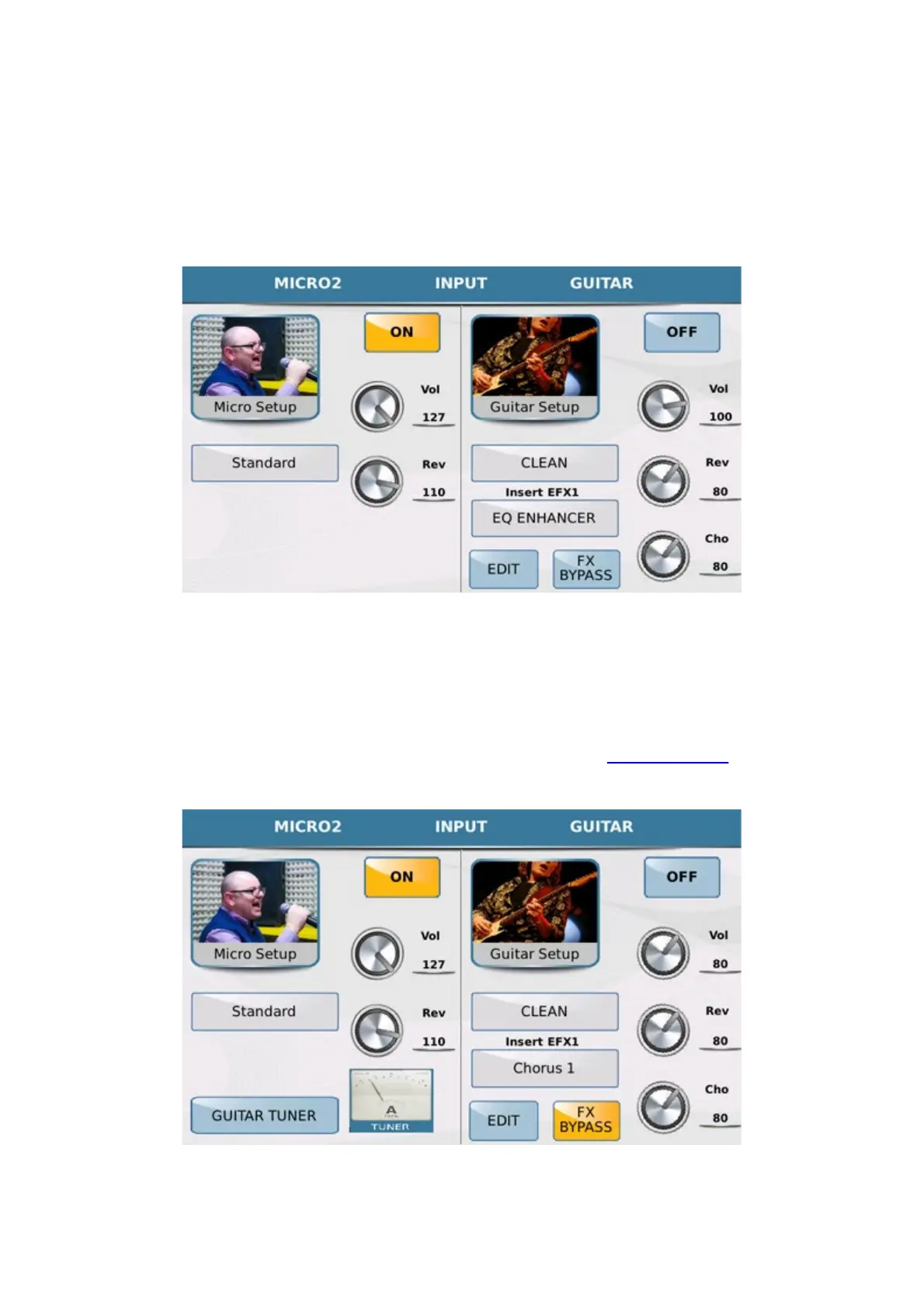
When you press from general MENU the MIC2/GUITAR tab on the panel, you enter a page where you
may adjust the settings of the second analogical audio input of the instrument that may be a microphone input
(Micro2) or guitar input (GUITAR).
Here again the page is subdivided into 2 sections: the first is MICRO2 and is for the microphone settings while
the second is GUITAR and is for the guitar effect settings. Considering that this is a single audio input, the
modes cannot be enabled together so that you may either use the input as a second microphone input or as a guitar
input. When you enable MICRO2 therefore, GUITAR mode is automatically disabled and vice versa.
All the parameters of MICRO2 mode are exactly the same as those of MICRO 1 mode. The only extra
feature is the key FX BYPASS which you may use to quickly disable the effect.
In this section we also find a very useful Guitar Tuner to tune your guitar without use external devices. The Guitar
Tuner can operate in two modes: Tone Generator or Tuner detection.
In this mode by tapping on the virtual strings represented by the display you can hear the notes produced by MJPRO



 To Next Page