ENGLISH
Chapter 5: KGUARD Web Client
DVR User’s Manual
95
Seng Up DDNS
DDNS (Dynamic DNS) is a service that registers a domain name and the oang IP address with a DDNS server so that
the domain name can be routed to the IP address even if the IP is changed in a dynamic IP system.
To use this feature, you must have a DDNS account. Obtain the informaon from your Internet Service Provider (ISP) or
create a free DDNS account with KGUARD.org server, visit the website hp://www.kguard.org.
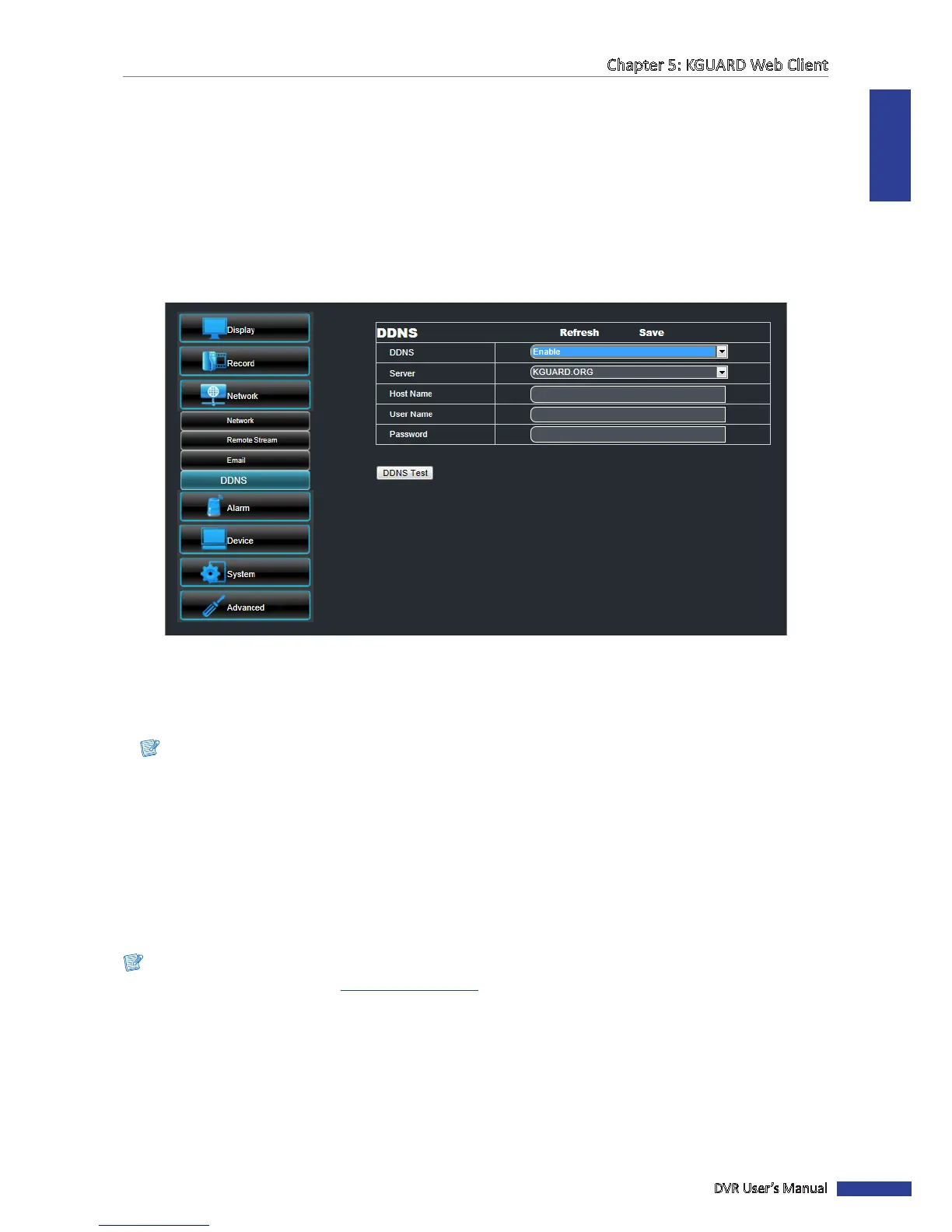
To setup DDNS, do the following:
1 On the Main Menu, click Remote Seng.
2 On the le panel, click Network > DDNS. The DDNS screen appears.
3 Enable DDNS.
4 On Server, select the DDNS server.
5 On Host Name, enter the domain name you registered on DDNS server.
Note:
If the registered domain name is 123ABC, the IP address you type on IE or Safari when you browse Kguard Web
Client is hp://123ABC.KGUARD.ORG.
6 Enter the DDNS User Name and Password.
7 Aer all sengs are complete, click Save.
8 To test the conguraon, click DDNS Test.
« TIP »
To cancel any modicaons and retain the exisng sengs, click Refresh.
Note:
To apply for a free DDNS account on hp://www.kguard.org.



 To Next Page