ENGLISH
Chapter 4: Using the DVR
40
DVR User’s Manual
4.1.2 Output Sengs
1 In the preview mode, right-click on the mouse to display the Pop-up menu.
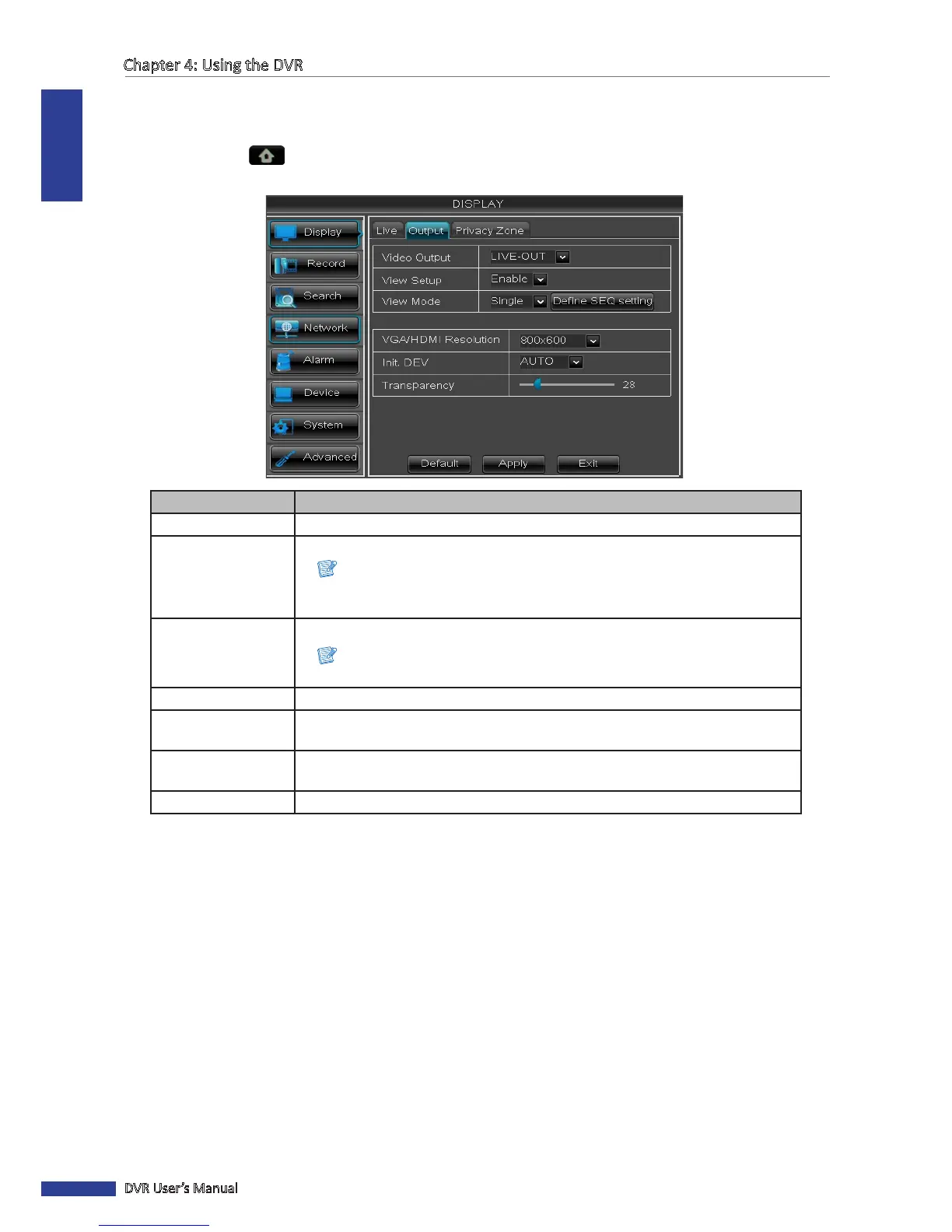
2 Select Main Menu > DISPLAY, then select the Output tab.
3 Modify the necessary sengs:
Menu item Descripon
Video Output To set the video output seng of the main monitor used for live view display.
View Setup Select Enable to enable view setup.
Note:
When View Setup is enabled, Split Windows funcon is not available (see “3.7.2
Split Mode” on page 34).
View Mode Select how you want to split the windows, opons are: Single, Quad, Nine, Sixteen.
Note:
Sixteen opon is only available on 16-channel model.
Dene SEQ seng Click Dene SEQ seng to set the order of how the channels appear.
VGA/HDMI
Resoluon
Select the output resoluon.
Init. DEV
(Inial Device)
Select where you want to display the OSD menu (BNC Video Out, HDMI, or Auto
Detecon).
Transparency Slide the bar to adjust the transparency of windows.
4 Aer all sengs are complete, click Apply.
5 When data saving is complete, click OK.



 To Next Page