EasyManua.ls Logo

KGuard Security Easy Link EL421 - Virtual Keyboard; Locking the Screen

KGuard Security Easy Link EL421
114 pages
Print Icon
To Next Page IconTo Next Page
To Previous Page IconTo Previous Page
Loading...
ENGLISH
Chapter 3: Geng Started
30
DVR Users Manual
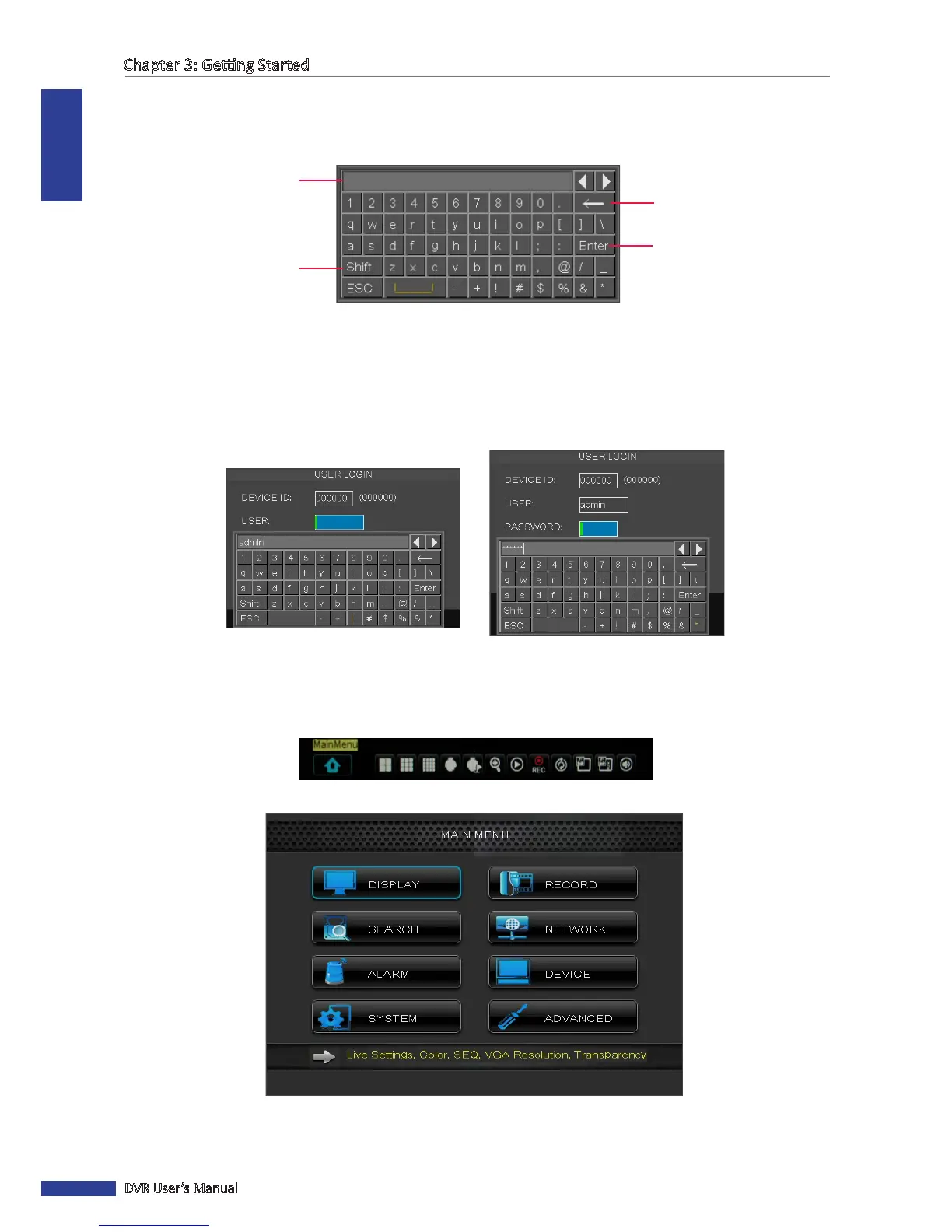
3.6.2 Virtual Keyboard
The virtual keyboard automacally appears on the screen if data entry is required.
Click to toggle the
keyboard to upper case.
Click to enter the text.
Click to delete a character.
Typed characters are
displayed here.
3.6.3 Locking the Screen
The screen is locked to protect unauthorized OSD operaon. Enter the user name and password before entering the
OSD menu.
The default user name and password are:
User Name: admin
Password: 123456
Enter Password
Enter User Name
For system security, we suggest you change the password on DVR to protect your privacy.
1 In the preview mode, right-click on the mouse to display the Pop-up menu.
2 Select Main Menu > SYSTEM.
3 Click Users tab.
4 Click Edit.

Table of Contents

Related product manuals