ENGLISH
Chapter 6: Mobile Device Access
102
DVR User’s Manual
Chapter 6: Using KView Series Soware
The KView Series surveillance soware provides real-me mul-channel viewing capabilies right on your smart
phones, tablet PCs or on your desktop computer. The KView Series surveillance soware includes:
• KView: Use in Android Phones and iPhones (see below)
• KViewHD: Use in Android Tablet PCs and iPad (see “6.2 KViewHD” on page 105)
• KView Center: Use in Windows-based computers (see “6.3 KView Center” on page 107)
6.1 KView
KView is a soware applicaon designed to view mulple channels in real-me through your iPhone or Android
phones. You can pan, lt, and zoom the cameras for beer viewing and take snapshots to save to the phone memory
card.
6.1.1 KView on Android
®
Phones
Note:
To ensure opmum performance, download and use KView on Android 2.2 or above.
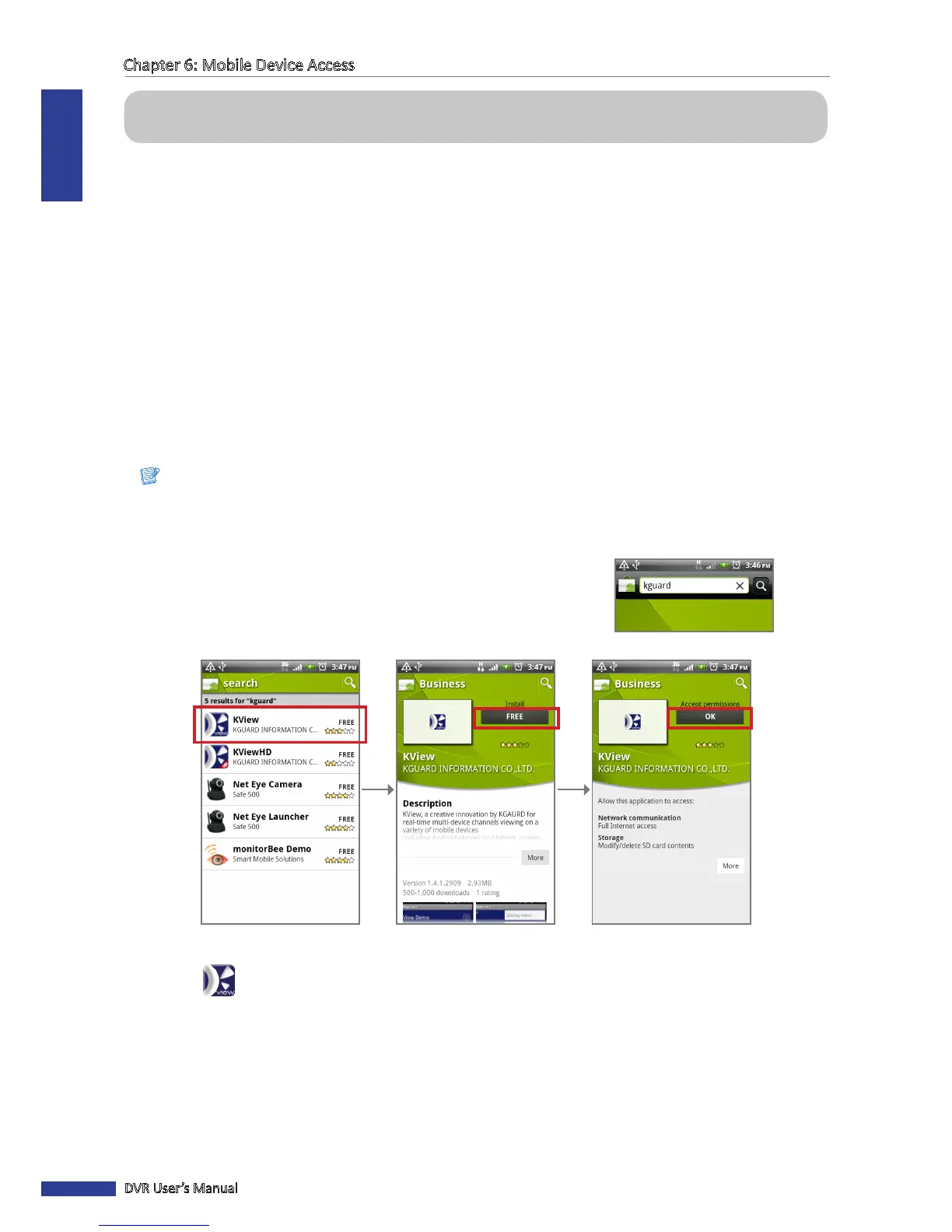
1 Make sure your mobile phone is connected to the Internet (either by mobile data connecon or Wi-Fi).
2 Open the Android Market applicaon.
3 On the Market search bar, enter the keyword “kguard” to search
and download KView.
4 Select to download KView.
Select the “KView” applicaon. Click FREE. Click OK.
The KView icon is displayed on the applicaon screen.



 To Next Page