ENGLISH
Chapter 4: Using the DVR
60
DVR User’s Manual
4.7 System Sengs
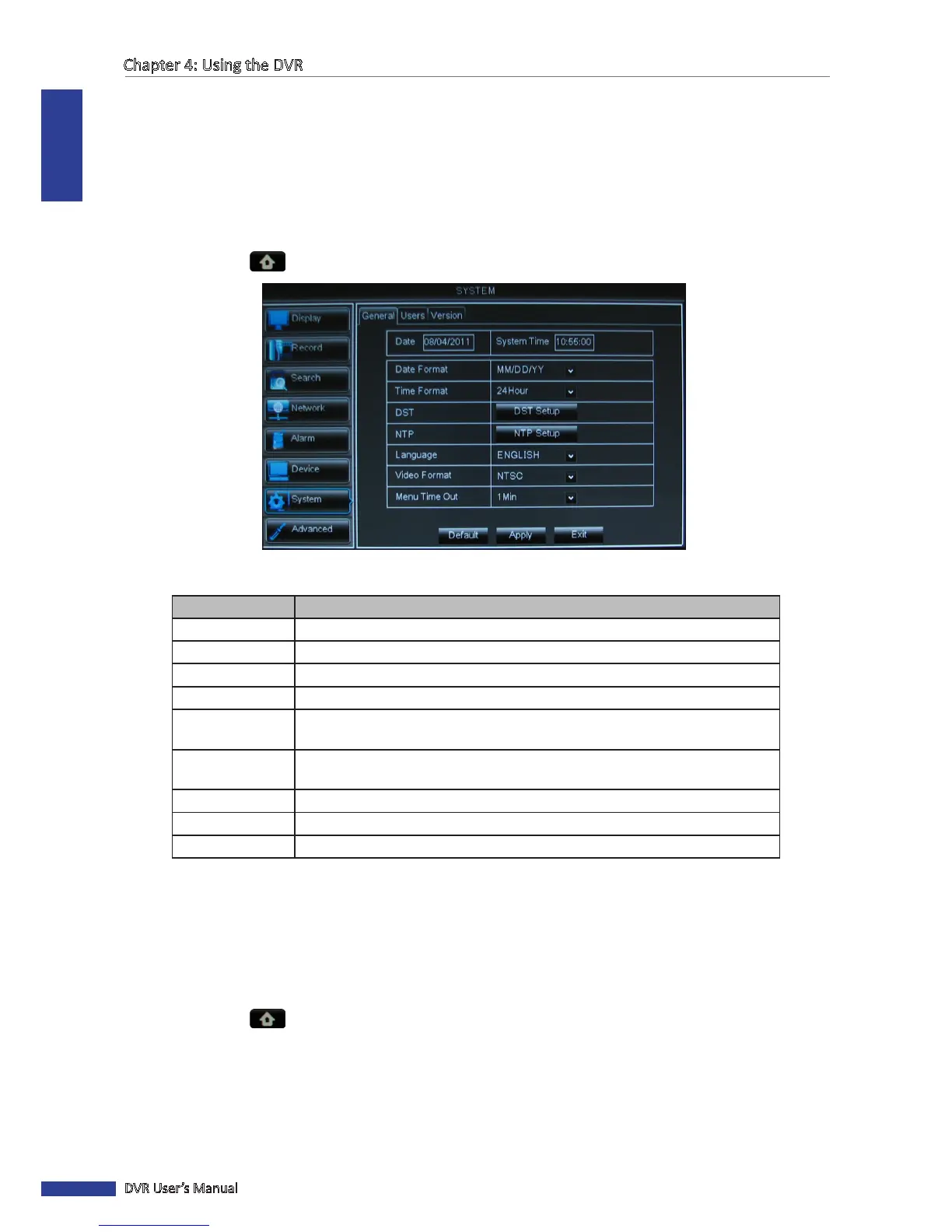
On the SYSTEM menu, you can congure the date and me, user and password, video output, on screen display
language, and view the system informaon.
4.7.1 General Sengs
1 In preview mode, right-click on the mouse to display the Pop-up menu.
2 Select Main Menu > SYSTEM.
3 Modify the necessary sengs.
Menu item Descripon
Date
Set the system date.
System Time
Set the system me.
Date Format
Select the date format.
Time Format Select the me format.
DST
Click DST Setup to use Daylight Saving Time. See
“Seng Daylight Saving Time”
on page 61.
NTP Click NTP Setup to synchronize date and me with an NTP server. See
“Synchronizing Time with NTP Server” on page 60below.
Language Select the menu language.
Video Format Select the video format in your locaon: NTSC or PAL.
Menu Time Out
Select the menu me out.
4 Aer all sengs are complete, click Apply.
5 When data saving is complete, click OK.
Synchronizing Time with NTP Server
1 In preview mode, right-click on the mouse to display the Pop-up menu.
2 Select Main Menu > SYSTEM.
3 In NTP, click NTP Setup.



 To Next Page