ENGLISH
Chapter 4: Using the DVR
DVR User’s Manual
41
4.1.4 Privacy Zone Sengs
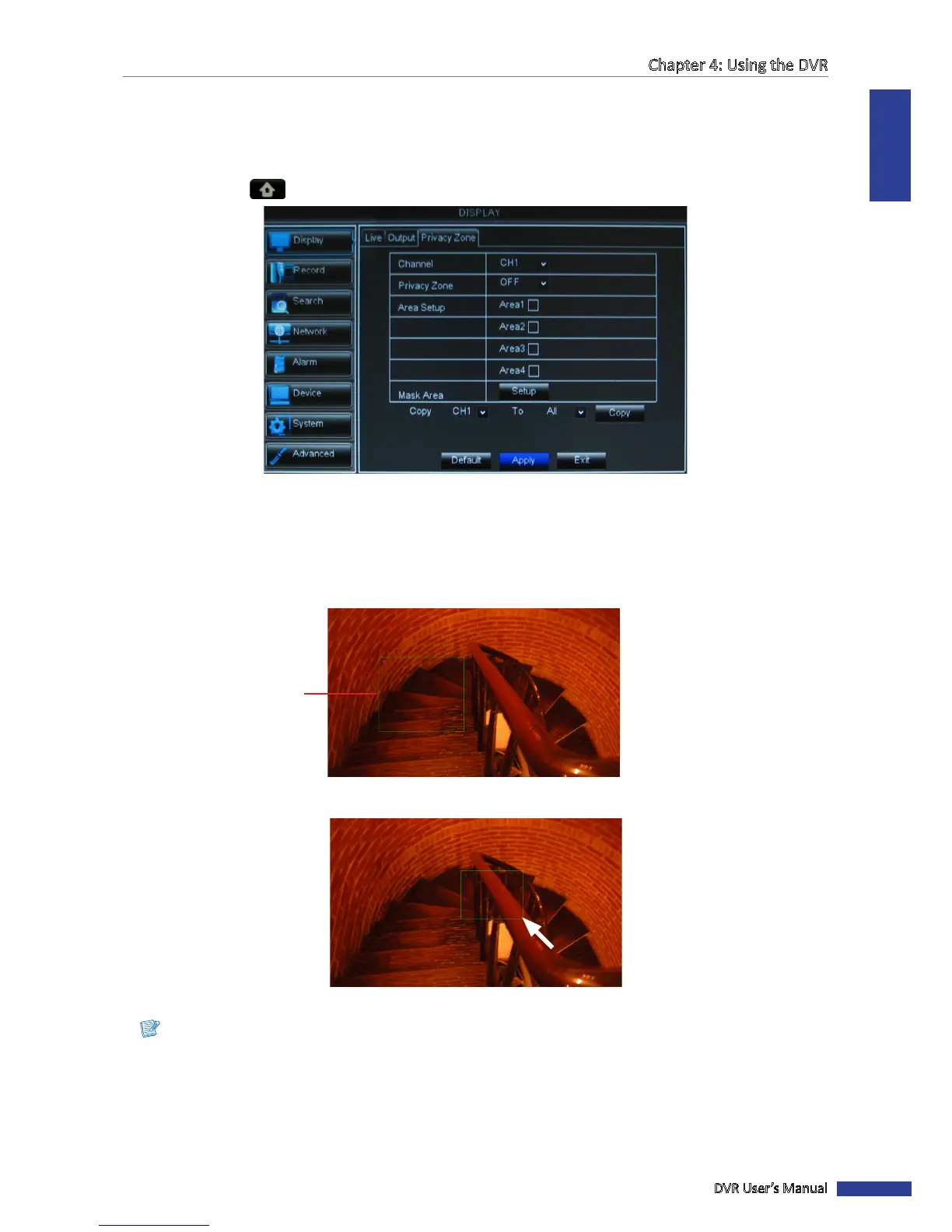
You can mask up to 4 areas to hide it from being viewed on the screen.
1 In preview mode, right-click on the mouse to display the Pop-up menu.
2 Select Main Menu > DISPLAY, then select the Privacy Zone tab.
3 In Channel, select the channel that you want to set the privacy.
4 In Privacy Zone, select ON.
5 In Area Setup, check the number of areas to mask. You can check Area 1 to Area 4 to create 4 masked areas.
6 Click Setup. The green box indicates the area for masking.
Area to mask
7 Drag the box to the area that you want to mask. You can resize the box by dragging the edges to desired size.
Note:
The above illustraon is an example of one checked area (Area 1). The number of green boxes depends on how
many areas you checked in Area Setup.



 To Next Page